URGENT PLEASE - Brizy Template not responding

Hello Brizy team,
I have a serious issue on my website. I already rolled back the plugin update but it is still happening. My home page both in English and Spanish is taking my Brizy design but when I click to any other pages, it's empty with the theme's (Blocksy) layout. On the backend, all pages are assigned "Brizy Template" and when I edit with Brizy the design is there but on the front end, it's either an empty page without the Brizy layout or a 404. Could you please help me as to why this is happening?
I look forward to your urgent feedback.
Thank you, Sofia
Please see the video for more details: https://www.loom.com/share/2062e67724064b36883de2f2f748215e?sid=9290e340-43b7-41c4-add6-f7ac501c03fc
-

Hi Sofia,
Please try these hacks and check if it resolves the issue.
- Deactivate StackCache and Auto Optimize temporarily
- Consider deactivating Pretty Links temporarily (if doing so has no undesirable effects)
If these steps do not help, please add a new user to your WordPress Dashboard and send the following details to our email: communitysupport@brizy.io
- Community Post link: https://support.brizy.io/hc/en-us/community/posts/14437086678546
- WordPress Admin URL:
- Username
- Password
Please let us know here when you send us the email.
0 -
Hi KC George,
I deactivated those 3 but nothing changed. I've sent you a login link via email if you could please help me with this as soon as you have time. I've just started promoting this site and I'm afraid other people will see this.
Just as a side note, this didn't happen in any other site. I do use the same set of plugins on all of them.
I look forward to hearing from you.
Thank you, Sofia
0 -

Hi Sofia,
Thank you for the update.
Upon checking, it seems that the problem is coming from mixed content related to the customer_chat bubble plugin. To troubleshoot this, could you kindly disable the plugin and observe if it resolves the issue?
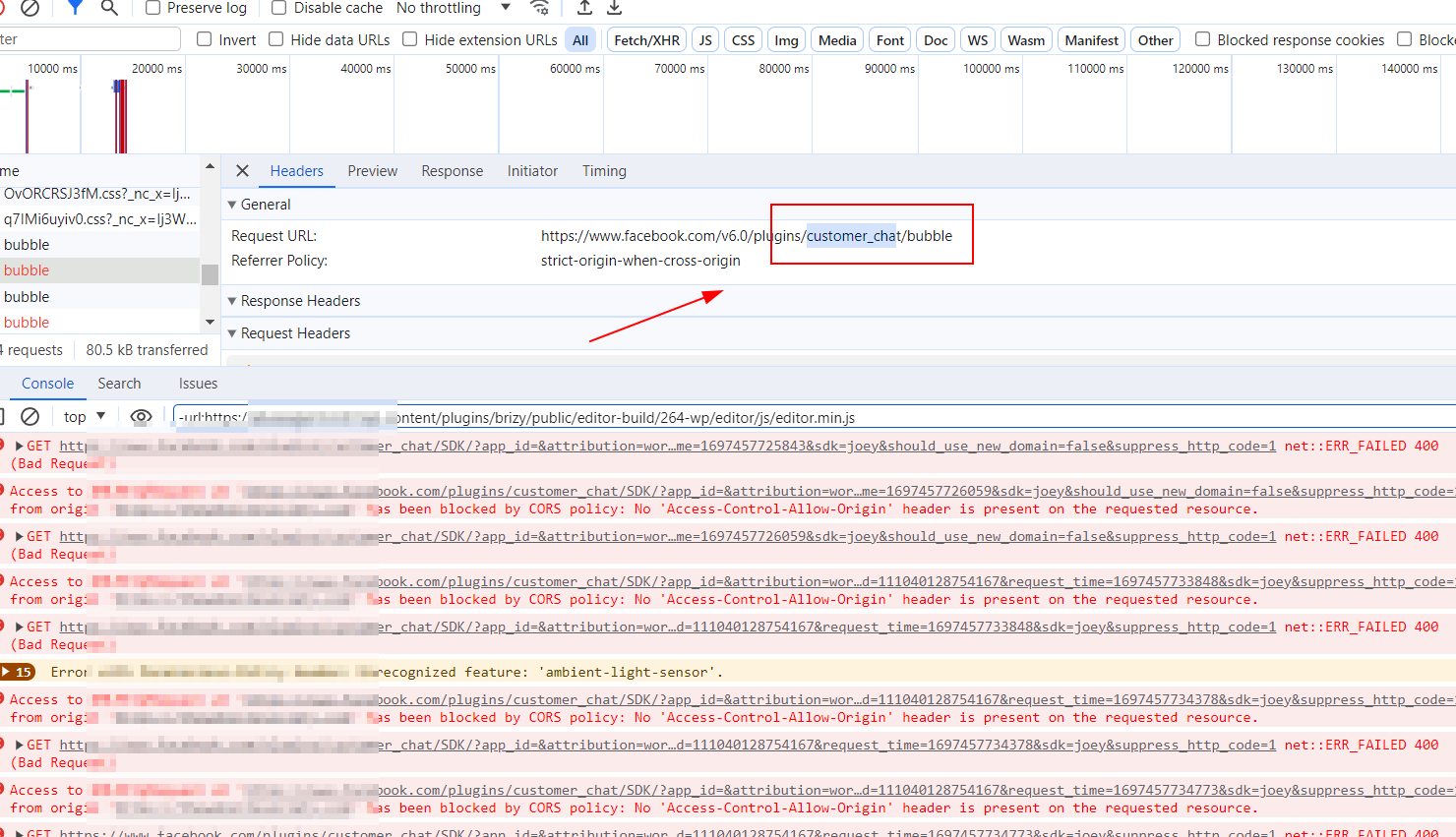
If disabling the plugin doesn't resolve the problem, it would be helpful if you could provide us with temporary access to your WP Multisite Admin credentials, so we can further check the issue.About the empty pages, resetting the permalinks should help resolve the issue.
I am looking forward to your response.
Best regards,
Ariel H.0 -
Hi Ariel,
Thank you so much! Disabeling the chat did help but only with the English content. So I'll delete that plugin and find a different one. On my other site I use another chat bubble that didn't give me issues.
But the Spanish version of the website is still not working correctly. And that's something new as well. It was working before. So now what I see if that the flag only appears on the main page. But when I click it it goes to a different URL which is not the one connected to the main page. And then if from the English version I go to other pages, the flag isn't that at all.
The login link should be for the multisite. It normally directs you to the main site's dashboard, but I believe you'd be able to switch to the network dashboard from the top left corner? Otherwise let me know please, and I'll create a user manually.
Thank you for your help!! Sofia
0 -
Hi Sofia,
Our access to your site is limited to Admin access for this specific website only. However, in order to for us to further check the issue, we will require Super Admin access.
Meanwhile, while we wait for the Super Admin access, could you please use your WP Multisite Admin access and try to reset the Permalink? This action may potentially resolve the problem you are encountering with your translated site.
I have included the below links for your reference:
https://github.com/polylang/polylang/issues/182
https://typerocket.com/flushing-permalinks-in-wordpress/Best regards,
Ariel H.0 -
Hi Ariel,
Thank you for your help!
I have sent you an email with details for super admin user.
I have updated the permalinks (thank you for the info on that) and it seems to be correct when hoovering but when I click it's not yet) and the flag is still not showing other than on the main page/URL :(
Thanks again, Sofia
0 -
Hi Sofia,
Thank you for your patience.
After reviewing your site, I am unable to identify the exact cause for the translated pages not being displayed. It might be beneficial for you to also contact Polylang support and inquire if they can provide any assistance.
Meanwhile, I will also consult my colleagues to see if they can provide any additional insights or assistance in resolving the issue you are currently facing.
Best regards,
Ariel H.0 -
Hi Sofia,
Our access to your site has been restricted by WordFence.
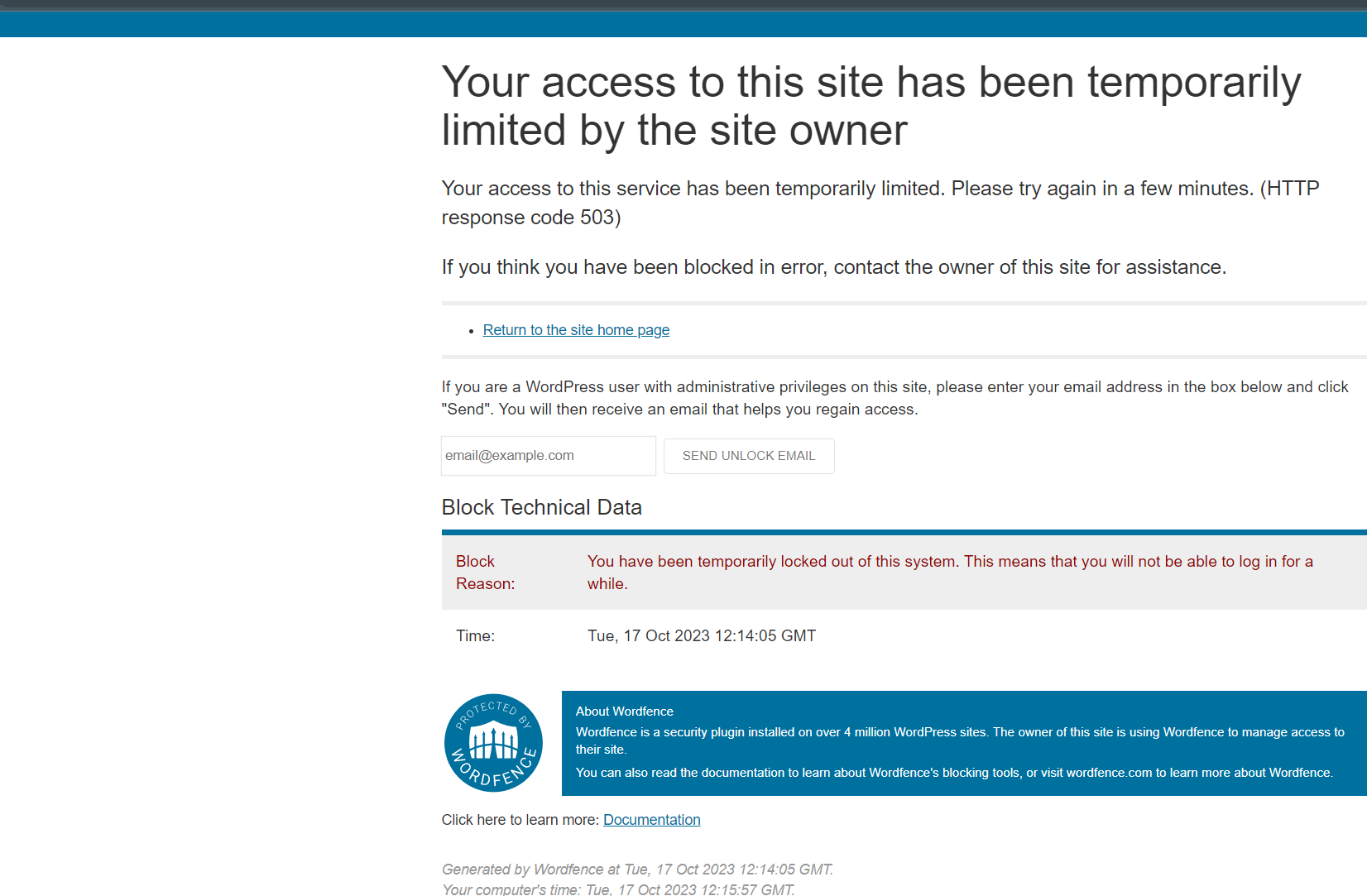
Please consider temporarily disabling it to allow us to investigate this issue.
Best regards,
Ariel H.0 -
Hi Ariel,
Thank you for your time and your help!
I have created a staging site for you if that will work?
In the meantime I noticed you had changed all the settings, deactivated plugins, changed my link structure which will result in Google penalties, and removed my global headers so I had to revert to a previous backup and redo all the things. The site is now live and I have just started promoting it so I can't have it like that. I think it would be best to work from a staging environment. Would you be ok with that?
I have sent an email with login information for super admin access.
I also opened a support ticket for Polylang. But I only have the free version, so let's see if I'm in any luck...
Thank you :)
0 -
Hi Sofia,
Apologies for any inconvenience, and I appreciate your effort in creating a staging version of your website.
We will check this again and get back to you as soon as we have an update on this issue.
Best regards,
Ariel H.0 -
Thank you so much for taking the time to help me Ariel, I really appreciate it
0 -
Hi Sofia,
Thank you for waiting.
Upon checking, it seems that the problem is originating from Polylang. When Polylang is disabled, the English pages function correctly. Have you received any updates from Polylang support regarding this issue? Additionally, could you please reach out to your hosting provider and confirm whether Mod Rewrite is enabled?
Best regards,
Ariel H.0 -
Good morning Ariel,
Thank you for all your help!
And sorry for the delay. My host has now replied: "I can confirm that the mod_rewrite module is enabled for sites on our platform."
Is this a bad thing or it's how it should be?
Polylang is not helping much though :( Here's my support ticket: https://wordpress.org/support/topic/404-errors-for-second-language-homepage-issue/#post-17132179
0 -
Hi Sofia,
Thank you for the update.
The staging website appears to be working now. This was achieved by reverting Polylang to Version 3.4.4. To accomplish this, we used the WP Rollback plugin to identify the specific version that works best for your site.
I kindly request that you review the staging site to validate if the changes made are successful. If everything is functioning as intended, I recommend implementing the same steps on your production site.
Best regards,
Ariel H.0 -
THANK YOU SO SO SO MUCH!!
I reverted to that version and everything is working again. Oh I wish all suport were like you!! Thank you so much for the time you've spent on this, I really appreciate it.
0
Please sign in to leave a comment.
Comments
15 comments