Footer problem

I get a double footer all of a sudden for all of my website pages and when I delete the second one and saved the changes it keeps coming back. Please help how to fix it. Thanks.

-

Hi Ellora,
If you are seeing two footers on all your pages, it implies that you have two global footers. To fix this issue, please access your Blocks/ Layout library by clicking on the + sign you see when hovering your cursor between two blocks.

Select the 'Global Blocks' tab and look for the footer designs.
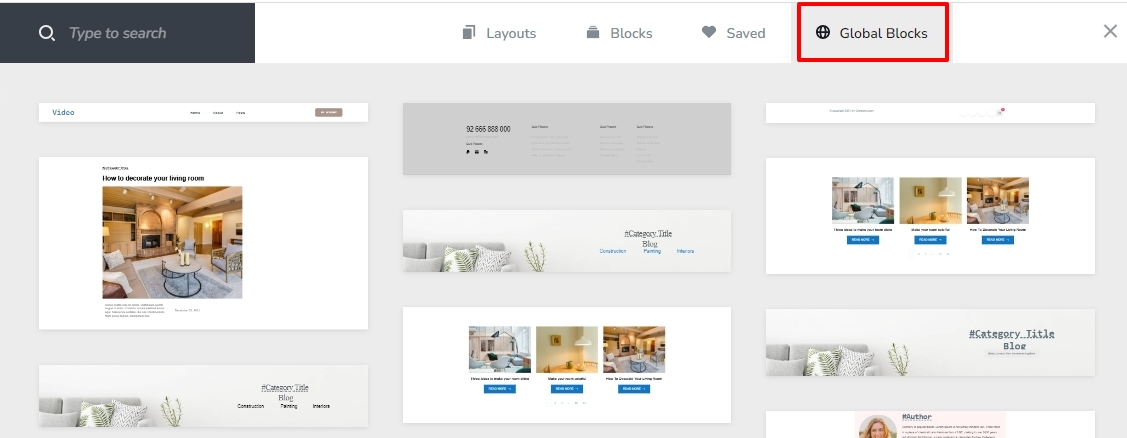
If you identify two footer designs, delete one of them by clicking on the trash can icon you see at the top right corner of your global block.
 0
0 -
Hi KC George,
I've followed this instruction yet nothing happened. I tried to delete it again on some pages but still it keeps coming back. I hope you guys can help.
0 -
Hi Ellora,
We need access to your project to help fix this issue. Please add me as a user to your WordPress Dashboard and send the following details to communitysupport@brizy.io
- Community Post link: https://support.brizy.io/hc/en-us/community/posts/13030846722834
- WordPress Admin URL:
- Username
- Password
Please let us know here when you send us the email.
0 -
Hi KC George,
I have sent an email with the details you asked already. I hope this gets resolved real soon.
Appreciate your help. Thank you!
0 -
Hi Ellora,
I have removed the additional footer from one of your pages. I looked through about 20 pages and couldn't find other pages with two footers. Please get back to us with the URLs of any additional pages that have this problem.
0 -
Hi KC George,
I just checked our website and I think they are all good! Thank you so much for your help. I really appreciate it!
0
Please sign in to leave a comment.
Comments
6 comments