Forms on Brizy not sending emails

I have 4 brizy websites and they are all not forwarding any mail from the forms on the sites.
I currently have Brizy pro 2.4.24 and have deleted the plugin from all of the websites and reinstalled them with no luck. Ive also deleted the forms itself and created new ones with no luck either.
The mail is forwarding the infro through word press. When I also try to create a Gmail forwarding as another option, I would then get errors when the forms are filled out and submitted. Saying "your mail has not been sent"
-

Hi Vinh,
Your email will be sent out through WordPress' PHP Mail feature, when you use the WordPress option to send out email notifications. Few webhosts like GoDaddy do not support PHP Mail. Please confirm that PHP Mail is supported by your web hosting company.
Email notifications can be easily suspected as spoof, so these messages may not reach the recipient. Please follow these best practices to avoid having your mail rejected by mail servers.
- Subject: Please don't omit the subject line. Give a meaningful subject. You can include a subject, such as "Contact Form."
- From Email: Make sure the 'From" Email' you use has the same domain as your website. The 'From Email' field on a form hosted at CNN.com can be form@cnn.com or info@cnn.com
- From Name: This field must not be left empty. Give a meaningful 'From Name'
After following the above suggestions if you are still having issues receiving emails, please get back to us. We will need access to your WordPress Dashboard to offer further assistance.
0 -
Thanks for following up so quickly. I think there is a misunderstanding on my issue. Im not sending emails. Potential clients are filling out forms on my website and Im not getting the email when they submit the forms.
The forms are created on the brizy app.
Also, when I set up to receive those forms through the Gmail options, I would get an error message that the form cannot be completed and sent
0 -

Hi Vinh,
Thank you for the update.
We'd like to look into the issue from your dashboard. Kindly grant us temporary access to your WordPress admin by adding us as a user. Please send the necessary login details to communitysupport@brizy.io.
Here are the details we need:
Community Post link: https://support.brizy.io/hc/en-us/community/posts/12953460589202
WordPress Admin URL:
Username:
Password:
Also include the URL of your contact form:As a precaution, please make a full backup of your website.
Best regards,
Ariel H.0 -
Hi Vinh,
Thank you for your cooperation.
We have identified the reason why you are not receiving emails or experiencing delays in receiving them from your contact form. The issue lies with your server, which is currently blacklisted. We have created a screencast that demonstrates this issue on this link : https://youtu.be/Ewg8tinyS5k
In the screencast, you can see that the form data is successfully captured in leads. However, there is a problem with email delivery specifically caused by the blacklisting of your server. On the other hand, when we used a third-party SMTP provider, we were able to send the email successfully to the target address.- This is the link to the form we used to reproduce the issue, if you'd like to check it : https://huynhlawcorporation.com/form-test,
- We use this tool to check for blacklisted domains: https://mxtoolbox.com/SuperTool.aspx?action=blacklist%3a%2fhuynhlawcorporation.com%2f&run=toolpage
- The consequences of a blacklisted email IP Address is explained further on this link: https://thegigabit.com/email-blacklisted-heres-what-you-can-do-about-it/
To resolve this issue, we recommend the following options:
- Bypass your current server by using SMTP. If you have access to another email address, you can use it to send out emails from your website. You can follow the example shown in the screencast mentioned above.
- You may also use a third-party SMTP relay service such as Brevo (we are using the free account). We used this service in the form, and it can help you send emails effectively.
If you have any further questions, please let us know.
Best regards,
Ariel H.0 -
Thanks for the help.
Can you help us with the set up using GMAIL to receive forms from our website to our gmail account? It keeps giving us errors that email from the form is not sent. The form doesn't work correctly on our page.0 -
Hi Vinh,
The credentials you had provided in the email did not work for me. I have replied to you by email.
It is easy to configure email notifications to be sent out via Gmail SMTP server. Please follow the process outlined here. Email notification via Gmail In the Brizy form, you must use a Gmail address in the username field, and Google App Password in the password field, Please refer to the above article for the procedure to generate Google App Password.
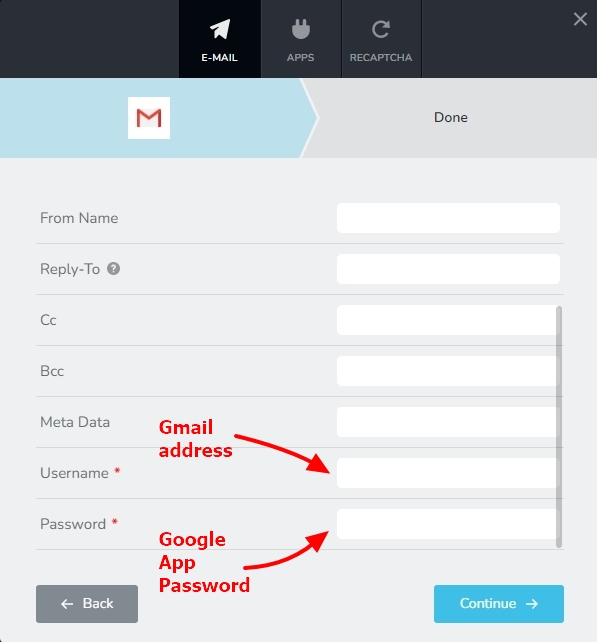
If you are unable to configure email notifications through Gmail, please get back to us with the right credentials. We will help you.
0
Please sign in to leave a comment.
Comments
6 comments