Brizy for WordPress running very slow!!

I have a new installation of wordpress at https://comfortmasterhvac.net/
As far as plugins I only have brizy, brizy pro and the siteground optimizer and security.
I'm using the blocksy theme for the sake of compatibility and speed, I'm using Workspace from the brizy templates library.
I disabled all plugins and ran tests and the page loads fast, is not until I activate brizy that things start running slow, you can notice it when you go from one page on the menu to the next.
Please help!!
-

Hi Luis,
I have looked at the GT Metrix performance of few of your pages. Here are the reports. Overall performance look reasonably good.
- Homepage: https://gtmetrix.com/reports/comfortmasterhvac.net/lut2qOG1/
- Contact: https://gtmetrix.com/reports/comfortmasterhvac.net/PbitrgPl/
- Services: https://gtmetrix.com/reports/comfortmasterhvac.net/dNf1QpC2/
I have also looked at the visual loading speed of your pages. Your web pages loaded within a second at my end. Please see this screen recording. https://jmp.sh/3VB6mUVg
How slow do the pages load when you say "until I activate Brizy that things start running slow"?
0 -
This is how I see it on my end:
https://drive.google.com/drive/folders/1-aAHiTzJJQei2dA0_ijlY73ci1SsdL46?usp=sharing0 -
Hi Luis,
In your WordPress Dashboard under SG Optimizer - Caching, have you enabled these options? Please see this screenshot https://jmp.sh/qKdU6r5w
- Dynamic Caching
- File-Based Caching
- Memcached
If you access your website immediately after purging cache, the page will be generated and cached. Hence when you check the frontend for the first time after purging, it will be slow. The second time onwards the pages will be served from the cache and hence it should be faster. Please also confirm if you are checking page performance immediately after purging cache.
0 -
Hey KC, I've tried what you told me and it still loads pretty slow on my computer when I'm working on it and also on my phones when I want to preview it, despite testing fast on GTmetrix
0 -
Hi Luis,
Your page will load slowly when you are working on your project and checking the preview for the first time. This is standard behavior. When you visit the same page again, it will be served from the cache, making it faster.
Are you saying that the page loads slowly the second time you check it?
0 -
On first load on any device it loads very slow, unlike the demo
0 -

Hi Louis,
Thank you for the update.
I suggest checking the GTMetrix result displayed here - https://prnt.sc/NhMqwDbHU0UP. In the "Top issues" section, specifically under "Network Payload," you will notice that the file size of the images used on your site is affecting its speed. To improve the speed, it might be necessary to further optimize the images.
For comparison, I have set up the same template on a test environment with the original optimized images. Please note that there are no caching or optimization plugins installed on this test environment, only Blocksy, Brizy, and Brizy Pro (https://prnt.sc/vY6oSAruCI8P). As shown in this screenshot - https://prnt.sc/jGQ4pNDekSPd, it receives an A rating, and moving from one page to another is also faster. You can try it out here - https://staging.server001.xyz/blocksy.
I also recommend checking your server settings, particularly the amount of memory allocated to your website. To do this, go to Dashboard → Tools → Site Health → Info → Server, as illustrated in this screenshot - https://prnt.sc/mZxFkLIWlS5P. If the memory limit is less than 256MB, it is advisable to update it to 256MB or higher for optimal performance.
Please try this and let me know how it goes.
Best regards,
Ariel H.0 -
I recently uploaded some images and I can definitely optimize those but this issue was present since the very beginning, at that point I only had brizy, brizy pro, blocksy and the siteground plugins.
These are the settings on my server, I'm using siteground, I have been using Brizy for a long time and I have a few other websites that run with it and have no issues at all. Not sure what to do, the website is far from done but I'm afraid of keep working on it for it to stay this slow or get slower.
The GTMetrix results don't reflect how slow it actually feels when I load the website in any screen whether is on desktop or mobile. Try it: comfortmasterhvac.net
Another interesting thing, the backend runs normal both the dashboard and the builder but it's the front end's loading time that has the issue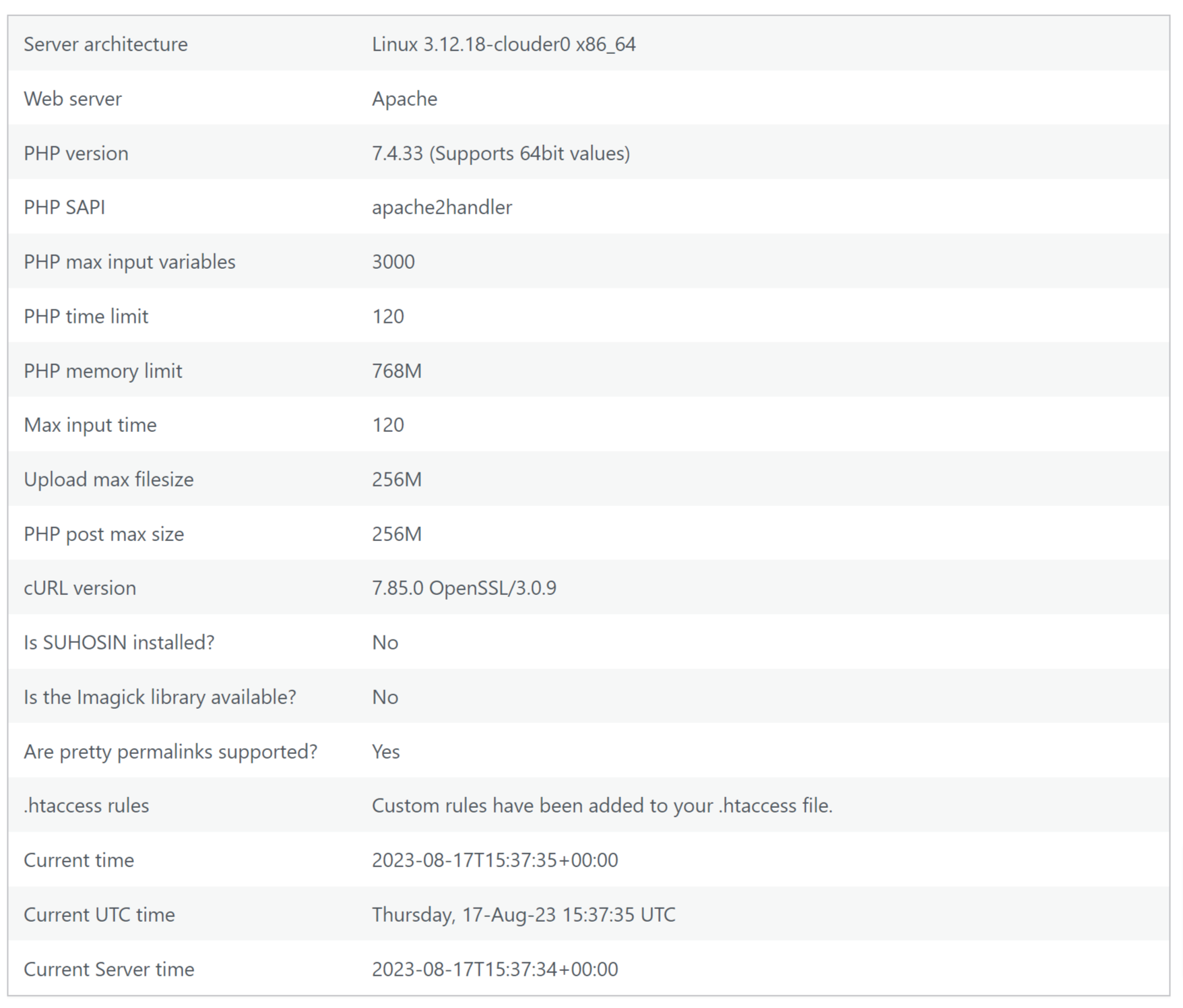 0
0 -
that's a screenshot of my server settings
0 -
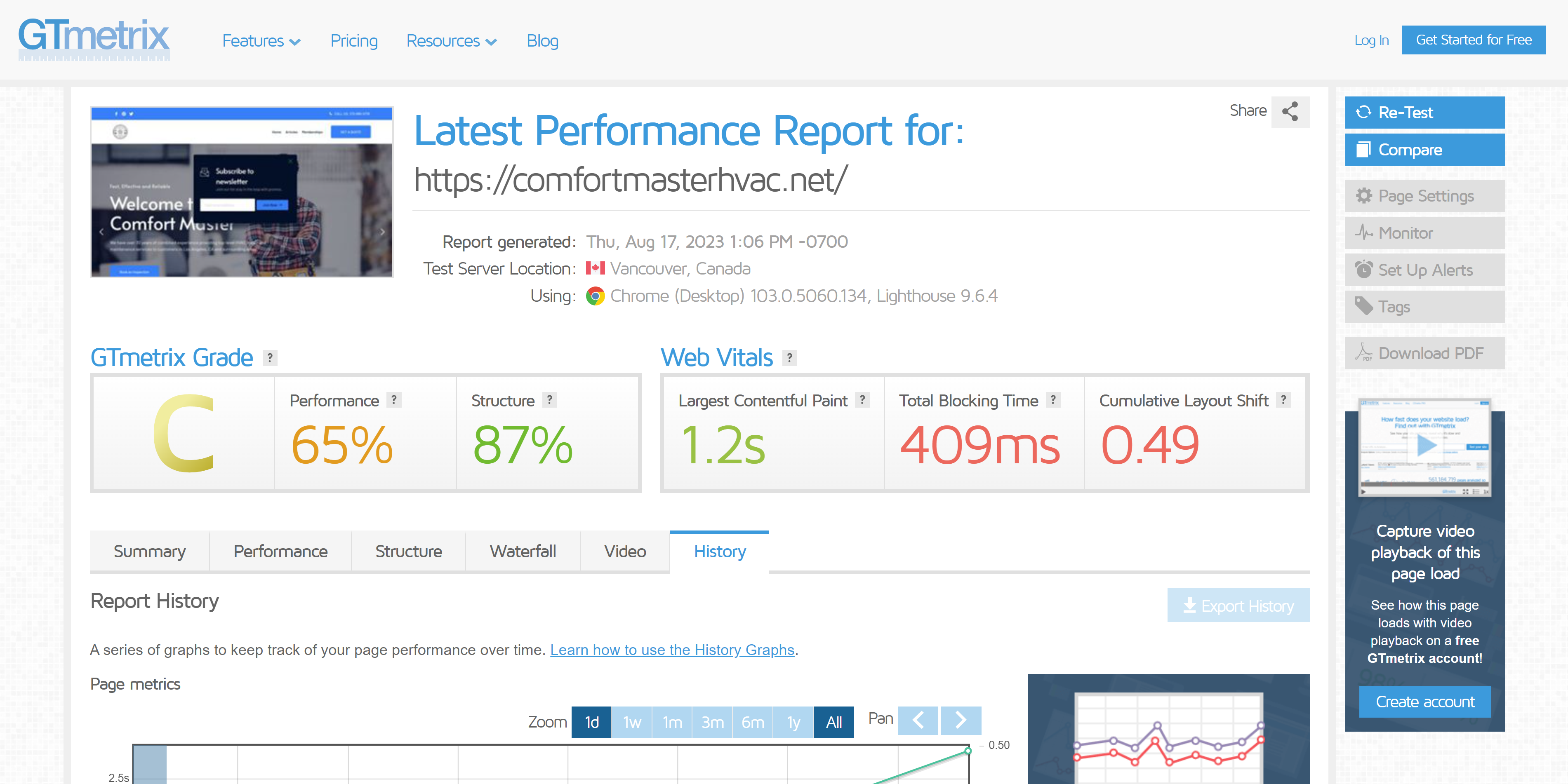
And it keeps getting worse on GTMetrix too
 0
0 -
Hi Luis,
Thank you for the update.
I assume that this has something to do with your server settings.
Could you please provide us with the WordPress credentials, so we can look into this issue further?
Please add us as a user to your WordPress Dashboard and send the following details to: communitysupport@brizy.io
Community Post link: https://support.brizy.io/hc/en-us/community/posts/12941811618322
WordPress Admin URL:
Username
PasswordIn addition, please provide us temporary access to cPanel or your hosting admin panel, so we will have access to your server settings.
Please make a full backup of your website as a precaution.
I am looking forward to your response.
Best regards,
Ariel H.0 -
I've sent you an email with all the information requested
Thank you so much for your fast response and for the great customer service :)0 -
Hi Luis,
Thank you for your cooperation.
We've found some mixed content errors on your site, this is also resulting in the error 500 as shown in the below screenshots - https://i.imgur.com/i9lWBuy.png
We've updated the home and site URL on your website to use HTTPS, and this seems to have made improvements in loading time and switching from page to page.Please try this at your end and let me know how it goes.
Best regards,
Ariel H.0 -
Would you mind explaining what creates those content errors?
0 -
Hi Luis,
Thank you for keeping in touch.
Mixed content occurs when a webpage is loaded over HTTPS, but certain resources like images, scripts, or stylesheets are loaded over an insecure HTTP connection. This can happen when a WordPress site is set up for HTTPS, but some elements within the site still use HTTP - https://www.cloudflare.com/learning/ssl/what-is-mixed-content
When a browser encounters mixed content on a secure page, it may block the insecure resources to protect the user's security and privacy. As a result, the browser is unable to load the necessary resources, leading to the error 500.
I hope this helps.
Best regards,
Ariel H.0

Please sign in to leave a comment.
Comments
15 comments