site auto updates format

We're using brizy wordpress and whenever we make an udpate it changes from brizy template to default template in the quick edit page section.
how do we fix this
-

Hi Mahmoud,
You can change to Brizy Template or Default Template from within the Brizy Editor on the left sidebar by clicking on the 'Page' icon and then making the appropriate selection under 'Page Template'
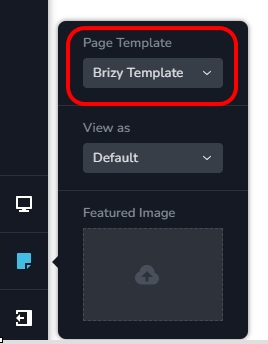
You have mentioned that " whenever we make an update it changes from Brizy template to Default template" How often does this happen? Always or sometimes?
What theme are you using? Please try changing to one of these themes https://www.brizy.io/theme-partners and see if that makes a difference.
If this does not help, please get back to us. We will need access to your WordPress Dashboard to offer further help.
0 -
its only after we make an edit in the brizy builder that it switches which is weird. Unsure if a fix is needed at this point as we don't plan on changing it for a while
0 -

Hi Mahmoud,
Thank you for the update.
This is something we would like to investigate from your dashboard. Could you please provide us with the WordPress credentials to the staging site, so we can look into this issue further?
Please add us as a user to your WordPress Dashboard and send the following details to: communitysupport@brizy.io
Community Post link: https://support.brizy.io/hc/en-us/community/posts/12232039341586
WordPress Admin URL:
Username:
Password:Also, please provide the URL of a page affected by this issue.
And lastly, please make a full backup of your website as a precaution.
I am looking forward to your response.
Best regards,
Ariel H.0
Please sign in to leave a comment.
Comments
3 comments