Text on the Brizy pages appears underligned

Hello,
Since the end of December, the text on the pages I have built with Brizy (WordPress plugin) started to be underlined. I tried to edit the text, but it doesn't appear as being really underlined in the editor... however, it looks like that on the page and it's bothersome. I was hoping some of the new updates will take care of this but it's been almost a month and nothing happened.
Here is one of the pages: https://magdatabac.com/online-course-the-neuroscience-of-stress/ (note: all the pages on my website, which are built with Brizy, have this problem; those which are made with Gutenberg or other ways, don't have the problem).
-

Hi Magda,
Add a new theme called Blocksy and activate it in your WordPress Dashboard's Appearance - Themes section to see whether the underlines vanish. If the page design gets messed up after changing the theme, feel free to switch back to the Fashion Diva theme.
Please let us know your finding.
0 -
Hi KC George,
thank you for your advice. I have added and activated Blocksy and the underlines vanished. However, when I returned to Fashion Diva it returned to being underlined.Thing is that Blocksy messes up my menus in the non-Brizy pages (most of my pages) :((((... any suggestions on how I can keep Fashion Diva as a theme but not have the underlined text?Thank youuu!Magda.0 -
Hi Magda,
The underline issue happens due to an incompatibility between Brizy and the Fashion Diva theme; your test confirms this. The solution I had suggested earlier will work only for Brizy pages and not for Fashion Diva pages. It is somewhat challenging to find a solution that will work for both the Brizy and Fashion Diva pages.
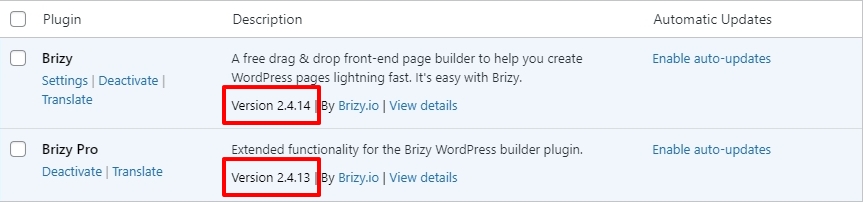
If the underline issue started recently, it is possible that the incompatibility issue is only with the most recent Brizy versions. Rolling back to previous Brizy versions might be a temporary solution. Please share with us the current Brizy versions you are using.
A more permanent solution is to have all your webpages developed using the same tool; either Brizy or Fashion Diva. This will help implement solutions which will apply uniformly across your website.
0 -
Hi George,
Here is a screenshot with the versions of Brizy I'm using (2.4.14 and 2.4.13 - I have auto-updates active). Indeed, using the same tool is what I would like, but I don't have the time/energy to do that myself or the finances to pay for someone to do that for my whole website. But I might need to look into that soonish...
Please let me know what can I do to revert to a previous Brizy version...
 0
0 -
Hi Magda,
You could try rolling back to the previous versions and see if that helps. This will help only if the incompatibility is with the latest Brizy versions. Please use these files
- Brizy 2.4.13: https://jmp.sh/coQtD5Vd
- Brizy Pro 2.4.12: https://jmp.sh/EWWmBbAR
Please follow this procedure to roll back.
- Deactivate and delete Brizy Pro
- Deactivate and delete Brizy
- Download Brizy 2.4.13 and in your WordPress Dashboard under Plugins - Add New - Upload Plugin, upload Brizy
- Download Brizy Pro 2.4.12 and under Plugins - Add New - Upload Plugin, upload Brizy Pro
If this does not help, we will see what we can do next.
0 -
Hi George,
thank you for your advice. I have added and activated Blocksy and the underlines vanished. However, when I returned to Fashion Diva it returned to being underlined.
Thing is that Blocksy messes up my menus in the non-Brizy pages (most of my pages) :((((... any suggestions on how I can keep Fashion Diva as a theme but not have the underlined text?Thank youuu!
Magda.
0 -
Hi Magda,
I am sorry; I did not understand why you are sending me your previous message again. Please click on https://support.brizy.io/hc/en-us/community/posts/12121126697617 and follow the communication.
0 -
Hi George,
sorry, I don't know why that happened... I think that was from me leaving browser pages open... I will try to do today the steps to roll back and keep you posted.
Thank you!
0 -
Hi again, George :)
It worked! All looks good now! Thank you so much for your help!I've now set the plugins to not auto-update... but as you said, this is a temporary solution, as I would like to have access to the updated plugins... Can it be found out what led to this change from the last update and maybe repaired in the next update?
Thanks again for the help!0 -
Hi Magda,
I have reported this issue. We will attempt to investigate the issue.
However it is also good to work out a more permanent solution at your end. It is good to have all your webpages developed using the same tool; either Brizy or Fashion Diva. This will help implement solutions which will apply uniformly across your website.
You had mentioned that " Indeed, using the same tool is what I would like, but I don't have the time/energy to do that myself or the finances to pay for someone to do that for my whole website." Would you like me to suggest someone to give you a quote for this work? You can then see if it is affordable.
0 -
Hi George! Thank you for reporting the issue. Hopefully it will be sorted out for the next update...
Yes, it would be helpful to get a quote for this... at least I'll have an idea if I can afford it now or later or... not :).
Thank you!0 -
Hi Magda,
I have requested Saurabh Sharma to send you an offer by email.
0 -
Hi George,
Thank you for the help!
All the best,
Magda.
0
Please sign in to leave a comment.
Comments
13 comments