blog post excerpt is pulling email address and subtitle

Hi I've upgraded to Brizy Pro specifically for the blog post function but I'm finding it is working properly. The excerpt is pulling my email address and the subtitle from the Brizy block that I chose (on the template it was "01 - Introduction" but I changed it to "Month Year") right at the start, before running onto the article. There are no spaces between the email address, subtitle and the first word of the blog post. Screenshot: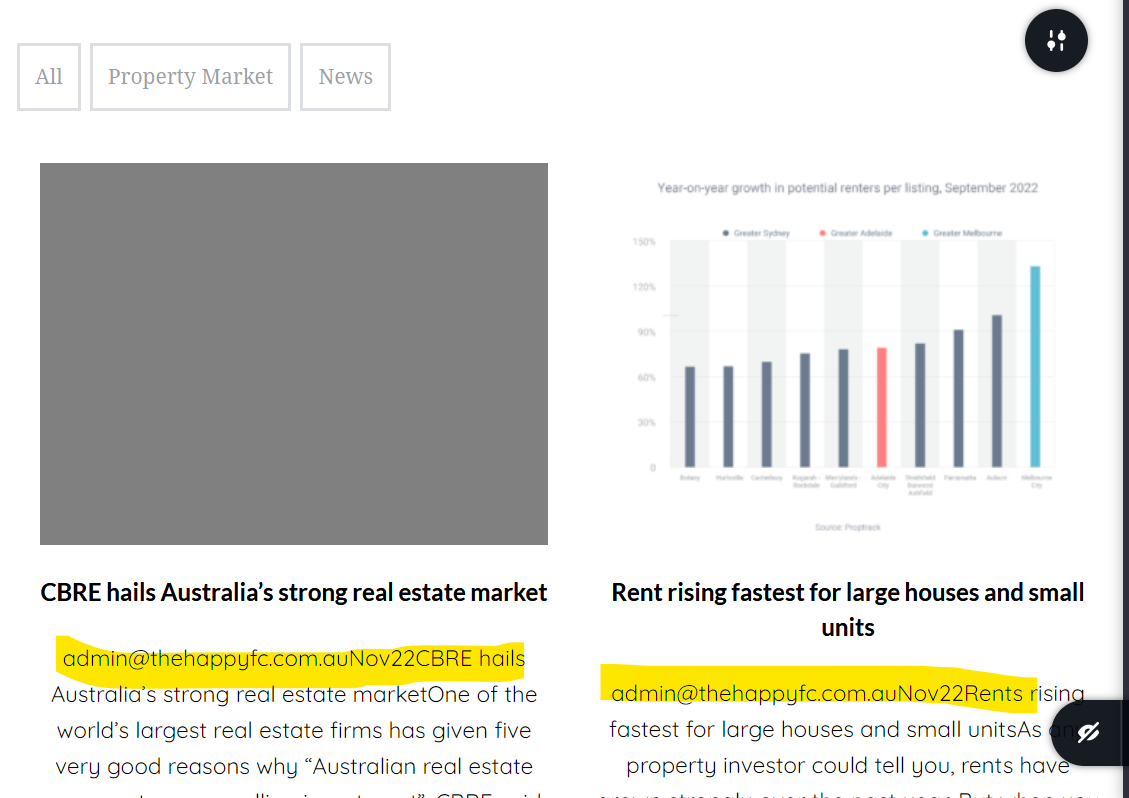
-

Hello Sally,
Thank you for contacting us.
Could you please send us the URL of the page you found this inconvenience?
Best regards, Nelea.
0 -
Hi Nelea, it's https://thehappyfinancecompany.com.au/test-news/ I've got the block set to 3 columns but have only 2 posts, and one of those is without a picture, which is why it looks like it does. I just didn't want to spend any more time generating the content if this issue can't be fixed. Thanks
0 -

Hi
Brizy does not generate post excerpts. It just displays the excerpt generated by WordPress.
We will need to take a look at your project to check why you are seeing the author email and the additional information along with the excerpt. Please add me as a user to your WordPress Dashboard if you need assistance with this. My email: kc.george@brizy.io. As shown in this screenshot: https://jmp.sh/sOSGGR3, please turn on the option "Send the new user an email about their account"
Please let me know here when you send me an invitation.
0 -
Hi KC, I have added you as a user and sent you an invitation. Thanks, Sally
0 -
Hi Sally
The Post excerpt is being auto generated by some software in your WordPress Environment. I spent sometime but could not identify the software which is generating the post excerpt.
To fix this issue, please add blog posts using Gutenberg and do not edit it with Brizy. Instead use a Brizy blog post template to stylize your blog posts. I have added a test blog post in Gutenberg and have also added a Blog post template under Brizy - Templates
I have also added a blog page and have created a blog template under Brizy- Templates. Please have a look at https://thehappyfinancecompany.com.au/blog/ You will see that the blog post I have added through Gutenberg displays the excerpt correctly.
You could watch this video for the procedure procedure to add blog templates. https://youtu.be/lkiSk6IE7tA
0 -
Hi KC,
Aware it’s been a long time since your reply below and you might not even work there anymore, but frankly, this just got all too hard. And then we got insanely busy as Dec/Jan/Feb are the busiest time of year in mortgage broking.
So here I am, trying to get the News and Updates section of our website working in April 😂
Your reply below has been really helpful, thanks. I still require some more changes though and I have tried to do them myself but I’m either doing it wrong, or there is something wrong in the background still.
Blog (archive) template – the one you created looks good thanks. I have worked out how to add rows/columns and I think it will work fine. But I want to add the categories to this page, so that readers can filter on the posts they are interested in. I basically want all of the posts to show here as default, but have buttons/links across the top (or a drop down-type thing) so that it can be filtered by category.
Post template – again the one you created was good but I want to put the date in underneath the title. I also want to have a “related posts” section down the bottom like in the video tutorial. I couldn’t work out how to do this, so I followed the instructions in the tutorial to create a new Post Template – but when I got to the page to add the elements, none of the blog-related ones were available to select (e.g. excert, post, featured image etc):
I also notice this on the bottom of the template you created, which isn’t in the video:
Can you let me know where I’ve gone wrong? I appreciate you setting up the templates but I’d like to make sure I can do it myself so that I don’t’ have to keep contacting you when I need changes.
Thank you,
Sally Williams
0 -
Hi Sally,
I have added a category menu in your Blog page. Please have a look at https://thehappyfinancecompany.com.au/blog/ I also made a video showing the steps I have followed: https://jmp.sh/KmGE4onN
You can add the date of publishing of your blog posts using the Text element and selecting the "Post Date" option after clicking on the 'Database' icon. I have done this on your blog post template.
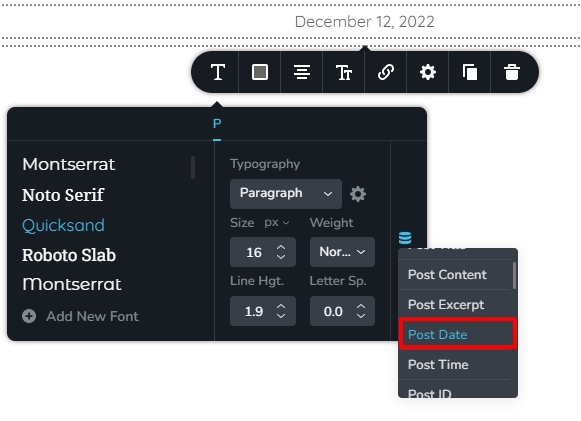
The information provided about Related Posts in this video https://youtu.be/lkiSk6IE7tA?t=362 appears incorrect. We regret the error in this video. The Posts element cannot display blog posts based on the currently active category. Hence you cannot show Related Posts using this element. You could try one of these plugins to display related posts. 10 Best Related Post WordPress Plugins for 2022 If any of the plugins support shortcode, you can use the Brizy shortcode element to add the plugin shortcode to the single blog post template.
When you already have a single blog post template, you cannot add a second one. This is the reason why the template you added did not work.
If you have more questions, please get back to us. We will be happy to help.
0 -
Hi KC,
Again, you've been so so helpful, thank you. I really can't fault the support - such a refreshing change from the other dramas I deal with all day!
I will delve back into this in the morning with a stack of new posts and see how I go.
Thanks
Sally Williams
0 -
Hi KC
I’ve had a chance to really look through this. All looks great except when I go into your blog post template to see how you did the date, I don’t get the option for a date:
I’m presuming this is because it’s already selected?
Also, is it possible to backdate the date? i.e. If I get behind and end up adding 4 posts all at once, can I backdate 3 of them?
Thanks,
Sally Williams
0 -
Hi Sally,
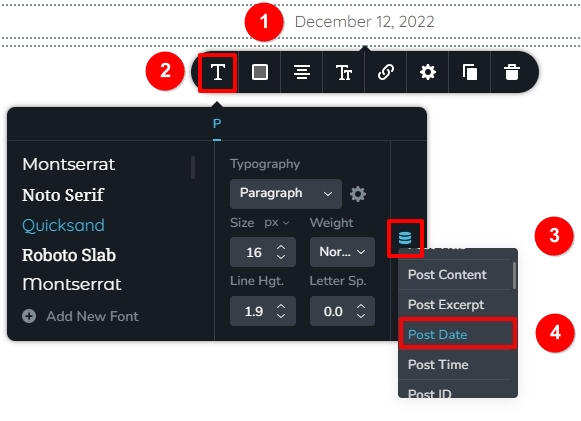
To set the Post Date, click on the
- The date
- The typography icon
- Database icon
- Select Post Date option
You can change the date of publishing of your blog posts in the Gutenberg editor. Please see the procedure here https://jmp.sh/iFVMHtrh
0 -
Hi KC,
It’s been a while! Have replied in this trail as my question kind of relates to the help you have previously given me.
I have a news and updates section of our website running beautifully, based on the blog post template and the archive blog template you set up for me.
My question is, is it possible to have 2 of these? Or to perhaps use just the one in 2 different places on the website, with different posts showing in each? I want to do a blog for educational resources/informational posts and I think I want to keep this separate from the news and updates. I remember you saying I can’t have more than 1 blog post template – I believe this is fine as I could still use the same layout. But I’m hoping to fiddle with the archive template so that it only displays certain posts…. What do you think?
Thank you!
Sally Williams
0 -
Hi Sally,
You will have to redesign your blog posts categories to make this happen. You need to setup two main categories and sub categories under these two.
Let's say these are your two main categories
- Informational
- New and Updates
News and Updates category can have sub categories like
- Property Market
- RBA Cash Rate
- Interest Rates
Informational Category can have these sub categories
- First Home Buyers
- Refinancing
- Investing
You can now add category archive templates for the two main categories following this procedure. https://jmp.sh/Bu4F4GIa
If you have more questions, please get back to us
0 -
Hi KC,
Easier to show what’s going on in a video:
https://www.loom.com/share/113e33cab2f3426eb151b259b2b30e79?sid=b1ae25a6-8d29-4537-8aea-38c65cc3be4a
You still have a log in to my website from the initial troubles we were having with Brizy pulling the wrong parts into the excerpt. I’ll send a reset link to you now in case you’ve forgotten the password 😊
Thank you,
Sally Williams
0 -
Hi Sally,
I am discussing two methods of adding blog posts in this screen recording. Please have a look at https://jmp.sh/spGoZWbP If you have more questions after watching it, please get back to us.
0 -
Hi KC
Wow this was great to watch, thank you.
I’m going to go with the second option for my Learning Centre – i.e. NO template and create the post by adding the content in Brizy not Gutenberg.
I do have just a couple of questions about this (mostly just for my own understanding rather than problems with the website):
1. Does this mean I could have actually kept the News and Updates template and been able to use 2 different blog post templates that way? i.e. News and updates utilise the template and have content pasted into Gutenberrg, and the Leaning centre be done without a template and have the content (and therefore layout) created in Brizy? I have already removed the news and updates post template and archive, as I decided I didn’t really need to have archive news articles anyway, but it would be nice to know if this is a viable option in the future.
2. If I did have 2 blogs as per above, how would I determine which posts would show on the carousel on my home page? Could I specify which posts or would I need to further categorise the posts as “informational” and “news” like we talked about previously?
3. I can’t work out how to make the share section (that was part of a template layout in Brizy) work. There doesn’t seem to be a settle to make it share to a page…. I can link the button to a URL, Block, Popup or File, but linking the button isn’t the same as sharing the content to your own facebook/insta/linked in page. I see that Brizy has their own share option for facebook, but I have found with this element that the Like button doesn’t work. The share button works, but this is only for facebook when I need it for the other socials as well. Will I need to add a plugin to make it actually be shareable?
Thanks again for all your help in educating me. Someone else at Brizy has taken the support request about my global header and footer issue, so hopefully I’ll have a fix for that soon too.
Cheers,
Sally Williams
0 -
Hi Sally,
Let me go over your questions.
1. Yes; you can add content for all blog posts under News and Updates category in the Gutenberg editor and use a Brizy Template to give it one blog post design and add Learning Centre blog posts content in Brizy and give it a another design.
Even if all blog post content are added in the Gutenberg Editor, you can add one blog post template for News and Updates category and another for the Learning Centre category. For instance, you can add the following Display Condition for blog posts belonging to the News and Updates category and give it one design and add another blog post template for the Leaning Centre category and give it another design. (I don't remember saying that you can’t have more than 1 blog post template. I am sorry; if I did)
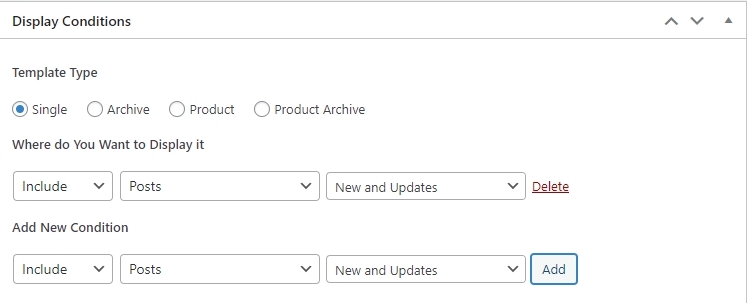
2. You can display a carousel showing blog posts within a specific category. For instance, you can display all New and Updates blog posts in a carousel. Please follow the procedure in this screen recording https://jmp.sh/V4ovQymB
3. To share blog post content on a social media platforms please consider using a plugin like Sassy Social Share You can also have a look at this list for more social share plugin options https://colorlib.com/wp/wordpress-social-sharing-plugins/
0 -
Hi KC,
So can I just check – I create News and Updates blog posts with template Gutenberg, and I create Learning Centre blog with Brizy (no template but insert saved layout). With both of these I categorise them, and then when I want to create a carousel for the home page or an archive blog page, I can select only the categories and subcategories I want to include?
Re the Brizy method (i.e. without template), I guess I need to just remember to re-save the layout every time I make an update; for example, if I remove the “share” feature that doesn’t work and use the plugin you suggested to insert a new share feature, I then need to save that layout for use in future posts. This would also mean that posts that have already been created won’t automatically update to the new template – right? So in that regard, the “template” method is better?
So, I guess I’m now considering using Gutenberg, as much as I dislike it. But I’m so confused about this; you definitely said I can’t have more than 1 template:
If I definitely can have more than 1, then I might consider doing this. But how would I set the pretty layout like I have in the saved layout in Brizy? With the “related posts” down the side, CTA insets, etc. Does Gutenberg have that capability? I basically want to be able to paste my content in and have it reformat as per the template so that it looks like the Brizy layout I created and saved.
Finally, I’ve got a question about how you got the “read more” posts to pull through – how do I set that up and how do I choose which posts? I don’t necessarily want the 3 most recent to pull through; rather, I want 3 relevant-to-topic articles to pull through and I’m happy to manually select them.
Thanks,
Sally Williams
0 -
Hi Sally,
So can I just check – I create News and Updates blog posts with template Gutenberg, and I create Learning Centre blog with Brizy (no template but insert saved layout). With both of these I categorise them, and then when I want to create a carousel for the home page or an archive blog page, I can select only the categories and subcategories I want to include?
Yes; you are right. You can add a carousel to the homepage and display blog posts within the selected category or sub category.
Re the Brizy method (i.e. without template), I guess I need to just remember to re-save the layout every time I make an update; for example, if I remove the “share” feature that doesn’t work and use the plugin you suggested to insert a new share feature, I then need to save that layout for use in future posts. This would also mean that posts that have already been created won’t automatically update to the new template – right? So in that regard, the “template” method is better?
Except the blog post content, all other sections of a blog post must be global blocks including the social share buttons. Updating the content across blog posts become easier when your content is within a global blocks. You can save the content block and when adding a new blog post, you can import the saved block and modify its content.
If I definitely can have more than 1, then I might consider doing this. But how would I set the pretty layout like I have in the saved layout in Brizy? With the “related posts” down the side, CTA insets, etc. Does Gutenberg have that capability? I basically want to be able to paste my content in and have it reformat as per the template so that it looks like the Brizy layout I created and saved.
If you add blog post content in the Gutenberg Editor, you must develop a Brizy blog post template to give it a Brizy design. You can have a 2 column design with a sidebar in the Brizy blog post template. However you can't have a 'Read More' section on the sidebar with manual content in the blog post template. Please consider using a plugin to display 'Related Posts' in the sidebar. https://blog.hubspot.com/website/best-wordpress-related-post-plugins.
You also cannot add a CTA within the blog post content area. Please consider adding the CTA to the sidebar or below the blog post content area.
Finally, I’ve got a question about how you got the “read more” posts to pull through – how do I set that up and how do I choose which posts? I don’t necessarily want the 3 most recent to pull through; rather, I want 3 relevant-to-topic articles to pull through and I’m happy to manually select them.
I have added the 'Read More' using the Brizy Posts element. This will work only if you are adding blog posts content in Brizy. You can't follow this approach if you are adding content in the Gutenberg Editor and developing a Brizy blog post template. As I have suggested above please use a plugin to display related posts.
0 -
Hi KC,
Nearly there! Just have one or 2 little problems to iron out.
I’ve rambled – put me on 2 x speed 😂
https://www.loom.com/share/ec48d98556964fb8a28a27b72f6966bb?sid=fea2cf03-693d-48a1-a5a5-d5066d34146d
Sally Williams
0 -
Hi Sally,
I have added an additional display condition for your News & Updates Archive Template. Please check if the template lists the blog posts correctly.
You could consider displaying the blog categories and the blog posts side by side. I have added a design like this for you in your News & Updates Archive Template. My design is added towards the bottom in a separate block which can be deleted.
You can manually add the excerpt into your blog posts in the Gutenberg Editor. This gives you control on the length and the content of the excerpt.
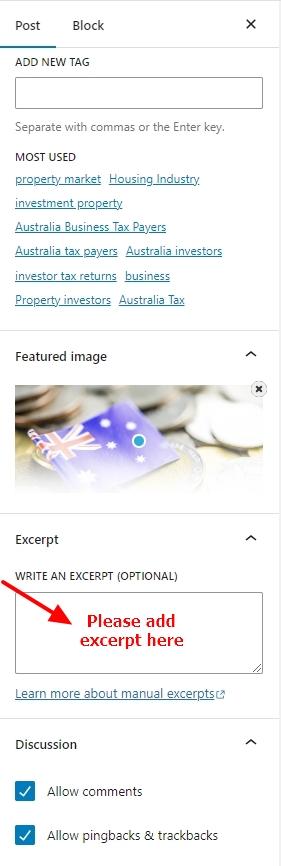 0
0 -
Fantastic, it all looks great, thank you so so much!
Sally Williams
0 -
Just when I thought we were home and hosed!
So I’ve published the News Archive template and given it a shorter Slug:
And then I’ve added a button to my homepage with that url:
But I’m getting this:
I must be missing something really simple….? Do I need to create a “page” with the template or something?
Thanks (again)
Sally Williams
0 -
Hi Sally,
Your News and Article archive page is available at https://thehappyfinancecompany.com.au/category/news-and-updates/
I am sorry, I could not locate the button on the homepage. Maybe you attached a screenshot to your email. Email attachments do not work well with our help desk system and hence I could not see any image. Please attach the screenshot to the forum post at https://support.brizy.io/hc/en-us/community/posts/11237168633489
0 -
Hi KC,
I had to remove the button because it was on a live page and I couldn’t get the button to link anywhere. Turns out I did have the url incorrect – thank you for advising correct URL, will link here and all will be good!
Thanks again for all the support, you really have been outstanding.
Cheers,
Sally Williams
0
Please sign in to leave a comment.
Comments
24 comments