This page needs a refresh. You’ve probably updated this page (or another page) in a different tab or browser.

Hi, Team
The Error "This page needs a refresh. You’ve probably updated this page (or another page) in a different tab or browser." is only shown in the specific page.
I have cleaned all my database using plugin but still problem persists.
URL: https://www.sgmcorporation.com/quartz-surfaces.
Please look into it and do the needful.
-

Hello,
Thank you for contacting us.
Thank you for all these details! We would like to check this problem from your dashboard. Could you please send us the wp credentials for these sites? I have created a private ticket for this request. You had to receive a notification regarding this by email. Could you send us in that private message the wp credentials to them?
Best regards, Nelea.
0 -
Hello,
Nelea Stanila.
Email Sent Please Check. Thank you.
0 -
Thank you, my colleague already reply to that email.
Best regards, Nelea.
0 -
Hello,
I was told to send my Login Credentials to Natalia who reached out to my email, and shared all the details including the Error message on my Specific page. But it isn't resolved yet!
I have not received any response or reply from Natalia until today. I request you to please prioritize this issue and help me resolve it as soon as possible.
Big thanks,
Happy Monday.
0 -
Hello,
Natalia replied to you on the same day, she answered you after 40 minutes after you gave her credentials. Please check your email or spam. Please see here the screenshot from the private ticket with the answer from Natalia.
Best regards, Nelea.
0 -
Okay, i had to remove the screenshot because it has my login credentials written into it.
Its very sad to see you people not digging to the email conversation and trying to blame on me. Out of curiosity i just shared the screen shot of the Email which had my login credentials.
Please let me know if you can fix it. Otherwise let me know how to proceed further.
Just want to let you know, i have changed my password. please let me know VIA email if you need it. I will be glad to share it with you.
Thanks.
0 -
Hello,
I just checked with my colleague and she answered you now again. Please check your email. Please let me know if you did not receive the reply for my colleague. Also, please check your spam folder.
Best regards, Nelea.
0 -
Natalia Just responded. Thanks for your support.
I will keep you posted if anything i need from you to get this issue resolved.
Thanks.
0 -

I also am having this same issue. Seems to me, as I began to use more effects and pop ups, the errors began to happen. Any solution?
0 -

Hi David,
This error can happen due to a variety of reasons. In case of the above user, in response to Brizy request, his hosting server returned a 503 Error.
Please log into your hosting account and check if any of this software is turned on in your server management system (like cPanel). Disable these systems one at a time and see if that makes a difference.
- Security system
- Malware protection
- Firewall
- DDOS
Please also check if you have installed a security plugin. Deactivate the plugin and check if the error disappears. Once you identify the interfering software, relax the security restrictions to allow Brizy editing, in consultation with your hosting company.
Please contact us again if none of the above helped. We will require access to your WordPress Dashboard to troubleshoot this issue for you.
0 -
@KC George, I looked into my hosting software and did not see any of the above turned on, nor did I have any security plugin installed.
David.
0 -
Hi David,
We would need access to your WordPress Dashboard to offer further assistance. Please add me as a user to your WordPress Dashboard and send the following details to our email: communitysupport@brizy.io
- Community Post link: https://support.brizy.io/hc/en-us/community/posts/10586721368593
- WordPress Admin URL:
- Username
- Password
Please let us know here when you send us the email.
0 -
KC, I sent the email to you a few hours ago.
Help would be appreciated.
David
0 -
Hi David,
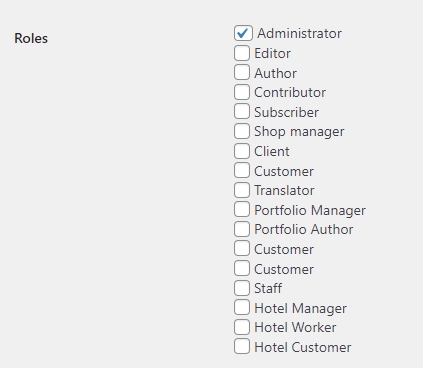
I could sign in to your WordPress Dashboard. However many sections of the WordPress Dashboard are missing. I only see the options provided in the below screenshot. Appearance and Plugins sections are not available.
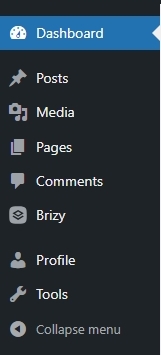
Can you please check the role assigned to the user brizygeorge?
 0
0 -
KC I have added you as an administrator.
Thanks,
David
0 -
Hi Pastor David,
Please have a look at this screen recording. https://jmp.sh/C9KElawp I do not see the error you are seeing when updating a page. Is there something specific I need to do to reproduce the error at my end?
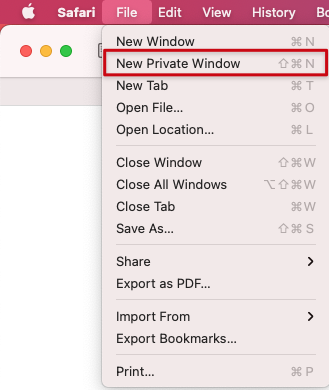
Please try signing into your WordPress Dashboard from a private (Incognito) window of your browser and check if you see the same error. Please also try a difference browser and check if that makes a difference.
 0
0 -
KC,
in order to recreate the error, or my inability to save a page, I would suggest you go into the 'About/staff & Administratrion' page, then try duplicating the row of photos located in the accordian, once and save. If that works, try duplicating another row, then try saving. I am unable to save after creating a second row of pictures.
0 -

Hi David,
Thank you for the update.
It seems like we have encountered a similar issue recently. To address this, I would suggest trying the solution that was shared in a community post:
https://support.brizy.io/hc/en-us/community/posts/13408943952146Please try this and let me know how it goes.
Best regards,
Ariel H.0
Please sign in to leave a comment.
Comments
18 comments