URGENT ISSUE

I NEED URGENT ASSISTANCE ON THESE MATTERS...
I am launching a new product early tomorrow and all of the pages I've checked are getting messed up. The footer block always pops up on top of the untouched pages and when I check and edit those pages, the footer is really up on top! I updated them to put them back down below and got it published but after few refreshes the ISSUE REOCCURS. Here's my main page editor link: https://www.brizy.cloud/projects/1088901/get-editor-url
Also, the header image I chose for the top block of the article pages I published when viewed in mobile mode shows a different photo than what I uploaded. But when viewed in Desktop mode, the photo background is showing up fine. Kindly, check it here: https://www.brizy.cloud/projects/1088901/editor/page/14312505
One last urgent matter, as I edit the text's font of the block too of different lines/row, I get an error and the whole block disappears and is replaced with a notice: Please Contact Brizy Support.
Can you attend to these as soon as possible?
Thanks,
Tom
-

Hi Tom,
We would like to check these issues on your page. Can you please share the public URLs of your page where you are facing these issues.
0 -
These are the public URLs of the pages that had the issues
https://www.nlptimes.com/ (home webpage)
https://www.nlptimes.com/big-nlp-myth
https://www.nlptimes.com/the-tote-loop
https://www.nlptimes.com/how-to-capture-strategies-on-youtube
0 -
Hi Tom,
Do you still have the issues you have reported above? Are some of the issues resolved?
- Footer on all pages appear in place. Does your footer move around even now?
- The header image for the top block of the article pages looks the same on the desktop and the mobile
You have also mentioned that as you edit the text's font of the block too of different lines/row, you see an error and the whole block disappears. Are you continuing to face this issue? If so, can you make a screen recording of it?
0 -
I'll attach to this thread if the next time I edit the pages I still experience the same issue.
0 -
Hi Team,
I'm following up on this thread as my concern is connected to the same experience.
First of all, I did updates on my webpages and to some text elements, but I still experience the same crashing issue and the change not being saved even after clicking 'update' and publishing the changes. Can you get this resolved?
Also, in connection to this, back during the launch day of the new product we did some crucial changes and updates to the webpage 6 hours worth of editing and even when we did 'update' and published the changes but it did not get applied to the page. It went back to how it was before 6 hours after it was changed and updated. This is really getting bad as it is such a waste of resources, time, effort, and money. Can you get this bug resolved swiftly?
Do you also, already have an auto backup and restore feature? We and the whole user community of Brizy badly needs that. If not and you do have it on your development plans, can you give us a link to a public development board/roadmap that you have so that we would know an estimate when to expect for these fixes and additions are going to be added?
0 -
Hi Tom,
We are sorry to hear about the loss of 6 hours of your work. Brizy Cloud does not have an autosave feature at the moment. You will have to manually update your work every 10-15 minutes to avoid loss of work. We have received feature requests for auto save and for project backups.
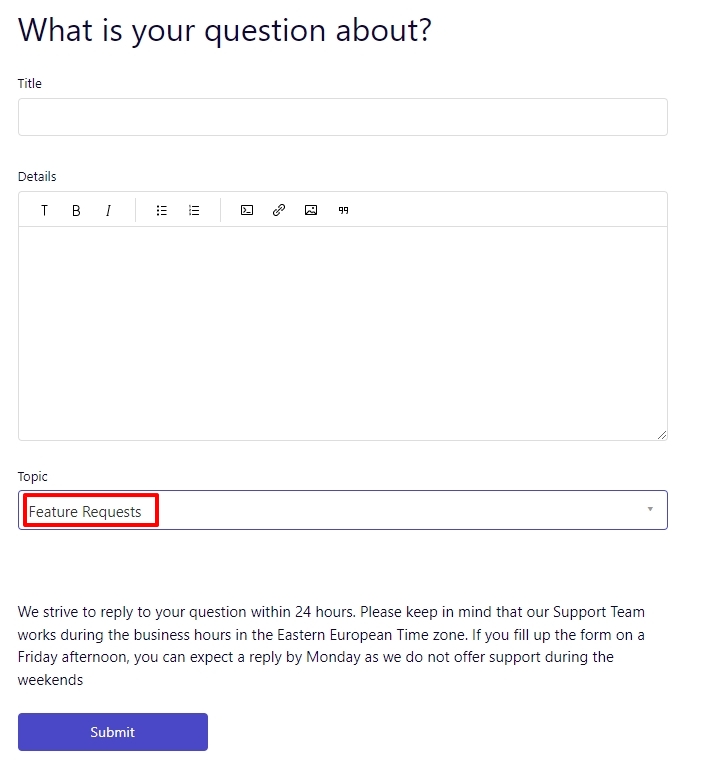
You can request for a new feature in this Forum. The support form has an option for Feature Requests. These requests get added as issues to our GitHub account. The features that get added to the development life cycle get listed with the Brizy Cloud Public roadmap at https://trello.com/b/0buMUNOS/brizy-cloud-public-roadmap
I had made some recommendations to speed up your website in reply to your post here https://support.brizy.io/hc/en-us/community/posts/10467377376657 Once you implement few changes, we will take a look at your project to see the issues you are facing with saving your work.
0 -
Hi KC,
Thanks. Re "You will have to manually update your work every 10-15 minutes to avoid loss of work." While that solution would be cumbersome, we would happily do it ... IF ... it worked. Unfortunetly we've had multiple experiences where the "Update"/Save function hasn't worked. So can you please escalate this with your development team to identify and fix the issue regarding saves not working consistently. Candidly it was an emormous pain for us and had very real consequences.
Thanks,
Tom
0 -
Hi Tom,
The Update/Save function works normally well for most Brizy Cloud users and this does not come across like a widespread Brizy Cloud issue.
Once you have implemented some of my suggestions to you in this post https://support.brizy.io/hc/en-us/community/posts/10467377376657 please let us know. We will look at this issue from your Dashboard.
0
Please sign in to leave a comment.
Comments
8 comments