Brizy elements "Title" and "Excerpt" render text differently then other text elements

As the title suggests the text seems to render differently. In the Brizy elements "Title" and "Excerpt" the text looks a lot rougher and more pixelated, like there is no anti-aliasing applied (sorry if this sounds weird, but that is the best way I can describe it). See screenshot below to view the difference. The upper text is the Brizy element "Title", below just a regular Brizy "Text" element (you may need to view the screenshot at exactly 100% without any zoom otherwise you might not see it):
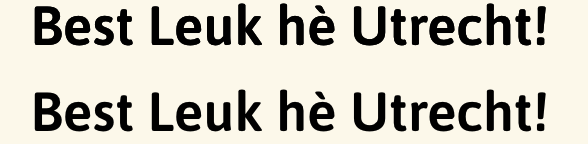
This is quite a noticable difference.
Brizy is updated to 2.4.11 and pro to 2.4.10. Switching to a default theme and disabling all other plugins made no difference.
-

Hi B.J. Cbrtg,
I have added two titles in this blogpost. https://kctest.online/adipiscing-elit-duis-tristique-sollicitudin One using the Post Title element and other one using the Text element, selecting the database icon and Post Title from the drop down. In the post title added using the Post Title element, the font edges are not particularly sharp when you zoom in and examine closely. However, it is hardly noticeable.
If you think the second method of displaying the blog post title looks better, feel free to use it.
 0
0 -
Thanks, the workaround looks indeed better.
Something else I noticed: when implementing a text element in the way you describe, and then add a link to that element (for example the "Post_URL"), it removes any color you selected and you can no longer change the color.
0 -
Hi B.J. Cbrtg,
I tried adding a link to the blog title. The title appears to retain the gradient color after adding a link. https://kctest.online/adipiscing-elit-duis-tristique-sollicitudin
0
Please sign in to leave a comment.
Comments
3 comments