Text with gradients in post title in templates are not applied

I have site in development where I use a gradient color for a #Post_Title in a Brizy Template for posts. The gradient is visibly applied in the brizy editor. However, when rendering the page it doesn’t show the gradient. See screenshot below:
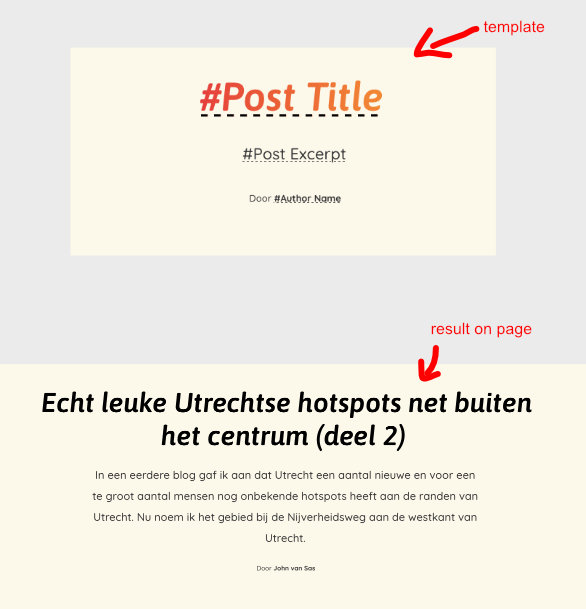
Brizy is updated to 2.4.11 and pro to 2.4.10. Switching to a default theme and disabling all other plugins made no difference.
-

Hi B.J. Cbrtg,
Please remove your current post title from your blog post template and add it again following this procedure. Drag and drop the Text element, select the Typography icon, then the Database icon and select Post Title from the drop down list.
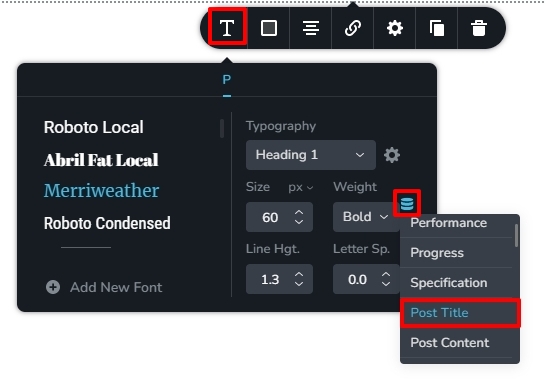
Please apply the gradient color to the newly added Post Title. The gradient color should display in your blog posts. Please have a look at my test page here https://kctest.online/adipiscing-elit-duis-tristique-sollicitudin/
0 -
Thanks KC George, your alternative method works.
0
Please sign in to leave a comment.
Comments
2 comments