Breadcrumbs don’t follow permalink structure for posts in templates

I have site in development where I run into some strange breadcrumb behaviour. Brizy is updated to 2.4.11 and pro to 2.4.10. Switching to a default theme and disabling all other plugins made no difference.
When you make a brizy template for posts and insert a breadcrumb element, the breadcumb element doesn’t follow the permalink structure.
My permalink structure for posts is:
https:leuk-he-utrecht.cybertuig.nl/nieuws-en-artikelen/%postname%/
Example url: https://leuk-he-utrecht.cybertuig.nl/nieuws-en-artikelen/echt-leuke-utrechtste-hotspots-deel-1/
However, on the actual page the breadcumbs on the posts look like this:
home / category / post
And the url resolves to this:
https://leuk-he-utrecht.cybertuig.nl/nieuws-en-artikelen/category/over-utrecht/
What I want (and expect) is the breadcrumb to honor the permalink structure.
-

Hi B.J. Cbrtg
When you modify the permalink structure, breadcrumbs would provide appropriate links based on the revised permalink structure. Changing the permalinks structure would not automatically modify the breadcrumb structure. If you would like to match the permalink structure with breadcrumbs structure, you need to redesign the breadcrumb structure.
You would need a breadcrumb plugin to customize the structure of your breadcrumb. You could try Breadcrumb NavXT plugin. Once you setup the breadcrumb structure in NavXT, add its widget to one of the widget areas; for example, you could add it to Footer Widget Area 1
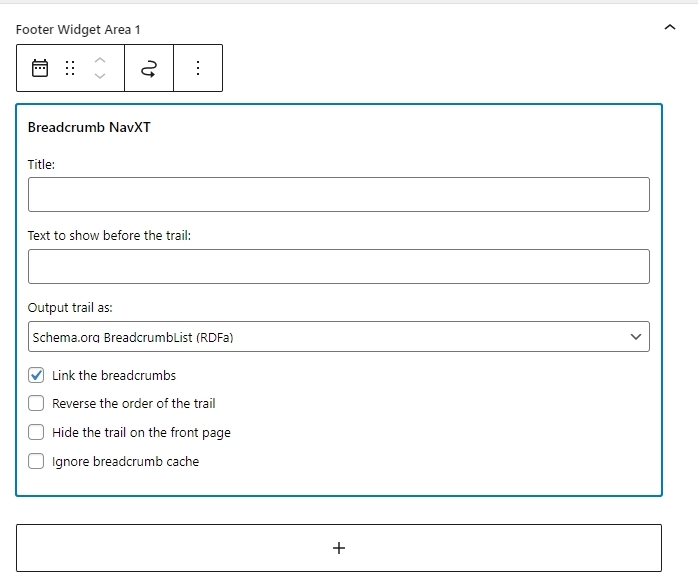
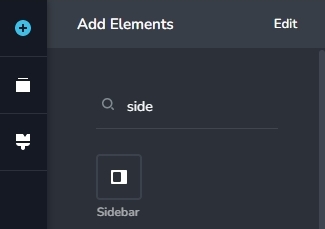
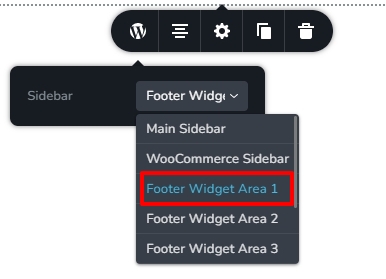
In your Blogpost template, replace the Brizy breadcrumb element with the Brizy Sidebar element and select the Footer Widget Area 1.
 0
0
Please sign in to leave a comment.
Comments
1 comment