Limited Access showing Styling Settings to make structure changes

I have the Editor set at Limited Access, and in full-screen mode, it does not show the Styling Settings fly-out.
But, if you view on Mobile or Tablet, the Fly-out is activated in Lock Mode the moment you select to view on Mobile or Tablet views.
This allows the Editor access to Make Structure Changes to the website, giving our clients a way to break the website.
How can I fix this from happening?
Help,
Mike
-

Hi Mike,
The only customizations that can be made are to the margins and paddings or to add some entrance/scroll animations, despite the fact that the side panel is visible in the tablet and mobile design views. New elements cannot be added since the elements panel is not available. Because the delete icon is absent, there is no way to remove any element. Access is still, in my opinion, quite restricted.
You had mentioned that
This allows the Editor access to Make Structure Changes to the website, giving our clients a way to break the website.
With editor access, structural modifications are not possible. I don't see a reason for concern here.
0 -
Maybe I'm missing something.
In Editor mode, the Desktop View does not show the Styling settings, but it does in Tablet/Mobile; why?
In Limited Editor mode, just with the Styling settings available, I can go from this:
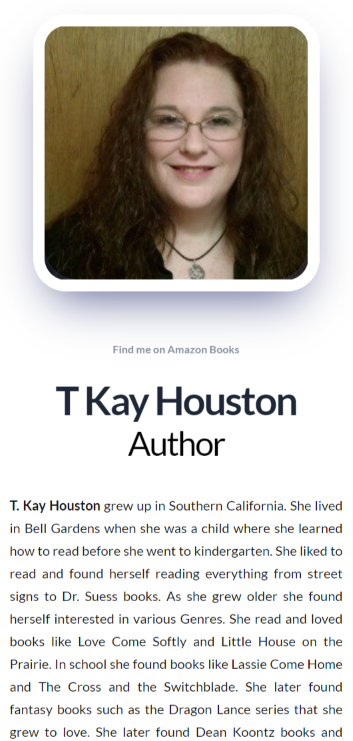
To This:
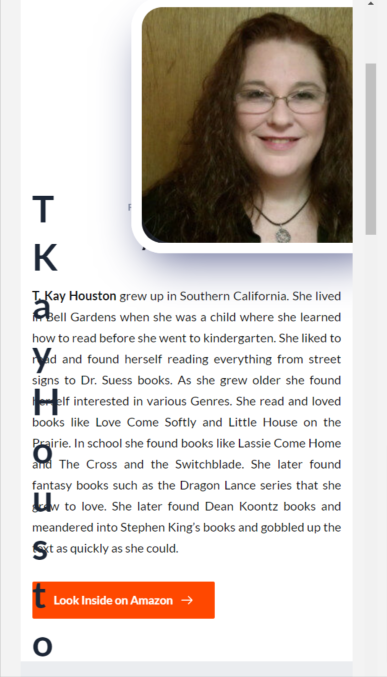
The other thing is it sort of points out that there is Styling to do because the Styling settings is Open when you go into Tablet/Mobile views:
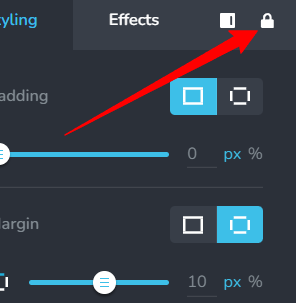
I tried to Unlock this, but it Defaults back to the Locked setting.
0 -
Hi Michael,
In the desktop design view the side panel is a popup, where as in tablet and mobile design views, side panel is always present and not a popup. That is the reason why it looks different in the editor access.
If your client knows how to use the undo a command in Brizy, he should be able reverse any changes made with his limited access.
0
Please sign in to leave a comment.
Comments
3 comments