Images Disappeared

Hi,
I just removed the LATO font and uploaded a new font to fix some GDPR issues and a lot of the images are now missing from the website.
Can you take a look.
Seems strange why images would disappear. There should be a full page image on the front page. Plus if you look on the Events page, images are missing half way down.
David
-

Hi David,
We regret this inconvenience. The images disappearing may not be linked to removing the LATO font. SVGs, Webps, and Gifs have issues with Brizy 2.4.9 and Brizy Pro 2.4.9. If you are using these Brizy versions, please consider rolling back to the earlier releases until we can provide a fix for this. Please follow this procedure: https://jmp.sh/SlMHWLK
Please download the previous Brizy versions here
- Brizy 2.4.8 : https://jmp.sh/ek66Syo
- Brizy Pro 2.4.8 : https://jmp.sh/ELbaLgT
0 -
Hi KC George,
This is a Brizy Agency Cloud issue. All images are JPGs and now have disappeared.
I have the images and can reinsert. But the main header image has completely disappeared.
What do you suggest? Is there any chance you can access the account to take a look?
0 -
Hi David,
Sorry for misunderstanding your request. I have looked at your website. You are right, you have three images missing.
- One image with a 404 error on your homepage: https://jmp.sh/6loopGx
- Two images with 404 error on your Events page: https://jmp.sh/N5smAKb
Many other images on your homepage are loading well. https://jmp.sh/22joNjz
I am not sure what caused the 404 error for the three images. May be you should delete and reupload the images?
0 -
Hi KC George,
I replaced all the images and had to remake the main header on the home page. Seems strange this errored once I delete the Google Fonts and uploaded a font file.
Also, I noticed some SVG logos all have a thin black line to the right. This is across all my Brizy sites, WP and Cloud. Is this something Brizy is fixing?
0 -
Hi David,
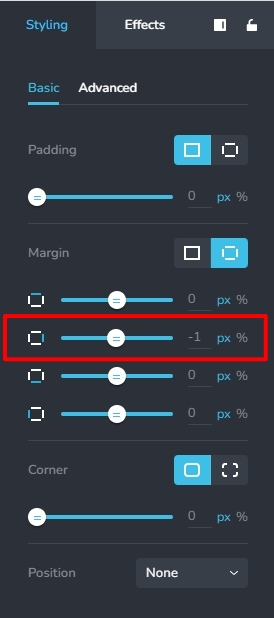
If the line appears to the right of the logo, please give a negative right margin of -1 to the logo and see if the line disappears
 0
0 -

Hi, it happened also on my sites, some images disappeared. Please take a look on this, it is very frustrating
0 -

Hi John,
Thank you for reaching out. I understand how frustrating this issue can be. To better assist you, could you provide more details on when the images started disappearing? Additionally, if you could share your website URL, we’d be happy to take a closer look.
Looking forward to your response.
Best regards,
Ariel H.0 -
Hi,
I am not sure when they disappeared, now I saw that some of the images are disappeared from these sites:
https://56restaurant1.brizy.site/
https://56restaurant2.brizy.site/
https://56restaurant3.brizy.site/
These are the sites.Can you take a look on them now?
I would like to reupload the imagesThanks
0 -
Hello John,
Missing images could be due to imperfections in the AI algorithm. If an AI website has missing images, kindly recreate the website. I added a fourth AI website and the images are looking good. Have a look at https://flamingo67ee19fd.brizy.site/
0 -
You mean to completely redo the website? That doesnt make sense, what if I like the website generated, I dont want to redo it to loose that design. Nonsense. Instead please work on your platform so the images dont disappear from websites created by AI.
Yes, the images were added correctly when I initially generated the website.0 -
Hello John,
I meant recreate the website using AI once again, which normally takes 2-3 minutes, assuming the images were not added correctly during the initial website auto generation run.
We have not received a report of images disappearing by itself without a user intervention. Usually images added to an AI website do not get lost without a user action. If you feel this is happening in your project, kindly capture a screenshot of the website before and after losing the image. This will help us investigate the issue.
0
Please sign in to leave a comment.
Comments
11 comments