contact form is not working

Hello,
I have purchased 'LTD for Brizy WordPress' plugin in June 2018 and recently I have installed Brizy Pro version 2.4.7 for my client's website www.vmarcspro.com and created 'Contact Form' using WordPress option.
I noticed that it is not working. Emails are not coming to desired mail IDs.
Kindly resolve the issue immediately.
Regards,
Chetan Patnekar
-

Hi,
Thank you for contacting us.
Please update Brizy plugin to the latest version 2.4.8 for Brizy Free and 2.4.8 for Brizy Pro. Sorry, but we cannot set up the email for you.
Even after seeing this success message, if you have not received an email, try these
- Check your email SPAM folder
- Check if there is a spelling mistake in the email address you have specified in the "Email To" field.
- Try adding an alternate email address with a comma in between and check if you receive the email notification in your second email.
Also, could you please check this article regarding how to connect the form with WordPress? Did you follow all steps and recommendations from there?
Let us know if all is working fine. Thank you!
Best regards, Nelea.
0 -
Hello,
Thanks for your inputs.
1) We have checked SPAM folders but we didn't found any mail there.
2) We have checked spellings of all ID's. Those are correct.We have added three mail id's like chetanpatnekar@gmail.com, info@vmarcspro.com, info@digitalenterprises.in for receiving the Contact Form mails.
Other than this, we have created one more FORM from Brizy Elements and checked it's function. After submitting, we received mail only to info@digitalenterprises.in id.
So, please guide in this regard. If you want WP login details, I will provide you.
Thanks and regards,Chetan Patnekar
0 -

Hi Chetan,
Your email will be sent out through WordPress' PHP Mail feature, when you use the WordPress option to send out email notifications. Few webhosts like GoDaddy do not support PHP Mail. Please confirm that PHP Mail is supported by your web hosting company.
When you send out email notifications via a form, there is a good potential that it might be suspected as a spoof. Please follow these recommended practices to avoid having your mail rejected by mail servers.
- Subject: Please don't omit the subject line. Give a meaningful subject. You can include a subject, such as "Contact Form."
- From Email: Make sure the 'From" Email' you use has the same domain as your website. The 'From Email' field on a form hosted at CNN.com can be form@cnn.com or info@cnn.com
- From Name: This field must not be left empty. Give a meaningful 'From Name'
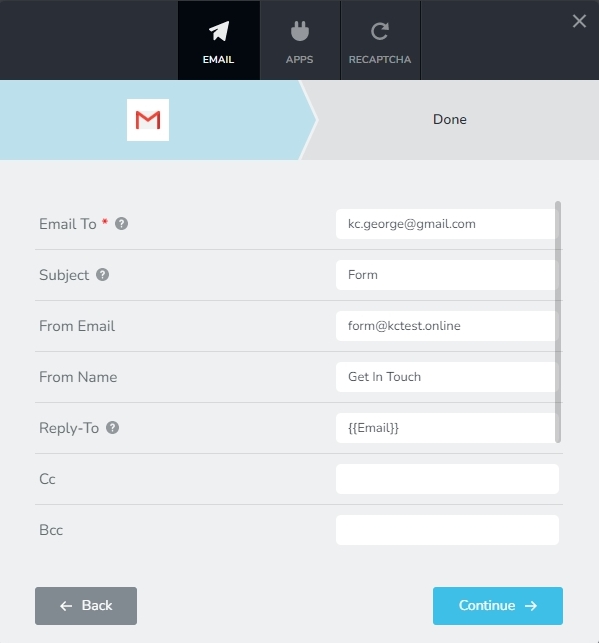
If after trying everything, you still can't receive emails from your form, please get back to us. We'll assist you in resolving the problem.
0 -
Hello,
Thanks for your feedback.
1) We have hosting with BigRock. We usually use BigRock services for our websites and those are fine with Brizy WP Forms submission.
We can't understand why this time we are facing such issue.
2) As per your suggestion, we have updated the Form Subject / From Email / From Name and checked it's function but the same problem is there.
Kindly check the issue.
Regards,
Chetan Patnekar0 -
Hi Chetan,
To help you further, I need access to your WordPress Dashboard. Please add me as a user to your WordPress Dashboard if you need assistance with this. My email: kc.george@brizy.io. As shown in this screenshot: https://jmp.sh/sOSGGR3, please turn on the option "Send the new user an email about their account"
Please let me know here when you send me an invitation.
0 -
Hello KC George,
As per your suggestion I have added you as an USER. Hope you have received the email regarding the same. Please check your inbox. I have attached an image here below for your reference. Kindly check the issue.
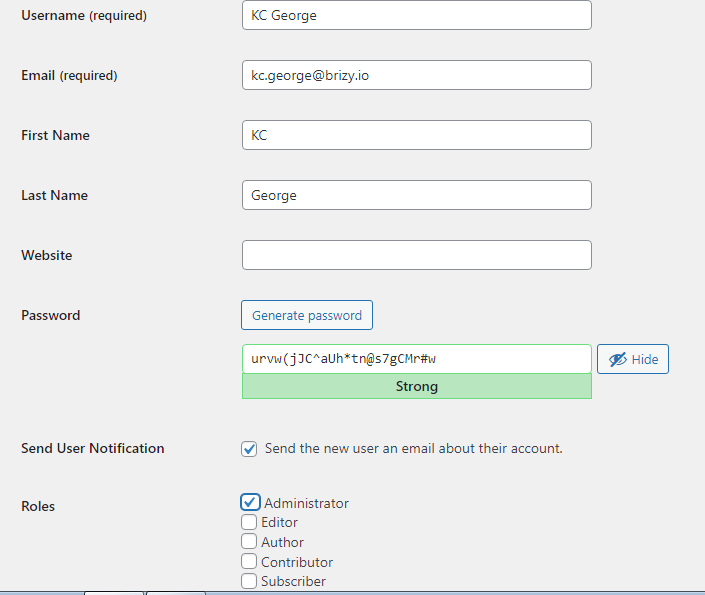
Regards,
Chetan Patnekar0 -
Hi Chetan,
I tried setting up the WordPress option for your form email notification. It did not work. This could be because BigRock does not support the PHP Mail feature of WordPress. Please check with Big Rock if they support PHP Mail.
I have setup the email notification for the 'Get In Touch' form on the Under Construction page using the Gmail option. The form is able to send out emails now. I have received a copy of the email
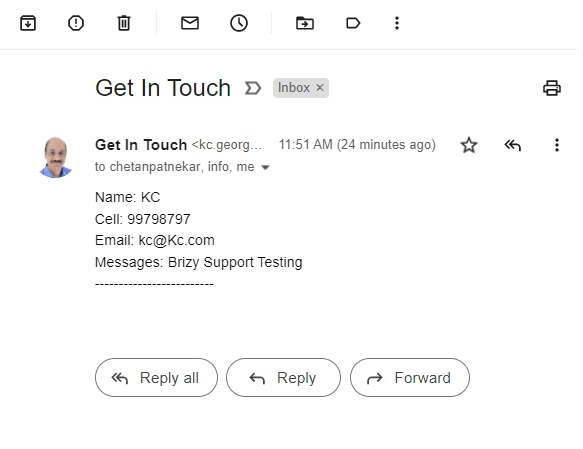
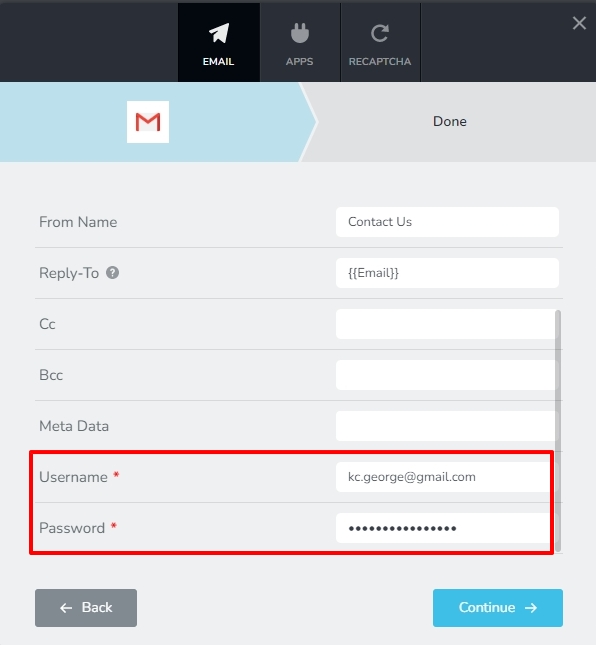
In the form, I am using my Gmail address and my Google App Password. Please replace my Gmail address and Google App Password with yours. Please watch this video for the procedure to generate Google App Password https://jmp.sh/YrA34W2
0 -
Hello KC George,
Thanks for your information and video.
Now henceforth please check WP FROM created on page https://vmarcspro.com/contact-us/
Today I have taken this issue with BigRock and set PHP version from 8.0 to 7.4. But still problem was there. Then Bigrock support Executive changed some setting in cPanel. I am sharing the same here below. After the setting emails started receiving from WordPress option to info@vmarcspro.com (BigRock), info@digitalenterprises.in (Zoho) But mail is not receiving to my gmail ID.
This is the status now.
Regards,
Chetan Patnekar
0 -
Hello KC George,
Sorry .... I forgot to attach this image.
"Then Bigrock support Executive changed some setting in cPanel. I am sharing the same here below."
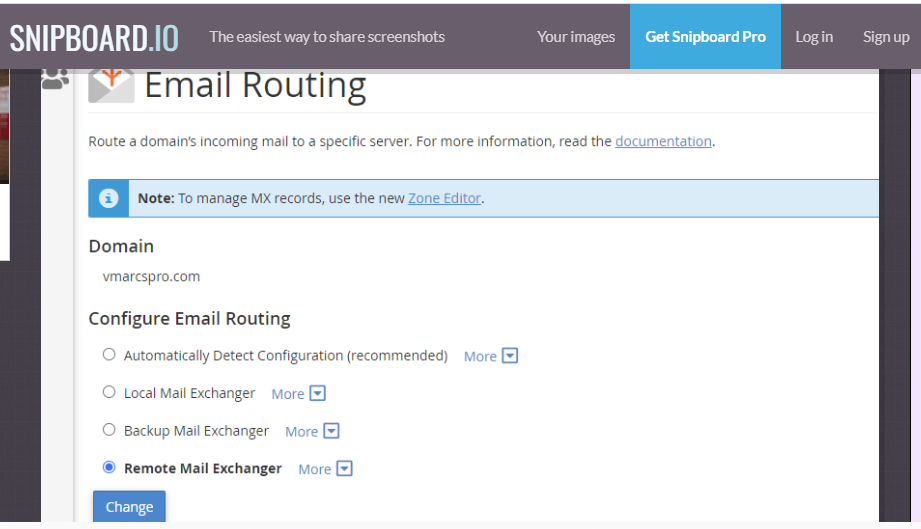
Thanks and regards,
Chetan Patnekar0 -
Hi Chetan
Looks like you are hosting email for the domain vmarcspro.com with https://www.unifiedlayers.com/ and hence BigRock has selected the Remote Mail Exchanger option for you. This helps deliver the emails sent to info@vmarcspro.com and other domain emails you have setup.
Did BigRock confirm that they support PHP Mail feature of WordPress? With the WordPress option, I tested the Contact Us form and I did not receive notification in my Gmail either.
Since WordPress option did not work, I setup the Gmail option using my Gmail address and Google App Password. The email notification did come into my Gmail.
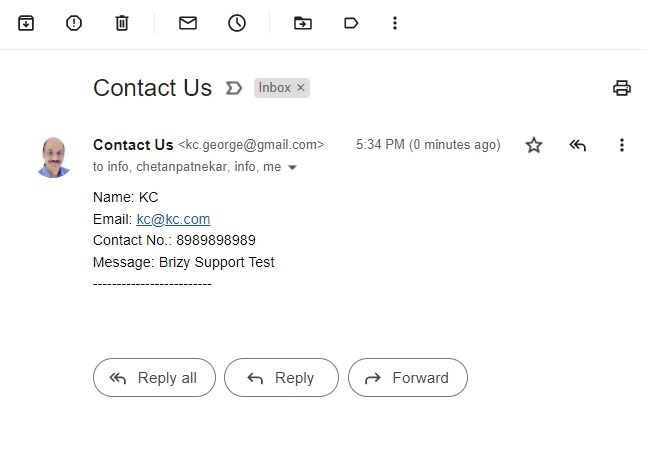
In place of my Gmail address and Google App Password here, please use an alternate Gmail and App password.
 0
0 -
Hi KC George,
Question : Did BigRock confirm that they support PHP Mail feature of WordPress?
Answer : Yes, currently they support only 7.4 and 7,3 and 7.3 is going to be deprecated as soon as possible. They advised to switch the PHP version to 7.4. Earlier I was using PHP version 8.0I have hosted maximum website on BigRock servers and all are designed using Brizy WP plugin and I never faced problem with WP Contact Form with WordPress option.
Regards,
Chetan Patnekar0 -
Hi KC George,
As per your guidelines, I have created my Google App password and replaced it on Contact Form. I found all mails are receiving properly.
Regards,
Chetan Patnekar0
Please sign in to leave a comment.
Comments
12 comments