Upade Brizy 2.4.8

Problem after update to Brizy from Version 2.4.6 to 2.4.8
Brizy Pro from Version 2.4.7 to 2.4.8
After updateing to Brity 2.4.8 and Brizy Pro 2.4.8 all Tables are totaly demage.
Tables are not displayed and Tables show only one column!
See: https://www.seacomair.de/products/natural-gas-compressors/sca150-200e43cng-compressor/
-

Hi Martin,
We apologize for the inconvenience. It appears that the table width has drastically dropped since the most recent update. I will report this bug to our developers and we will work on fixing it.
Please use this workaround in the interim. Please make the table wider by these percentages and check if looks good. Please type these values in place of 100%.
- Desktop: 1000%
- Tablet: 800%
- Mobile 600%
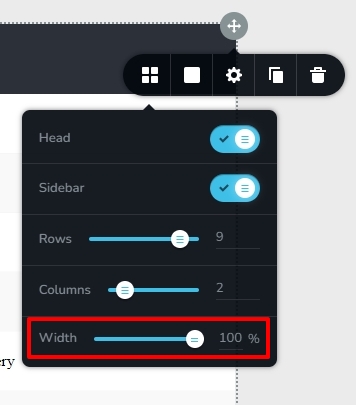 0
0 -
With 1000% It works but tables are not full width as before, unfortunately columns are narrower, text is in multiple lines.
0 -
Hi Martin,
Please play around with percentages like 1200%, 1300% and see which one works the best for you.
0 -
Hi KC,
We instaled new update 2.4.9. But Tables still do not work. If enter value 100% table width still decreased. When value 1100% or 1200% teable widht works ok.
I do not thing, typing value 1100% or more is the right solution for the future0 -
Hi Martin,
A fix for this issue was not included along with 2.4.9. We are still lookin into this issue.
This problem does not exist for newly created tables. If you recreate the table, in Brizy 2.4.8 and later it will work properly (without modifying the percentages)
0
Please sign in to leave a comment.
Comments
5 comments