Brizy not showing Wordpress options even though I have registered Pro version

Hi
I have a problem with building a blog post template in Brizy for WP.
I am trying to create a blog post template, however the only Wordpress options that seem to be available are the two that you have on the unpaid version of the product, not the rest of them.
I.e. all I can see is this: https://a.cl.ly/qGuxl21g
What is occuring here?
Also the menu which is meant to appear on all pages isn't appearing.
Please help!
Many thanks
Robin
-

Hi Robin,
This is how your elements panel should look when you are developing a Brizy blogpost template. https://jmp.sh/QGpsGUG If you are not seeing this, please check these
- Are you using WordPress 5.9 or above? https://jmp.sh/iqlQrFw
- Are you using PHP 7.4 or above https://jmp.sh/XrkFgLV
- Are you using a theme compatible with Brizy? Twenty Twenty One and these themes work well with Brizy https://www.brizy.io/theme-partners. Try changing to one these and see if it makes a difference.
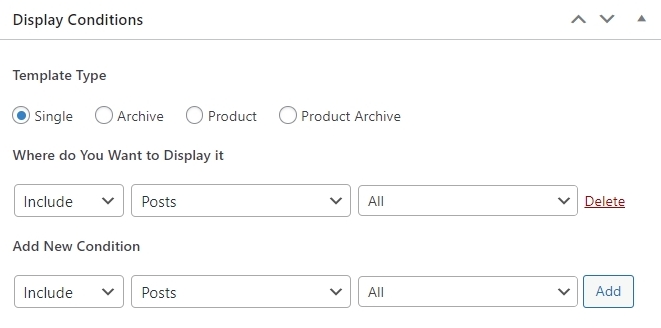
- Have you selected this Display Condition?
 0
0 -
Ah - I hadn't actually selected the display condition. I thought it said I had but I hadn't. That's gone and done it. Thank you!!
0
Please sign in to leave a comment.
Comments
2 comments