Breadcrumbs do not work as intended with pods

I use pods for custom post types. However, breadcrumbs in custom post types are broken with 2nd level or deeper url's.
Example of a breadcrumb: Home > Level 2 > Level 3
- In this scenario Home links as intended to root
- Level 2 links to the current page I'm editing (Level 3) but should be linking to the parent (Level 2).
- Level 3 works as intended.
Brizy and Brizy pro is updated to the latest version (2.4.5 and 2.4.6). I've tried disabling all other plugins as well as switching to a default theme.
-

Hi B.J. Cbrtg
If you make certain selections in PODS for your custom post type, the Level 2 of your breadcrumb can link to the Custom Post Type archive page. Please have a look at this video for more details. https://jmp.sh/q7fOf1m
0 -
Thanks, that was an excellent explanation. It works now as intended. Thank you.
2 questions: the brizy-ARCHIVE-element doesn't have a "tags", but the brizy-POSTS-element does. I understood the filter element is part of an upcoming update based on the previous showcase-video.
1. Will the filter/tags also be included with the brizy-archive-element?
2. Does a matter if I use the brizy-POSTS-element on the archive-template (and then select my custom post type as the filter) so I can use tags? Or will it not work properly?0 -
Hi B.J. Cbrtg
Coming to your questions
- The filter element will allow end users to filter the blog posts/ products/ custom posts types they see on a page. I don't think we have a plan to include tags in the Archive element.
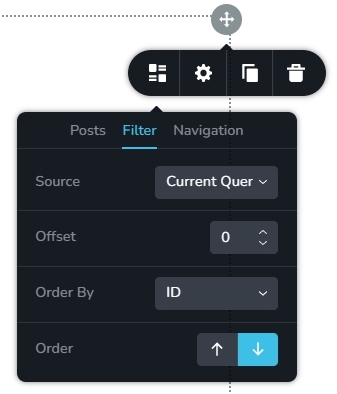
- In the Posts element, if you select 'Current Query' against 'Source' this element would behave exactly like the Archive element. Feel free to use the Posts element with this selection. You can also use tags.
 0
0 -
Thanks for clarifying it works exactly similar. Looking forward to the update with the enhanced working of the filter element.
0
Please sign in to leave a comment.
Comments
4 comments