Display conditions for Templates not working

Hello,
when I try to add a new Condition (e.g. "Include" "404 page") I get the JavaScript error "Uncaught TypeError: api.validateRule is not a function". Also when selecting e.g. "Include" "Pages" it never stops loading and I get the JavaScript error "Uncaught TypeError: api.getPostsGroupList is not a function".
I already checked the steps in this post: https://support.brizy.io/hc/en-us/community/posts/7630924497425-Template-Conditions-not-working?input_string=Display%20conditions%20for%20Templates%20not%20working
- Theme: Twenty Twenty One
- Wordpress: 6.0.2
- PHP: 7.4.30
Any way this can be fixed?
Greetings
Freddy
-

Hi Frederik,
If you are adding a Display Condition to a global block within a Brizy blog post template and if you would like the block to appear on all your blog posts, you will add a condition like this
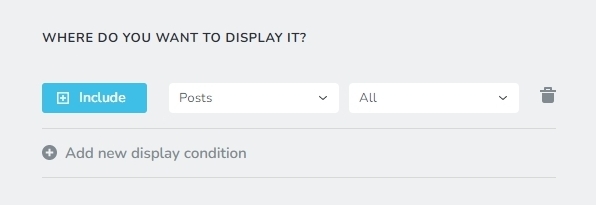
If you are adding a display condition to a global block within a Brizy Category Archive template and you would like all category pages to have the same global block, you will add a condition like this
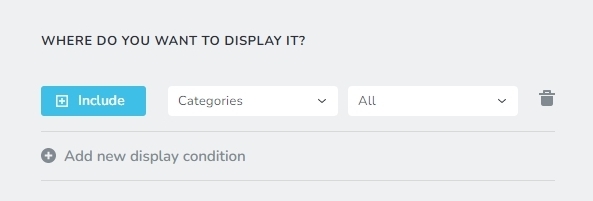
You said, you are trying to add a Display Condition to include a global block within a Brizy template to a 404 Page. Can you please give us the context of what you are trying to do?
- Are you trying to include specific block within a Brizy template to a 404 page?
- Is your 404 Page developed using Brizy?
0 -
I'm not talking about the display conditions of a global block. I am talking about the display conditions of a brizy template (post_type: brizy_template). When I go to Brizy > Templates > Add new and try to include all blog posts or any other type I get the following error:
When I click on Add nothing happens and I get the following error:
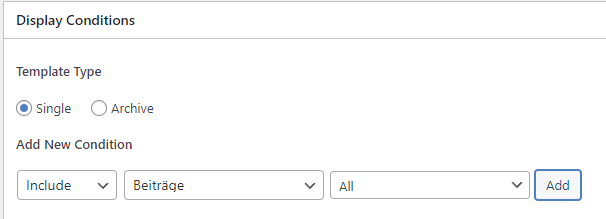

When I just select "Pages" (or in my case "Seiten") it never stops loading and I get the follwing error:


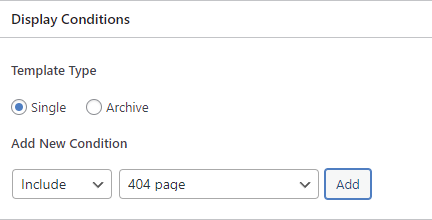
When I select "404 page" and click Add nothing happens and I get the following error:
 0
0 -
Hi Frederik,
Sorry for the irrelevant response. The above error is an indication of an incompatibility issue. Can you do a few compatibility checks?
- Are you using WordPress 5.9 or above? https://jmp.sh/iqlQrFw
- Are you using PHP 7.4 or above https://jmp.sh/XrkFgLV
- Are you using a theme compatible with Brizy? Twenty Twenty One and these themes work well with Brizy https://www.brizy.io/theme-partners. Try changing to one of these themes if you are not using one.
- Do you have a plugin which is incompatible with Brizy? If none of the above helps, please deactivate one plugin at a time and check if the problem persists.
If you are not able to find a solution, please get back to us; we will help you troubleshoot
0 -
- Theme: Twenty Twenty One / Brizy Starter Theme from https://github.com/ThemeFuse/Brizy-Starter-Theme (tried both, problem is still there)
- Wordpress: 6.0.2
- PHP: 7.4.30
- Latest version of Brizy and Brizy Pro
- I deactivated every plugin apart from Brizy but the problem is still there0 -
Hi Frederik
Please change theme to Twenty Twenty One and check if you see this error.
0 -
Yes, the problem also happens with Twenty Twenty One
0 -
Hi Frederik,
To help you further, I need access to your WordPress Dashboard. If you need help with this, please add me as a user to your WordPress Dashboard. My email: kc.george@brizy.io. Please enable the option "Send the new user an email about their account" as in this screenshot https://jmp.sh/sOSGGR3
Once you have sent me an invitation, please let me know here.
0 -
Hey,
I created the user. We don't have mail set up yet but I send you a mail with username, password, url.
0 -
Hi Frederik,
I was able to add a blog post template, a blog listing template and the 404 template. For adding the 404 template, I needed to deactivate the 'Woody code snippets' plugin. I did not see any error.
Please check
0 -
Hey,
with Firefox it works for me aswell. With Chrome I still have the errors.
I will just use Firefox in the future. Thanks a lot for the help.0
Please sign in to leave a comment.
Comments
10 comments