Not receiving emails from contact form - Brizy PRO Wordpress

Hi
Messages sent from the contactform on my website is not received in my email.
I have made a contact form using Brizy PRO and chosen Wordpress-configuration. I can see the emails are recieved within wordpress (Brizy leads) but are not sent to my email provider (same as my domainprovider). Where is actually the problem?
Website: https://digitec.digitecweb.no/kontakt
Page builder: Brizy Pro
Wordpress hosted at: Hostinger
Domain and email provider: Domeneshop.no
Regards,
Roger Brustol
-

Hi Roger,
When you use the WordPress option to send out Email Notifications from your Brizy form, the email goes out through the default WordPress mail service. Hostinger users need to enable the Sendmail service to send out emails. Please check if Sendmail is enabled on your hosting account. Here is the procedure to check it. https://support.hostinger.com/en/articles/5953671-how-to-manage-mail-services-for-web-hosting-emails
Please also check if you are following few Email Notification best practices.
- Ensure the 'Subject' field is not left blank. Please give a meaningful subject. For example you can use the Subject: 'Contact Form'
- Use a 'From Email' of the same domain as your website. For example, you From Email can be: form@digitecweb.no. This helps avoid getting rejected by Mail Servers suspecting your form email as spoof
- Please do not leave the 'From Name' blank: Give a meaningful From Name.
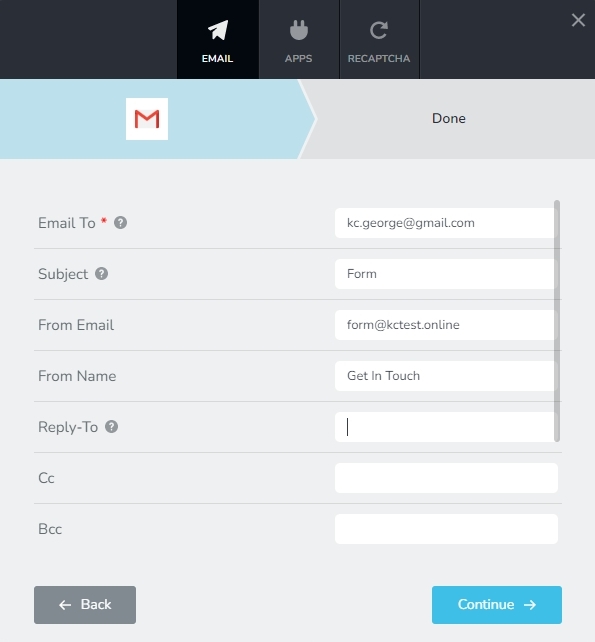
After sending out a test mail, please also check your SPAM folder for the Email Notifications.
If none of the above helped, please get back to us. We will help you setup an alternate method of sending out Emails from your form.
0
Please sign in to leave a comment.
Comments
1 comment