Can I move to other block in menu?

I want to copy this website.
I made menues on the header.
But I don't know how I link to other block in same page. (like above website)
some menues is to link blocks in same page, the other menues is to link other page.
Is it possible?
And, I feel that above website is very fast. When I click 'who we are', 'our partners' and 'careers'.
But my website is slower than above.
https://peach13186364.brizy.site/
-

Hi Yong,
For the procedure to link to other blocks within the same page, please have a look at this video. https://youtu.be/a3PuLxufI0c?t=108
Your website speed appears reasonable to me. Please see how GT Metrix compares the performance of these two websites here https://gtmetrix.com/compare/aGnBS7vL/viPFzjcx
0 -
ok! Thank you for answer! I checked the video tutorial. But my question is how to link “in header”. I sent to you several capture image files. I appreciate to you for rechecking.
0 -
Hi Yong,
Please watch this video for the procedure to add anchor links to your menu. https://jmp.sh/Q2FVSX4
0 -
Hi KC George,
I watched the video. I learned how to add anchor links to my menu. Thank you very much!
But I have a problem. In other menu page (not home), It doesn't work. For example, after moving to Service page below, when I clicked About Us, It doesn't work. https://kiwi13253013.brizy.site/
And I have more question, Could you tell me how to set a header design like this website? https://www.cargill.com/ It looks luxury header and website's speed also good!!!
I feel that my website is too slow to move to Services and Our Partners. Please help me.
Thank you
0 -
Hi Yong,
When a user clicks on the 'About' link on the Contact Us Page, Our Partners page and Services page, what should happen?
- Do you want the user to go to the About section of the Homepage?
- Or do you want to include the About block on all those 3 pages?
The header in https://www.cargill.com/ uses Mega Menu. Please have a look at this video for the procedure to create a mega menu using Brizy. https://youtu.be/qY7xjLbyr2I?t=251. This tutorial is for Brizy WordPress; however you can get a broad idea about the Brizy Cloud mega menu from the video.
0 -
My answer is No2. I want the user to go to about section of the homepage from wherever page. I didn’t watch the video about mega menu yet.
0 -
sorry, my answer is no.1 I want the user to go to the About section of the Homepage. 2022. 8. 31. 오전 2:07, 손용석 작성: My answer is No2. No.1 I want the user to go to about section of the homepage from wherever page. I didn’t watch the video about mega menu yet.
0 -
Hi Yong,
For the anchor link to work from all pages, please add a / (forward slash) before #about. Your menu should look like this.
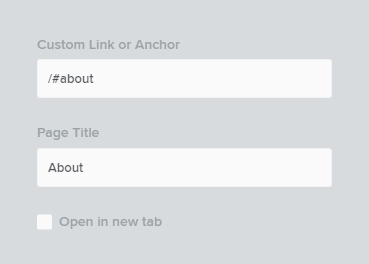 0
0 -
Oh!!!
Thank you very much, KC George. ! I've solved it.
Could you tell me another question? I wander how to set this effect in below site. https://block-leaders.com/#!/portfolio Is it possible to realize both PC and mobile?
0 -
Hi Yong,
With the Brizy User Interface, I think it is not possible to replicate the design at https://block-leaders.com/#!/portfolio
You may be able to do this using CSS. Please have a look at this blog post. https://hacks4.brizy.site/hover-revelation
0
Please sign in to leave a comment.
Comments
10 comments