Accordion Scrolls Down After Expanding Item on MOBILE

Hey guys,
On mobile, when I expand a section in the accordion on my products page, it will automatically scroll up or down instead of staying in place and expanding.
Once the section has been expanded and then closed and opened again, it will stay in place. Not good and confusing for the user experience.
See video: https://jumpshare.com/v/jTWckeM5rxbGynTZDhYz
-

Hi Chris,
Please have a look at my test page on a mobile. https://digital-works.brizy.site/accordion. Can you please check if the text scrolls or it stays in place as you expand each item.
I am unable to reproduce the issue you are facing at my end.
0 -
Hi KC,
Thanks for the reply!
The error I am experiencing did not happen on your website.
I forgot to mention that each section within the accordion is being populated with text via a shortcode using Advanced Custom Fields and Code Snippets.
Perhaps this is why ?
0 -
Hi Chris,
I have added few custom fields to Products and have added an accordion in the Brizy Single Product Template. Please have a look at my product page here. https://kctest.online/product/coffee-table. As you can see the text stays in place as you expand each item.
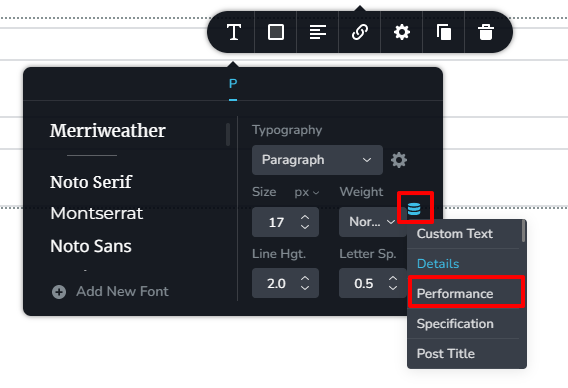
To add these custom fields to the accordion, I dragged and dropped the Brizy Text element, selected the database icon and from the drop down list and I chose the specific custom field added using ACF.
If you follow this approach, you can avoid using code snippets and shortcodes. If you want me to make a short video explaining the procedure, please let me know.
 0
0
Please sign in to leave a comment.
Comments
3 comments