switch website to new domain

Dear Brizy Team,
I know this is a rather wordpress than Brizy related question, but since Brizy is a very all encompassing plugin/page builder and you are the specialists I would like to ask you anyhow about things to watch out for.
Currently my website is running under the domain www.best-baueisen.com
I would need to switch the domain to www.best-baueisen.at the next days.
Could you please tell me what I would need to keep in mind and what steps would I need to set to get this done without running into problems.
Best regards and thank you for your help,
Max
-

Hi Max,
You can follow the process in this article for changing your WordPress domain name. https://blog.hubspot.com/website/wordpress-change-domain
If you have access to an additional hosting account, please also consider migrating your website from your current hosting account to the new hosting account using a migration plugin.
- WPVivid: Please follow the process in this document https://docs.wpvivid.com/get-started-transfer-site.html or in this video https://youtu.be/Ow0LR_A6jDM
- BlogVault: Please follow this procedure. https://youtu.be/onPha5oTk14?t=126
In Brizy, if you have manually added hyperlinks to buttons or texts within your website using full URLs, those links will not transfer to the new site. If you have added it as internal links (eg: /contact for contact page) those links will transfer over. For example if have a button linked to www.best-baueisen.com/contact, it will not automatically change to www.best-baueisen.at/contact. If your button links to /contact the link will transfer to the new domain well.
0 -
Hi KC George,
ok i will do as you said. I do understand the difference you mentioned with the www.best-baueisen.com/contact, link and the /contact link. I can fix this using a search & replace plugin correct?
?why do you suggest to migrate to another hosting account? I am using webgo as a webspace provider which is a professional provider and i am very happy with them.
Best regards,
Max
0 -
Hi Max,
You can use the Brizy Replace URL tool to find and replace hyperlinks added to texts, buttons and other elements. Here is the procedure. https://jmp.sh/Q1TP4Hi
You normally migrate from one WordPress instance to another. Please read additional hosting account as additional WordPress instance. I did not mean an alternate hosting provider. If Webgo allows you to host multiple websites, you can create a new WordPress instance and carryout the migration.
0 -
Ok and the reason for migrating would be exactly that, using a plugin that makes sure all links are changed where needed, correct? You suggest this is the more professional way than doing the link adjustment using a search and replace plugin.
I suppose the migration Plugin takes care of the steps mentioned in your recommended Article.
* change WP general settings WP-Address & Site-Address to new domain
* change wp-config.php domain in wp_home & wp_siteurl
* Update WP Database wp_options
Best regards,
Max
0 -
Hi Max,
I recommend the migration option because it is more automated and hence you have minimal chance of making a mistake. Even if you make a mistake in the migration process, your current site will be still unaffected and you can always re-migrate.
If you have added hyperlinks with full URL, migration process will not take care of it. You will need to change those URLs either manually or attempt a search and replace.
0 -
Hi KC George,
One question on 301 redirects. A "301 redirect" is an HTTP status code that informs that the requested URL or resource is no longer available at that address and has been permanently moved to a different URL. It is important to implement them in our new website once the URL has been changed.
Researching how this should be done i found two different code snippets. Can you tell me which is the right one to use for our brizy website?
1) Put the following code to the .htaccess file of the root folder:
#Options +FollowSymLinks

RewriteEngine on

RewriteRule ^(.*)$ http://www.mynewdomain.com/$1 [R=301,L]
or
2) as far as I understand this php code would need to be translated in a brizy-corresponding mod-rewrite tool and then be placed into the htacess.php file in the root folder. Do you know which is the right way to go?
<?php
header("HTTP/1.1 301 Moved Permanently");
header("Location: http://mynewdomain.php");
header("Connection: close");
?>
Do you know which is the right way to go?
Best regards,
Max
0 -
Hi Max,
I don't have experience implementing a domain redirect by modifying .htaccess file. My views may not be very useful here.
I don't think there is a file by the name htaccess.php. The file name is .htaccess and it is placed on the website root folder. The second option you have mentioned above does not look right to me.
Instead of adding a domain redirect instruction in .htaccess file on the hosting server, I prefer to add a redirect record to the domain (by signing into the domain registrar account)
0 -
Hi KC,
ok thank you. I will look into it.
Best regards,
Max
0 -
Hi KC,
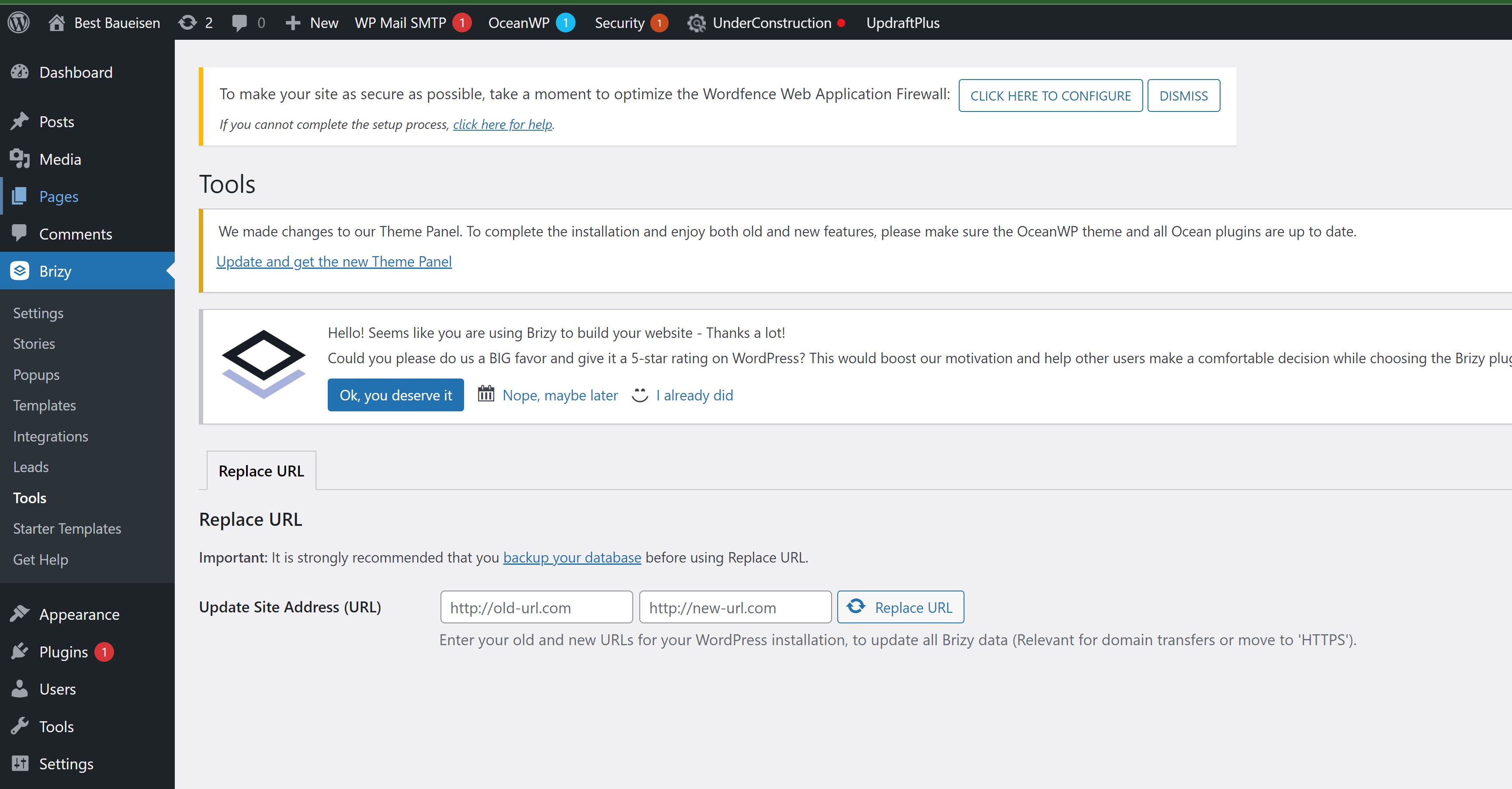
I discovered a Brizy Internal function which seems to be used url within brizy. Is this like a kind of brizy internal search and replace function. Should i use this instead of the regular search and replace plugin to change the links in the database while switching to the new url or additionally?
Best regards,
Max
0 -
Hi Max,
I am sorry; I did not understand what you meant by "Brizy Internal function". Where did you find it? Can you share with me some details so that I can check?
0 -
 0
0 -
sorry I forgot to add the screenshot
0 -
Hi Max,
The Replace URL feature is expected to take care of the hyperlinks added to texts, buttons and other elements within a project. It is a recent feature. I have not tested it myself. I will do a test and get back to you on how you can use this.
0 -
ok thank you KC
0 -
Hi Max,
The Brizy 'Replace URL' tool can be used to find and replace hyperlinks added to texts, buttons or any other element. Here is the procedure. https://jmp.sh/Q1TP4Hi
0
Please sign in to leave a comment.
Comments
15 comments