Landing page loading speed problem

My webpage is loading slowly.
https://masterclass.ohsuccessday.com/existing-students-register
In particular, loading on mobile is significantly slower than loading on desktop.
But these days, people use mobile more and more.
I'm in Korea, and potential customers come from Korea too.
Is the page loading speed this slow because I'm using a basic CDN and I'm far away?
The result of analysis by GTmetrix introduced by the bridge forum is grade C.
https://gtmetrix.com/reports/masterclass.ohsuccessday.com/0ZQCqrjL/
Bridge advertises that the loading speed is fast, but it seems to be very slow when I actually use it.
Why is the page loading speed slow and how can I speed it up?
-

Hi
I repeated the GT Metrix performance test at my end. Overall performance of your webpage looks good. https://gtmetrix.com/reports/masterclass.ohsuccessday.com/Y36L0ElG/ After making some changes to your website, when you are checking your page for the very first time, the page will be relatively slower. However the second time onwards the page will load faster.
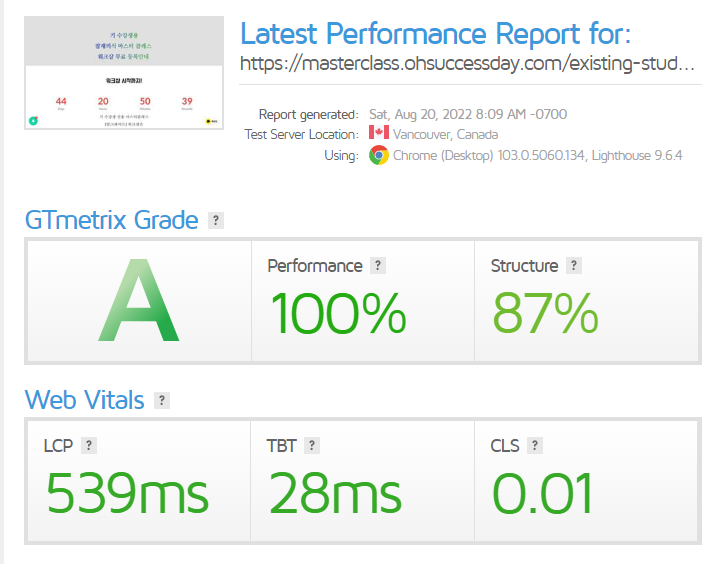
Please have a look at this video for a visual loading speed at my end. https://jmp.sh/VrdLJPA Does the page load slower at your end?
1 -
Thank you very much for your kind answer.
There is a lot of comfort to my heart.
However, there was one additional question
The reason why the loading speed is faster from the second is not because it is stored in the cache?
If you are possible, you can delete the cache and test it again?
0 -
Hi
You are right. during your first access, the page preview gets generated and cached. When you check the page for the second time you are seeing the cached page. Every time you make a change, please ensure that you check the page preview. This will ensure that your users can access the page faster.
0 -
As far as I know, caches are created on users' personal computers or mobile devices.
Does my viewing of the preview page have to do with the creation of a cache on each user's computer or mobile?
0 -
Hi
I'm referring to server caching here. The first time you preview a page after making changes, the preview is generated and cached on the server. Anyone who is accessing the page for the second time onwards, will be accessing the cached file on the server.
When a user accesses the page on his device, some images and files get cached on the browser as well. You viewing the preview only helps with the server caching.
0
Please sign in to leave a comment.
Comments
5 comments