Contact form not forwarding to website after 2 years of working?

Hi,
I am using the Wordpress optionI have tried forwarding to different email addresses but the issue still persists.
Any suggestions please?
Joe
-

Hi Joe,
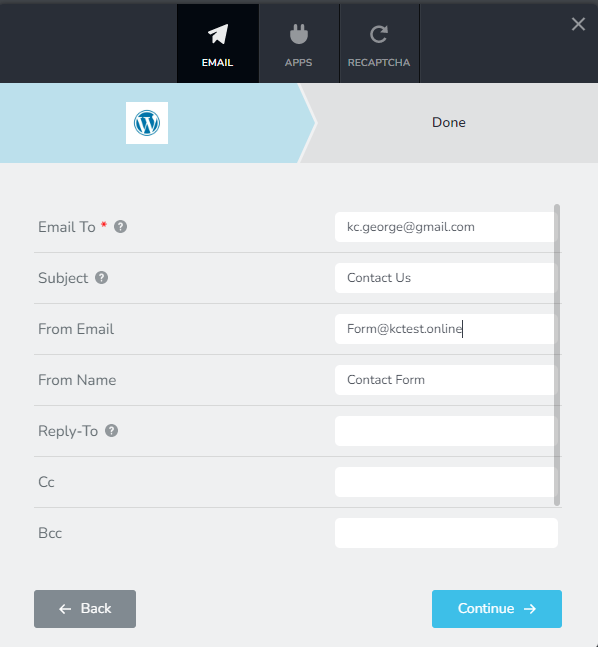
Form emails sent out through the default WordPress option can be easily suspected as a spoof by mail servers and are prone to be rejected. To avoid being rejected by mail servers, please ensure these
- Do not leave the subject blank. Give a meaningful subject.
- Specify your 'From Email' as something@yourdomain.com. For example. if your form is setup on bbc.com, the 'From Email' can be form@bbc.com or contact@bbc.com etc.
- Do not leave the 'From Name' blank: Please provide a meaningful From Name.
Please also try these
- Email notifications sent out through WordPress normally gets delivered to Gmail and Yahoo. Please try adding a Gmail /Yahoo address and check if you receive it.
- Please check SPAM folder for the Email Notification.
- Email notifications sent out through the WordPress option relies on PHP Mail, the default email sending feature of WordPress. Confirm that your hosting company supports PHP Mail and is enabled on your account.
 0
0 -
Hi,
I have just tried your suggestion but still no forwarding. Is there any way you can look at our set up and let me know what has gone wrong, as the links have been working for over 2 years without any issue.
Many thanks,
Joe
0 -
Hi Joe,
Sure; I am open to take a look at your project to see why the emails are not going out.
If you need help with this, please add me as a user to your WordPress Dashboard. My email: kc.george@brizy.io. Please enable the option "Send the new user an email about their account" as in this screenshot https://jmp.sh/sOSGGR3
Once you have sent me an invitation, please let me know here.
0 -
Hi KC,
I have followed your guide and sent you an email with your new password.
Regards,
Joe
0 -
Hi Joe,
I have taken a look at your website. I have noticed that you are using Cloudflare CDN. Since your pages and being served from Cloudflare, sending out emails from your PHP Mail script on your hosting server does not make sense. We recommend sending out your emails using an external SMTP server since you are using Cloudflare.
I have setup your Contact Form to send out emails through Gmail and it is working fine. Please check if you have received the same email.
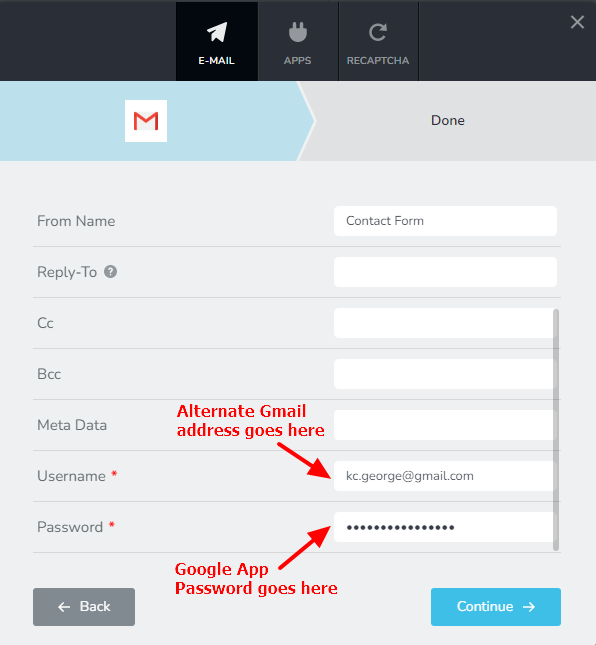
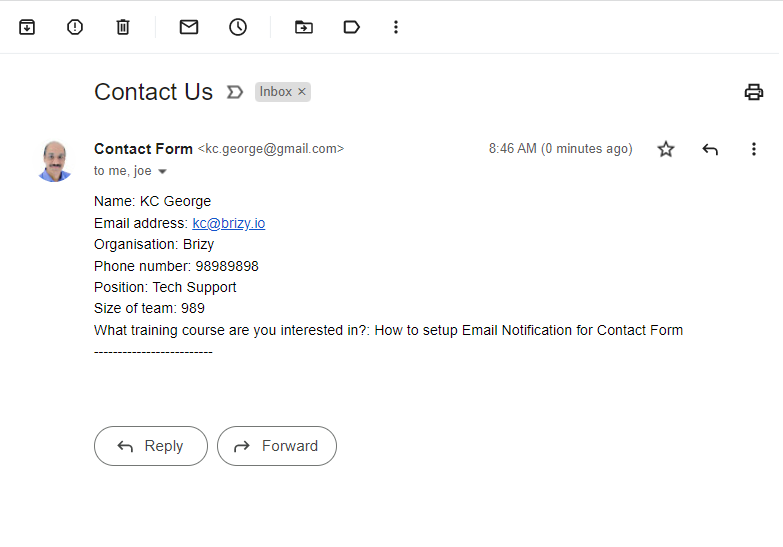 To send out the Email Notifications through Gmail, I have used my personal Gmail address and my Gmail App Password. Please replace it with an alternate Gmail address and please generate an App Password following this procedure https://support.google.com/mail/answer/185833?hl=en-GB. You can also watch this video for the procedure. https://jmp.sh/uis4rTC
 0
0
Please sign in to leave a comment.
Comments
5 comments