Waiting for SSL to approve creo.build domain

Hello Team - I'm not able to link creo.build domain to a project in my profile in spite of changes in godaddy. Attaching screenshot for ref.
It's been 3 days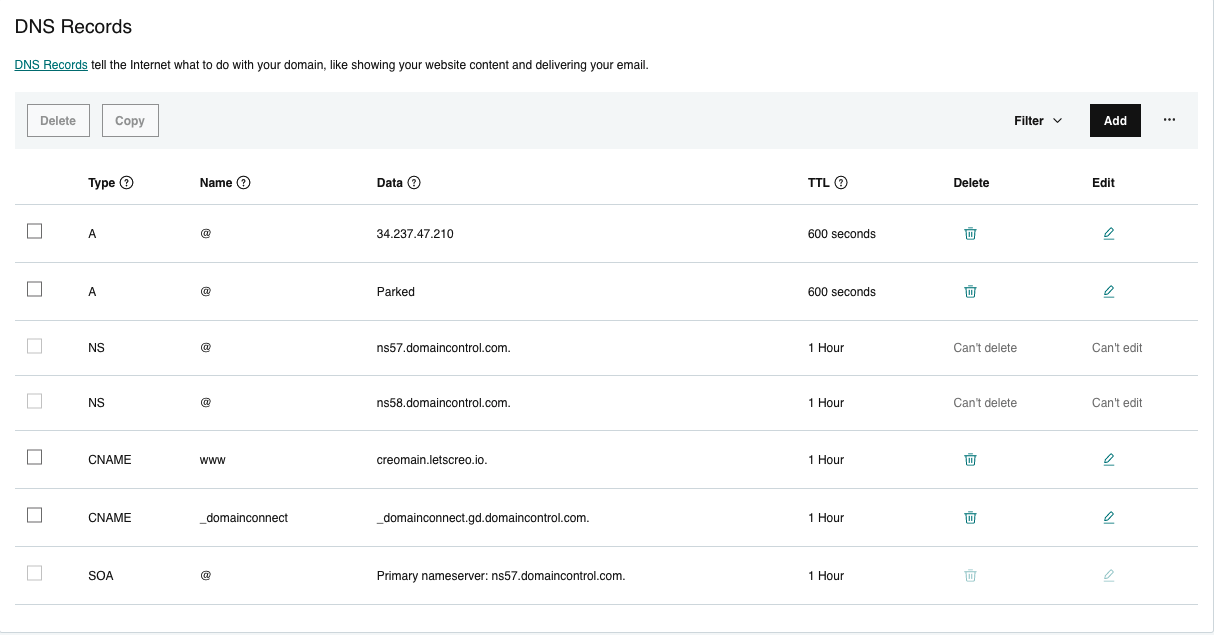
-

Hi Vijay,
Please have a look at the DNS look up of your domain here https://jmp.sh/xd5hQCq
I see an additional A Record 34.102.136.180 apart from the one you have added above
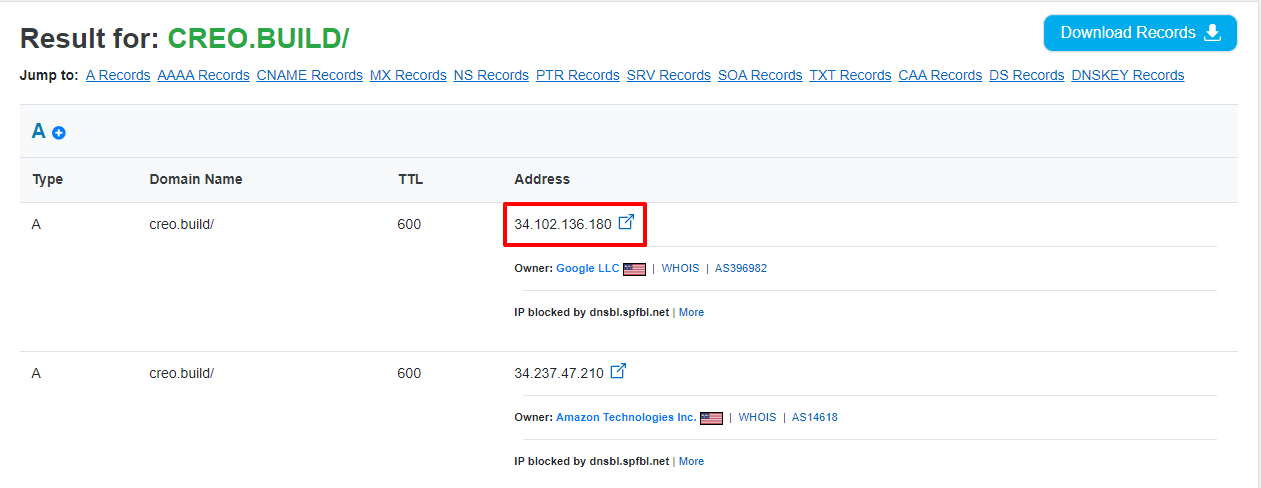
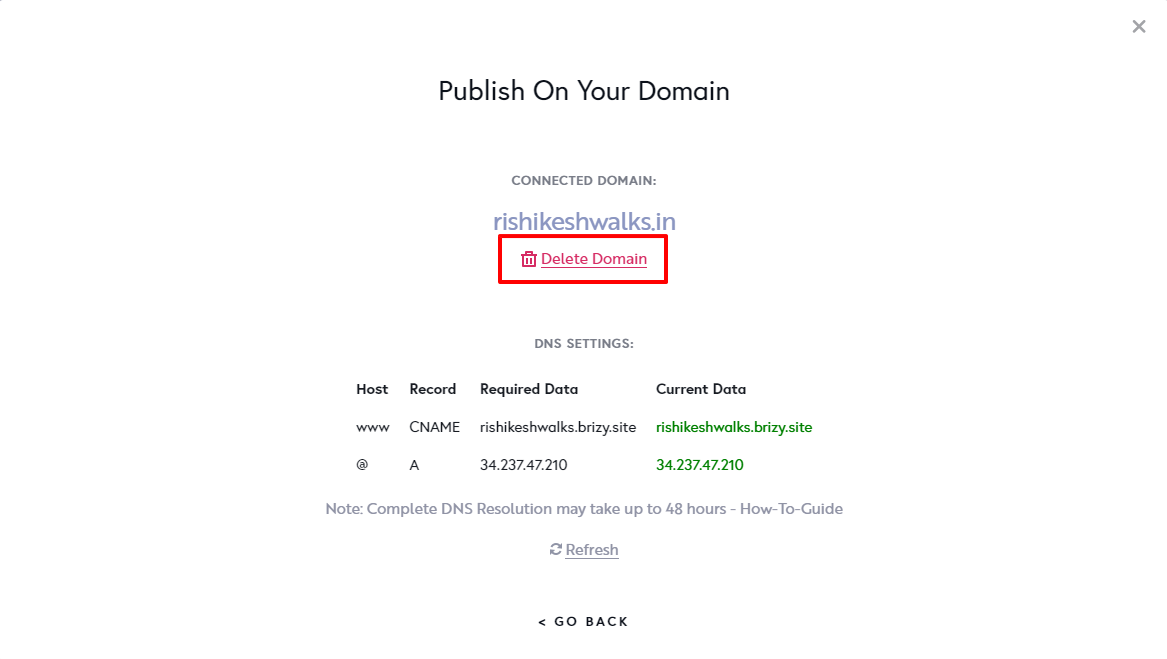
Please check if you see this A Record on your domain and delete it. Once you have deleted this A Record, please delete your custom domain and add it again to restore your SSL (This helps purge DNS cache)
 0
0 -
Hello George - I don't see 34.102.136.180 cname on my end on GoDaddy. Could you help me find it in order to delete the same?
Thanks,0 -
Hi Vijay,
Can you please contact GoDaddy for this? This is what you can tell them.
A DNS Lookup of my domain creo.build shows two A Records: I would like to retain the second record and delete the first one.
- 34.102.136.180 - delete
- 34.237.47.210 - retain
Can you please help me with this?0 -
Hello George - Thanks for your response. I don't see 34.102.136.180 on my end. Attaching the screenshot of my GoDaddy account for your reference. Could you help me find it ?
0 -
Hello George , Attaching the screenshot of their response.
0 -

Hi,
You have replayed to the notification email noreply@rizy.zendesk.com. The email was received as spam, we had to recover it, and the screenshot, in this case, is not attached. Please post the replay on the forum. Please do not reply to the notification email noreply@rizy.zendesk.com.
Best regards, Nelea.
0 -
Hello George - Attaching the screenshot of my chat with GoDadaddy where they mentioned that they cant find the id you're seeing on your end.
0 -
Hi Vijay,
Please do a Google search for 'DNS Lookup", select any DNS service and do a DNS Lookup of your domain creo.build. Here is the procedure. https://jmp.sh/kTTFQUj You will notice that two A records are associated with your domain. Please ask the GoDaddy support to do a DNS lookup of your domain and take their help to delete the IP Address which is from Google.
If you are not able to get this done with GoDaddy, please invite me to access your GoDaddy account. I will interact with their Support to resolve this issue. Here is the procedure to invite me. https://in.godaddy.com/help/invite-a-delegate-to-access-my-godaddy-account-12376. My email: kc.george@brizy.io
0 -
Hello George - Very kind of you to help me with this. Granted access to godaddy
Also, wanted to check how can I keep me support questions private ?0 -
Hi Vijay,
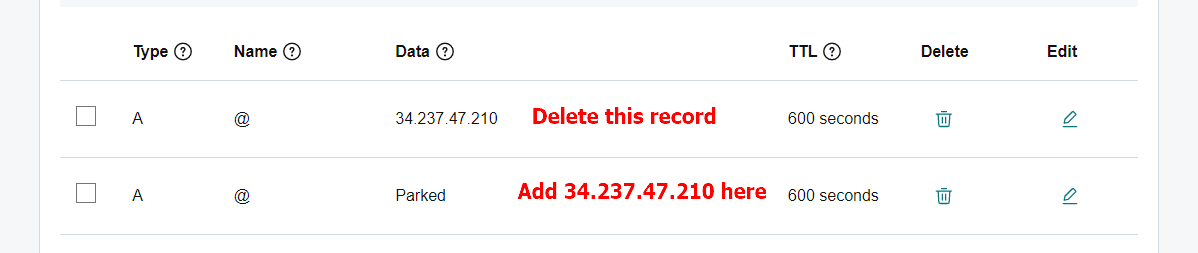
I have interacted with the GoDaddy support. The Support staff asked me to delete the A Record you have added and edit the Parked A Record and add the address 34.237.47.210 in place of 'Parked'
I tried doing the same. May be because I am not the owner of the account, I could not do it.
 0
0 -
Hi Vijay,
You website is working fine now. Please see it here https://jmp.sh/BpQXc4Z Please refresh the page.
0 -
Thank you for your support.
0
Please sign in to leave a comment.
Comments
12 comments