Https issue


-
I received that today with my tools:
Alert: SSL Expiration Alert
Affected site: https://potentiel-infini.com/
Event: The SSL certificate is about the expire or has expired. Expiration date is at 2022-07-26 03:37:18.0 -
Hi, No. I remove it to try. The A was set up before the issue. The issue is not here but about the SSL that has an expired date. Best regards, Vincent SPAM"
0 -
Hi, The issue is that the SSL expired since July 25, 2022. Not the A record (I removed it, added it and removed it to test after the issue. Before that It's worked with and without A RECORD. See the screenshot below. Best regards, Vincent SPAM"
0 -

Hi Vincent,
The SSL certificate will not be propagated if the A record is wrong. Please add the correct A record, then they SSL will be propagated automatically.
P.S. Please do not reply to the notification email noreply@brizy.zendesk.com ; the email will be received as spam and they will not be posted here.
Best regards, Nelea.
0 -
Hi Nelea,
I added the correct A record (see the screenshot below).
https://share.getcloudapp.com/4gurgyxP
I have the same issue.
I need to resolve that please.
I think it's not the A record the issue but the SSL who is expired.
Best regards,
Vincent
0 -

Hi Vincent,
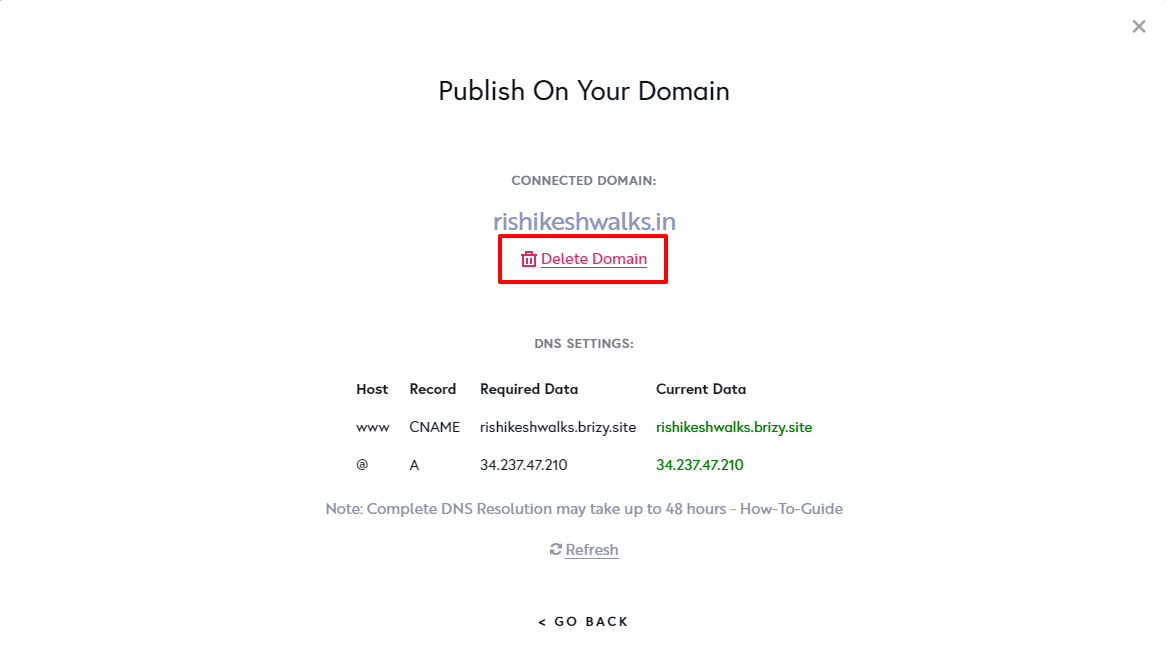
Can you please do this to restore your SSL certificate? At the 'Publish On Your Domain' screen, please delete your custom domain and add it again and wait for half an hour for the SSL to be restored.
 0
0 -
Hi George,
i do it. I will wait to verify.
But do I need to make that each time the SSL is expired?
Best regards,
Vincent
0 -
Hi Vincent,
If your domain has the right A Record and CNAME record and do not have additional incorrect records. your SSL should renew automatically.
After making changes to your domain records, we need to purge the server DNS cache for the changes to take effect. Deleting and adding the custom domain helps purge cache.
0
Please sign in to leave a comment.
Comments
9 comments