How to determine which template was used to build site?

I paid a company to use Brizy to build my website so I could maintain it when they finished building. They failed to follow through with the end which would be advising me on what they did during building (among other things). Now I'm trying to figure out which template they used to build my website. Can you tell me how to figure that out? My thought is I would delete all the other templates so I don't have to keep updating every time there is an update. I don't want to delete a template that was used. On my website we also have a Woocommerce store. I hope you can help me.
-

Hi Sharon,
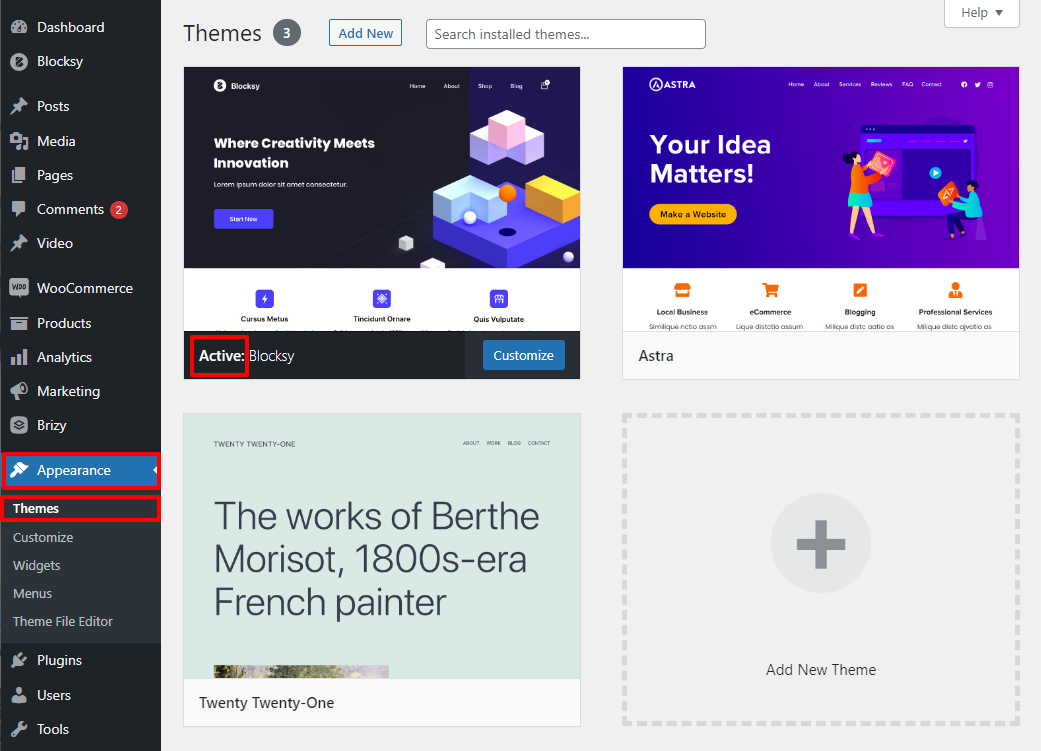
When you say "how to determine which template was used to build site" do you mean which WordPress theme was used for building your website? To identifying the current theme in your WordPress Dashboard, click on 'Appearance' in the left sidebar an then 'Themes' You will see a list of themes on the right hand side. One of the themes will say "Active" In the attached screenshot, active theme is Blocksy.
For your website to work well, you need to retain the active theme. Other themes can be deleted. However sometimes you will see two similar looking thumbnails. In this case, one is the Parent theme and the other is the Child theme. The Parent theme is required for the Child theme to function well. Hence if a Child theme is active, please also retain its patent theme.
 0
0
Please sign in to leave a comment.
Comments
1 comment