Brizy Editor Image Feature not Pulling up Wordpress Media Pop-up

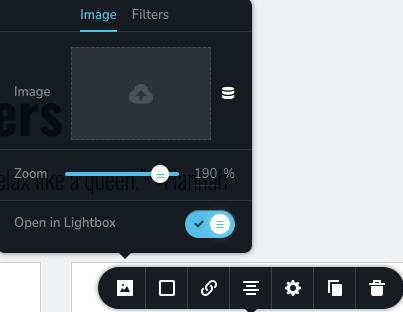
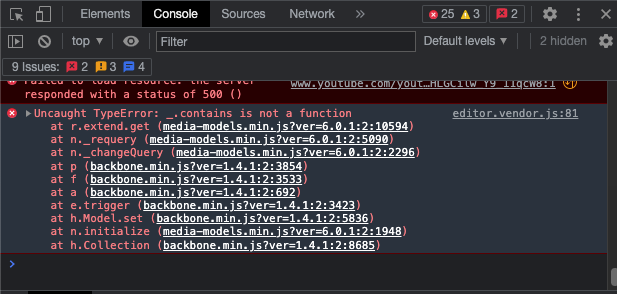
When I click the box to select/upload an image from the Wordpress media library in the Brizy editor (shown below as ScreenShot #1), it doesn't do anything. Instead it gives an error in the JS console (shown in ScreenShot #2).
I've found the incompatibility, it is with ElfSight. For some reason, whenever this code is in my footer, this problem happens. Is this incompatibility a Brizy problem or Elfsight problem?
<script src="https://apps.elfsight.com/p/platform.js" defer></script>
<div class="elfsight-app-4a7407ed-59b4-48ac-9874-{REDACTED-END-OF-CODE}"></div>
ScreenShot #1:
ScreenShot #2:
-

Hi Kyle,
I have pasted the above Elfsight code on the footer of a Brizy page and then added an image from the WordPress Media Library. It worked well at my end. Please see my test here https://jmp.sh/bBKoS3Z
Elfsight code normally works well with Brizy. There could be another factor in your WordPress environment which is causing the conflict. Can you please check these?
- Are you using a compatible PHP version? Brizy works well with PHP 7.4 and above. https://jmp.sh/2MRd96w
- Are you using WordPress 5.9 or above? https://jmp.sh/Oe63wQY
- Are you using a compatible WordPress theme? Twenty Twenty One and these themes work well with Brizy. https://www.brizy.io/theme-partners
- Are you using an incompatible plugin? After checking all of the above, deactivate one plugin at a time and see of that makes a difference?
0 -
Hi KC!
I initially partially redacted the code, but you can use this full-code instead of the one above. Regarding your questions:
- It's on PHP 7.4
- It's on the latest version of Wordpress (42, 6.0)
- I've tested this problem on Twenty-Twenty One theme
- I've de-activated all plugins except for this script in the Headers & Footer Script plugin and it still occurs (note that if I remove the ElfSight script from the Header & Footer Script plugin, the problem does not occur).
0 -
Hi Kyle,
Can you deactivate the Headers & Footer Script plugin and embed the code using the plugin Insert Headers And Footers?
0 -
I haven't, but got this response from the Elfsight Team:
Our developers have checked everything, and it seems that our widget was overwriting the global variable which the Breezy Editor uses.
However, I am glad to inform you that we have fixed the issue for you by reinstalling the widget with the help of a special script: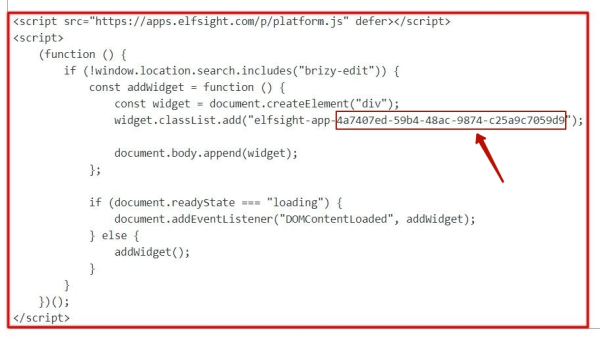
This script prevents the widget from generating in the editor to avoid the conflict. The widget still shows up on all pages, and everything should be working fine now.@Brizy Support, is there anyway this can be prevented in the future?
0 -
Hi Kyle,
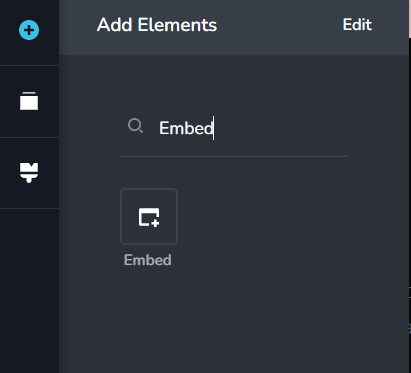
To prevent this from happening in the future, instead of adding the Elfsight code using a plugin, paste the code within the page using Brizy Embed element. You can paste the original code from Elfsight in your global footer. You will be able to upload files from the WordPress media library.
Have a look at my test page here https://kctest.online/elfsight
 0
0
Please sign in to leave a comment.
Comments
5 comments