Header White Space

Hi guys, I have not been able to get rid of a white space above the menu, I tried everything, I been using Brizy Pro for a couple of years and I just do not know what to do. Please help.
Thank you!
http://salelectric.com/SE2022/home/

-

Hi James,
We will need to take a look at your project to help you with this. If you need help with this, please add me as a user to your WordPress Dashboard. My email: kc.george@brizy.io. Please enable the option "Send the new user an email about their account" as in this screenshot https://jmp.sh/tSRznJX
Once you have sent me an invitation, please let me know here.
0 -
Hi George, sorry for the delay in responding, I was away for a 3 day weekend, I just set you up as a new user, please let me know if you can access the account, so again, these are my issues, I added 2 more I cannot figure out:
- There is a white/gray space over the navigation and below the phone number that I cannot eliminate.
- How can the navigation stay in place while that pages scroll so the user always sees the navigation.
- How to I make this new navigation global so I can use it in other pages.
Thank you KC for all your help.
0 -
Hi James,
- I have recreated your header using the Header block and have removed empty spaces. I have also added a sticky header. Please have a look.
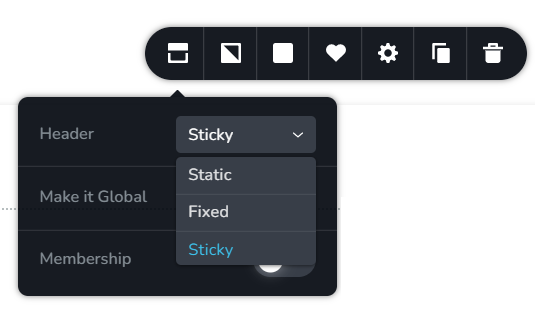
- When using a Header block, you will find options to make it Sticky, Fixed or Static. (see the first image)
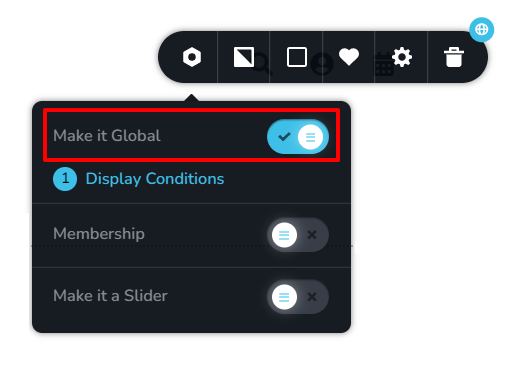
- In the block settings, you will find an option to make it global. (see the second image)
Please watch this video for more detailed instructions. https://jmp.sh/4qKpnX8
 0
0 -
Hi KC, thank you so much,I now know how to do these items, thank you again, you guys are the best!
Regards, James
0
Please sign in to leave a comment.
Comments
4 comments