Menu Problem

I am a Brizy Pro user. The Main menu on my site at fcgweb.com is set to be sticky. However, when the page is scrolled so that the sticky or "secondary" view of the menu is displayed, another menu gets displayed. It is a Basics menu that I created for a secondary way of viewing my site. When I created this menu, I mistakenly had the Main still selected, so that menu got changed to the Basics Menu. I discovered this and went back and re-created the Main menu. Somehow in this process the sticky portion of the Main menu now displays the Basics menu. How can I fix this?
-

Hi Forrest,
Are you saying that you would like all your pages to have these two main and sticky headers?
Main header

Sticky header

We need to take a look at how you have implemented your headers to help you fix this. If you need help with fixing this issue, please add me as a user to your WordPress Dashboard. My email: kc.george@brizy.io. Please enable the option "Send the new user an email about their account" as in this screenshot https://jmp.sh/tSRznJX
Once you have sent me an invitation, please let me know here.
0 -
Hi Forrest,
Your invitation to access your website was in my SPAM and did not see for a day. I have briefly looked at your website. Looks like you are signed into your website at the moment; hence I could not open the Brizy pages.
Here is a quick observation: You seem to have edited your pages using multiple editors (classic editor, Gutenberg, Unyson and Brizy). This can mess up your pages therefore it is not a recommended practice.
I will take a look at it later when you sign off.
0 -
KC,
I added you as a user with Editor access for https://fcgweb.com/wp-admin/ username ------ PW - -----------
If you need admin access instead, please let me know, but explain why. I use the same menu on all my pages, but the headers are all different - they use a different featured image. I have discovered that I can fix the issue by editing the secondary menu when it appears, if the original was created as Sticky. I also learned that one way to get a sticky menu is to use one of the headers supplied by the Brizy Builder and edit it as needed. I see that if I create a new menu, the default menu loaded is Basics, not Main. How do I change that? While you are at it, if you can tell me why my site is so slow, that would be a big help! I know most of the pages are large, with lots of images, but the performance problem is more than that. For example, try loading this page: https://fcgweb.com/mixers/ One thing I noted is that it displays play.google.com as being accessed. Why does that happen? Thanks for your help!
Forrest C. Gilmore
0 -
Hi Forrest,
I have looked at few pages of your website. Usually website headers are developed once and reused on different pages by making it global and adding display conditions. On your website each page has its own header with a different background image.
You can have two approaches towards designing a uniform sticky header.
1. Add the sticky header on every page one by one. This could be a tedious task.
2. Redesign your header and use it on all your pages using Global Blocks and display conditions. Then you also add a sticky header which will automatically update on all your pages.
Please let me know how you would like to proceed
0 -
KC,
Thanks for looking into this. Yes, I currently use different images in the headers of my pages. I think I remember that if I set up a global header in Brizy, when I change it on a page, the changes get saved to the global block file. That may not be too bad - at least the menu data will be there when I create a new page. There is probably a global header that is part of my temp[late (OceanWP-child) that could be used on all pages, but I have not tried that option. One thing that seems odd to me is that if I set up a header from scratch, I am not able to make it sticky, even in Brizy Pro. If I start with one of the headers in Brizy, where the header is sticky, I am able to then modify the secondary menu when it opens. If I save and then try to modify the menus later, the secondary menu (the sticky part) does not display. I have to go to the menu block, select the sticky option again (which already is set to sticky), and then the secondary (sticky menu) will display when I scroll the page. This seems to be a Brizy quirk. The number of pages I need to modify is not huge, so I am working through them, but it is a bit annoying having to deal with the Brizy quirk. I can't just scroll the page to display the second menu and change it - I first have to re-initiate the sticky option of the header block. Am I missing something here?
Forrest
0 -
KC,
I responded to your second message before I saw this earlier one. Yes, I am aware that my site has traces left over from earlier development, before I decided to go with Brizy. I have tried to turn off some things like Unyson, but some of the pages then do not work. I started with another template a few years ago, but when I moved to Brizy I looked at templates recommended for Brizy. The template I am using is OceanWP-child, which seems to be based on Elementor, but I have not tried to use that builder, as Brizy does what I need to do. My site is pretty much complete, with additions to the pages as new technology options come out, so perhaps I could think about a re-design, because the performance stinks. Your suggestions would be welcomed. For example, If you could look at https://fcgweb.com/mixers/ and tell me what is slowing this page down, that would be a big help, though I realize this may be out of your normal scope of work. Can you recommend a developer which might be able to help me? BTW, I am on Eastern Std time, and I typically work on the site between 2:00PM and 11:00 PM. If you can suggest the times when you would like to access the site, I will try to get out of the way. Forrest
0 -
Hi Forrest,
Along with the project, you have inherited a lot of issues that needs a clean up. Part of the reason why the header may not work as expected could be because of these issues.
To setup uniform header and footer, you have broadly two options
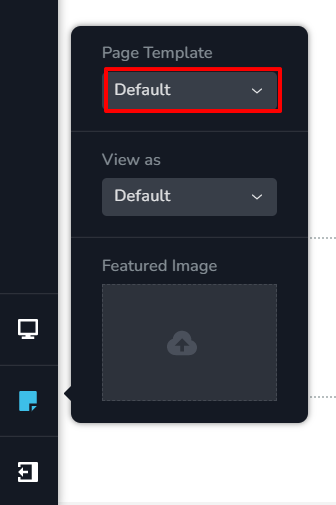
- Design your header and footer in your theme and then change the Page template of each page to 'Default' (see the attached image)
- Redesign the header and footer in Brizy and make the header block global and use display conditions to add it to all pages
Even if a single page is following the older design, that page may not work if you deactivate Unyson. When all pages are recreated in Brizy, you can deactivate Unyson plugin.
Are you looking for a Brizy developer to develop a uniform header for you? If you are, then the same person can also recreate the pages completely in Brizy. This can help speed up your website. (Pages that were edited using multiple editors will definitely be slower.) If you are, I can recommend someone to do this for you.
 0
0 -
KC,
Yes, I am interested in having someone help me modify the site to improve performance. Give me your recommendation, or have that person contact me via email.
Forrest
0 -
Hi Forrest,
I have passed on your email to a Brizy designer. He was part of the Brizy design team who designs the Brizy premade layouts available here https://www.brizy.io/all
He said he will contact you.
0
Please sign in to leave a comment.
Comments
9 comments