Synching in progress even Export the HTML files

Hi,
A) I have used "Export the HTML files" and upload into this domain (fresh - no files at all) but the webpage has this error: "Synching in progress"
Can help check? My website: https://www.sgterm.com
B) In addition, initial I used the cloud version, but somehow I can't manage to redirect non-www to www. I used cpanel and set permanent re-direct but not working also. The non-www always shows: "Project was not found". Any other settings I need to do?
Because of the above error, I decided to try to export.to html instead. Anyway, if you can answer both my queries above, it will be good.
Thanks.
-

Hi Brian,
A. The error 'Syncing in Progress' indicates that your Brizy Cloud website is trying to sync with either the Server Sync or Third party publishing option. Possibly you have attempted one of these publishing options in the past. This error was exported to your current website along with HTML Export. Please mention the brizy.site URL of your Brizy Cloud project. We can fix this error for you.
B. We can also fix the 'Project Not Found' error when accessing the non www version of your website. Please let us know your brizy.site URL.
0 -
Hi George,
Thanks for the prompt reply. I have change to my domain sgterm.com.
For brizy link, i assume is this:
https://www.brizy.cloud/projects/12524793/editor/page/1418914
If not, let me know how I can view my site name.A) Oh, even if the website is totally new?
Thank you.
0 -
Hi Brian,
Please follow this procedure to preview your Brizy Cloud website https://jmp.sh/k1thE3R and let us know your brizy.site URL.
Yes; we can fix the 'Project Not Found' error for an old or new project. During weekend, we offer limited support. We can fix this issue when we get back to work on Monday.
0 -
Thanks for the guide. It shows this:
https://www.sgterm.com/?system_page_access_token=$2y$10$Vxph0gREj0D/xQEcc6cnjuPfEpDAntq0yVqT933WgMb.rDKbnOXMK
But from the dashboard, the preview link show this:
https://www.brizy.cloud/projects/12524793/previewHope one of the links is correct.
0 -
And also with the changes of "CNAME" & "A" to brizy's settings, will it impact in my mail settings? Somehow, I can send out but not receiving any emails. Something wrong with the IMAP settings.
Thanks.
0 -
Hi Brian,
When I checked your website https://sgterm.com/, I do not see the 'Syncing in Progress' message now. The non www URL https://sgterm.com/ seems to load fine as well.
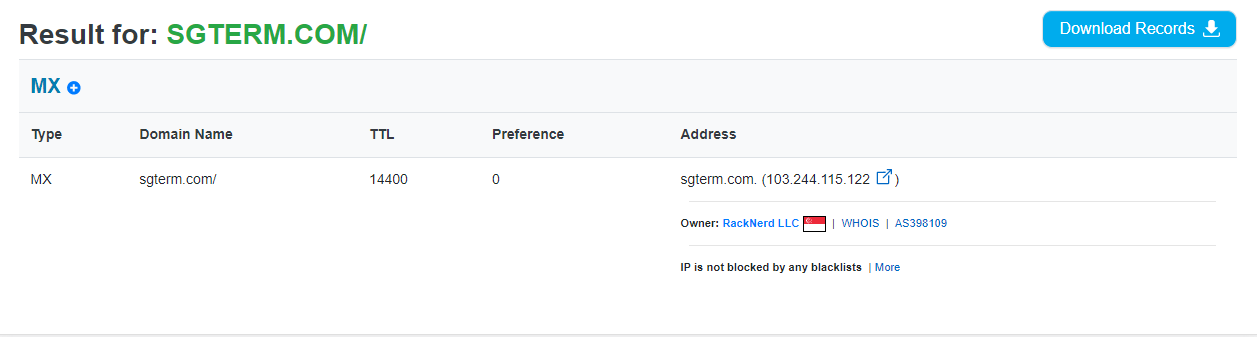
To setup emails like info@sgterm.com, you need to specify a mail server in your MX Records. You have not added a mail server to your MX Records yet. Please check with your hosting company what mail server you should add here.
 0
0 -
Thanks George for getting back to me so promptly. For the past few days, I have been trying both the cloud and offline version. Now it's looks ok. Thanks alot for the help.
0
Please sign in to leave a comment.
Comments
7 comments