Problem with Astra page template - block padding

I'm creating a new site for a client and discovered a problem with Astra theme 3.8.3 and Brizy builder, there is padding around the Brizy block I created on new pages. When I switch to Neve theme (as a test) it goes away? I want to use Astra because I have all the plugins and licenses for it, obviously it's a very popular theme.
EDIT: I solved this issue after working with the Astra Support Team. See this link for the solution to this issue with Astra https://support.brizy.io/hc/en-us/community/posts/7647137703313-Astra-Theme-Versions-3-8-3-and-Brizy-Block-padding-solution-
-

Hi Bryan,
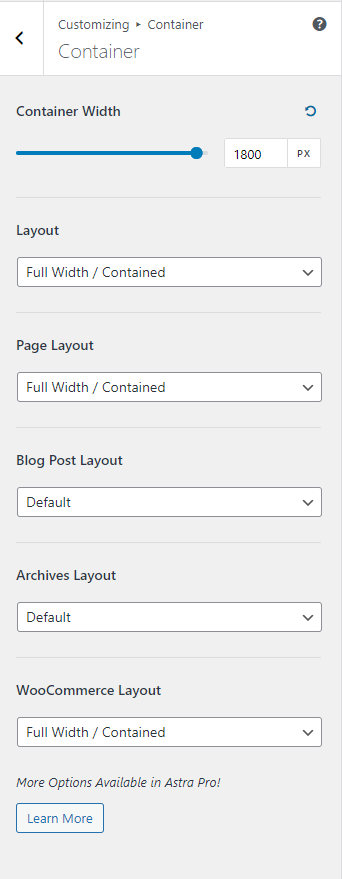
At the WordPress Dashboard, under Appearance - Customize - Global - Container, please explore different options for
- Container Width
- Layout
- Page Layout
May be you have selected a boxed Layout/Page Layout; try changing to 'Full Width'. May be you have selected a small container width; try increasing the container width. You can refer to this article for more details. https://wpastra.com/docs/container-overview/
 0
0 -
Thanks for your help. I solved the issue, see the edited version above for the solution Astra provided. If future versions of Brizy solved this without code that would be great!
0 -
Thanks Bryan,
Thanks for sharing the solution in this community. Another user in this community could already benefit from your post. See here https://support.brizy.io/hc/en-us/community/posts/7660194497553
0
Please sign in to leave a comment.
Comments
3 comments