Current Query & other missing Posts element info

The Posts element is terrific for a standalone page, like the Home page. For templates, which need to be dynamic for multiple pages, not so much.
I've gone through all the available help sources, and there is nothing more complex than a single-level use of the Posts element in templates. The trouble is that in one instance of a template's use on a page (not a post), the needed category might be A, but the next instance is B, and the next C, etc. There is no wildcard in the Posts element, in a template, that lets this happen.
Perhaps "current query" resolves this, but how do I know? There is NO info on how to use that option anywhere. As it stands, templates are fine for styling posts but are pretty useless for pages, which I want to use to collect different types of posts (sorted by category). No matter how I try – and I have spent hours on this – it appears to be impossible to set up a Posts element in a template to do anything but a single-level query.
Which means templates are fairly useless for pages. At least they are given that almost no documentation exists on the topic.
-

Hi T.A. Barnhart,
I have answered your question in the Brizy Facebook community thinking that you are referring to Brizy Cloud. https://www.facebook.com/groups/brizy/posts/1207564753340728/
In Brizy WordPress, we use the 'Archive' element for building Blog page and Category Archive pages (and not Posts element) The Archive element helps list blog posts belonging to different categories. Please watch this video for the procedure https://youtu.be/cWJEetL4f-s The Posts element is meant primarily for listing of blog posts in standalone pages like homepage.
You said "Templates are fine for styling posts but are pretty useless for pages". While the Display Conditions allow you to set up templates for pages, we do not recommend this approach. Blogging templates are meant primarily for posts. What is your use case which requires you to use templates of pages? If you can discuss your use case, hopefully we can suggest the best implementation strategy for your specific use case.
0 -
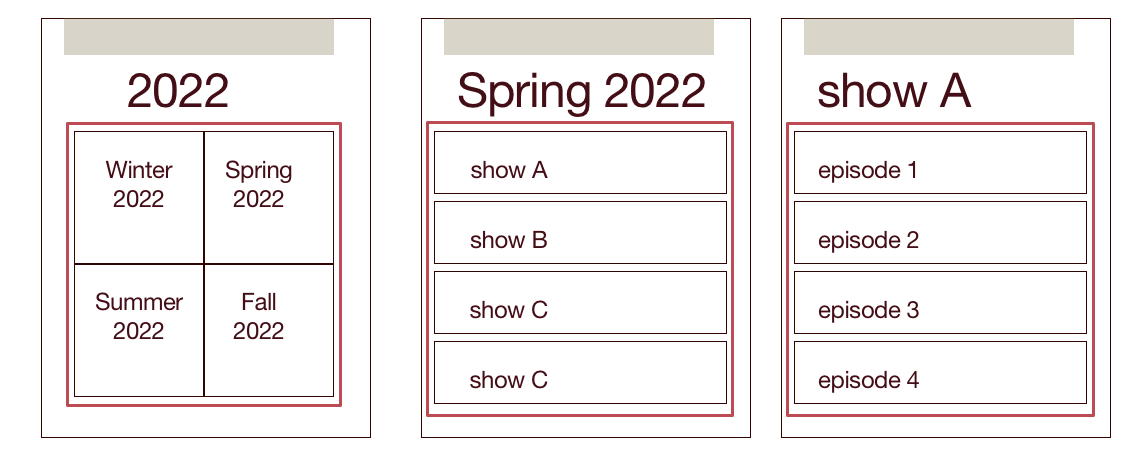 I hope this helps. I'm writing this up as I desire it to happen. I can create these as individual pages, not using templates. And I'm fine if that's the only option at this time. Duplicating a page is easy enough (plugin).
This is an anime review website. So 2022 is a top-level page. It contains (the red block) a Posts element that shows Pages with category "2022" (and offset by 1, to exclude the page itself). These have the page title, an excerpt, and maybe a featured image.click to go to a specific page, Spring 2022.
This page is similar. The Posts element shows Pages with Category "Spring 2022". So "show A" links to that show's page & has title, excerpt, featured image.
click to go to. a specific show page.
This page "Show A" has a posts element with Posts category "show A". click to go to that post.
To further complicate templatery, I'd want a block of text & perhaps an image or gallery between the page title & the Posts element.
Again, if the solution at this time is to skip templating, that's fine. As I said, the template for individual posts seems to work just fine, and that's what I'll have the most of. The Show page (right column) would take the most work if I had to recreate it from scratch every 3 months, but duplicating Spring 2022 with a plugin & then just modifying is not much different than using a template.
0 -
Hi T.A. Barnhart
I recommend implementing your design using the Woocommerce products. Woocommerce allows you to setup product category hierarchies. Using the woocommerce shortcodes, it is easy to display product categories.
Take a look at my test page: https://kctest.online/product-category/2022 Click on "Spring 2022". Then select any 'Show' to see the 'Episodes' within the 'Show'.
You can implement your design in 4 steps
- Setup categories: Setup 2022 as your primary product category. Setup Winter 2022, Spring 2022 etc are sub categories of 2022. Setup shows as sub categories of the different seasons.
- Setup products: Add 'Episodes' as products to Woocommerce.
- Link products to categories: Ensure that every Episode is linked to to a Show. To do this, add the Show as a category to each product.
- Design Brizy Templates: You need to design multiple Brizy Templates.
- Design one Product Archive Template for 2022.
- Design one Product Archive Template each for Winter 2022, Spring 2022, Summer 2022 and Fall 2022.
- Design a Product Archive Template for all Shows.
Please add this shortcode and modify it to develop some of your Product Archive Templates. Specify the category ID for 2022 to list the sub categories of 2022. You can find the category ID when you edit the category page from its URL
[product_categories parent="23" columns="2"]
You can read more about the shortcode here. https://woocommerce.com/document/woocommerce-shortcodes/
For more detailed procedure, please watch this video. https://jmp.sh/yz8wMyE
0 -
that's a far more extravagant response than i expected, so thank you. and it would be a good way to learn Woocommerce, which i didn't realize had non-commerce uses. good to know.
after i sent my illustrated comment, i started to work with my posts and it dawned on me, at last, that i can use GB plugins & other features. i had originally run into problems with that, but the newest version of Brizy seems to work much better with WP 6. it turns out Query Loop works quite nicely within the Contents element, and i know WL pretty well. the problem is there seems to be limits on how that element works with things like QL and other plugin styling choices.
WC, otoh, appears to be able to be more amenable to direct styling, or at least allowing the styling to come through. and your example shows me it's very similar to php-based products i've used in the past. it'll be fun to play with. thanks for the guidance.
0
Please sign in to leave a comment.
Comments
4 comments