Script does not work anymore

Hello Brizy Team,
I just noticed that on all my web pages the inserted script does not work anymore. It is no longer displaying correctly in the live pages.
© <script>document.write( new Date().getFullYear() );</script> Tafel Rastatt gGmbH
Look at https://www.rastatter-tafel.de
I suspect it may be related to the last update.
Installed:
Brizy 2.4.2 / Brizy Pro 2.4.2
WordPress 6.0
Can you help me?
Thank you very much.
Stefan
-

Hi Stefan,
Thank you for contacting us.
I have introduced the Script on our page and everything is working well, please see this screenshot. Could you please temporarily deactivate all external plugins (except Brizy Free, Brizy Pro) and then check this issue again?
Best regards, Nelea.
0 -
Hello Nelea,
I have now tested it again in detail and of course first deactivated all plugins (except Brizy/Brizy Pro).
This did not solve the problem.So I created a whole new WordPress installation and then also installed only Brizy/Brizy Pro as plugins. Again, it does not work.
Then I installed the older versions of Brizy/Brizy Pro (2.3.29/2.3.23). And lo and behold - it works again. The script is executed correctly.
By the way, I also tested it in Brizy Cloud. Also here the script does not work.
So for me it is obvious that it is Brizy after all. I also exclude a problem with my hoster, because I use different hosters and the problem exists with all Brizy websites.
It would be really great if you could take a closer look.
Here are the access data for the test WordPress installation.Here are currently the "old" Brizy versions installed and it works. You are welcome to upgrade to the new versions and you will find that it doesn't work then.
Thanks and greetings
Stefan0 -

Hi Stefan,
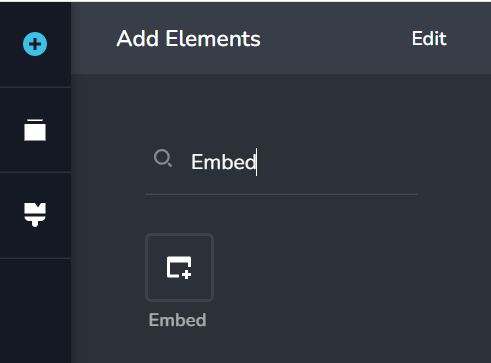
HTML, CSS and JS code should be placed in the 'Embed' element (and not in the Text element). In the test WordPress installation, you had placed the JS code within the Text element. I have now placed it in the Embed element and it seems to work fine. Please check https://stefan-gerstner.de/test/
In your production server, please check if you are using the Text element or the 'Embed' element for the JS code.
 0
0 -
Thank you Geoge for your quick feedback.
Unfortunately your suggestion does not work. Only the text is displayed, but not the script (the current year should be displayed).As already written - so far it worked without problems (script entered in a text field). Only with the update to Brizy 2.4 it does not work anymore.
Stefan
0 -
Hi Stefan,
I inspected your page now. Please see this video for a comparison between your live and test pages. https://jmp.sh/ofCSz86
Can you please confirm if you are using the 'Embed' element (and not the Text element)
0 -
Hello Geoge,
Sorry - your suggestion with the embed function works. My mistake. Maybe as a justification it helps that it's 35 degrees here today.... :-)
But apart from that, as a layman I would be interested to know why you removed the function to insert a script into a textbox?
Just to understand from a customer's point of view: I use Brizy because it's a really great software that even people like me, who don't know HTML, Java, etc. at all, can use to create very sophisticated and beautiful websites.
Very specifically, this change with the new version of Brizy means that I can now no longer simply format the area with the text tool, but now have to fathom how to insert the text formatting (size, font, color) here so that it again fits the overall design of the web page.
So for me, this is a step backwards that complicates the otherwise great handling of Brizy. Of course, this can be solved as well - but with a higher effort for me as a layman.
Stefan
0 -
HI Stefan,
You said " I would be interested to know why you removed the function to insert a script into a textbox?"
We are sorry that it appears like we have removed this feature from the Text element and hence going backward. I would like to share an alternate perspective on this topic
In most page builders and in WordPress Gutenberg, you will find the Text element independent of the HTML embed element. The Text element helps you stylize Text, while the HTML Embed element helps you convert HTML, CSS and Javascript code into a design.
You had mentioned that in the previous versions of Brizy if you inserted code into the Text element, it would display the design correctly. I have never tried this since the Text element is not meant for adding code. If it worked in the past, it would have worked by coincidence and not by design. Text element was not designed to convert code to design.
0 -
Hi Geoge,
thank you very much for your reply. As a silent reader of the many posts here in the support forum, I would also like to take this opportunity to commend you.Your answers are always very qualified and shaped to find a good solution to your customers' problems. You really do a great job - THANK YOU!
Stefan
0
Please sign in to leave a comment.
Comments
8 comments