Hide Featured image when none is provided

Hi, is there a way to hide the display of the placeholder image box on the Blog feed when no Featured image is provided? We do not always have a Featured Image assigned to everyone Post, so we want to be able to show the Featured image when it exists, but also Hide the placeholder rectangle when no Featured image is assigned. Is this possible?
See example here on our staging site. The first post has no featured image, but Brizy still displays a rectangle. Second Post has a featured image so it displays. We would want to hide the grey rectangles.
-
Also, in your previous version of the Builder, Unyson, and the theme Philanthropy, if I designated a Post as a Video type, it would grab the embedded video from the Post content and display this on the Blog Feed page as the Featured image. Is this possible in the new Brizy builder? Does specifying "Video, Audio, etc" on the Post type do anything in Brizy? Or is there no reason to use this native WordPress functionality anymore? It was a nice feature in your previous theme/builder, but as I am updating our site to Brizy, I am not able to get the same functionality from the Blog.
0 -

Hi Eric,
We do not have a way to automatically hide the featured image placeholder when it is missing in some posts. Here is a possible work around you can think about.
Let's say you have hundred blogposts and 50 do not have featured images and 50 have. Consider adding add two categories
- With Featured Image
- Without Featured Image
Assign these categories to the blogposts with and without featured images. On the page where you want to list these blogposts, use two different Posts elements
- First Posts element: List all the blogposts with featured images using the first Posts element
- Second Posts element: List all the blogposts without the featured images using the second Posts element. Remove the Featured Image place holders in this Posts element
0 -
Thank you for your response. But doing this would take the Posts out of chronological order. The point of a Blog feed is to have everything in order by date usually. So if I use two post elements, and some from one category are posted at different times between the posts from the other category, they will not display all in order. Can you please escalate this to your Dev team?
I see this Post from 2020 where the feature was requested and nothing seems to have been done, yet multiple users requested it.
0 -
Hi Eric,
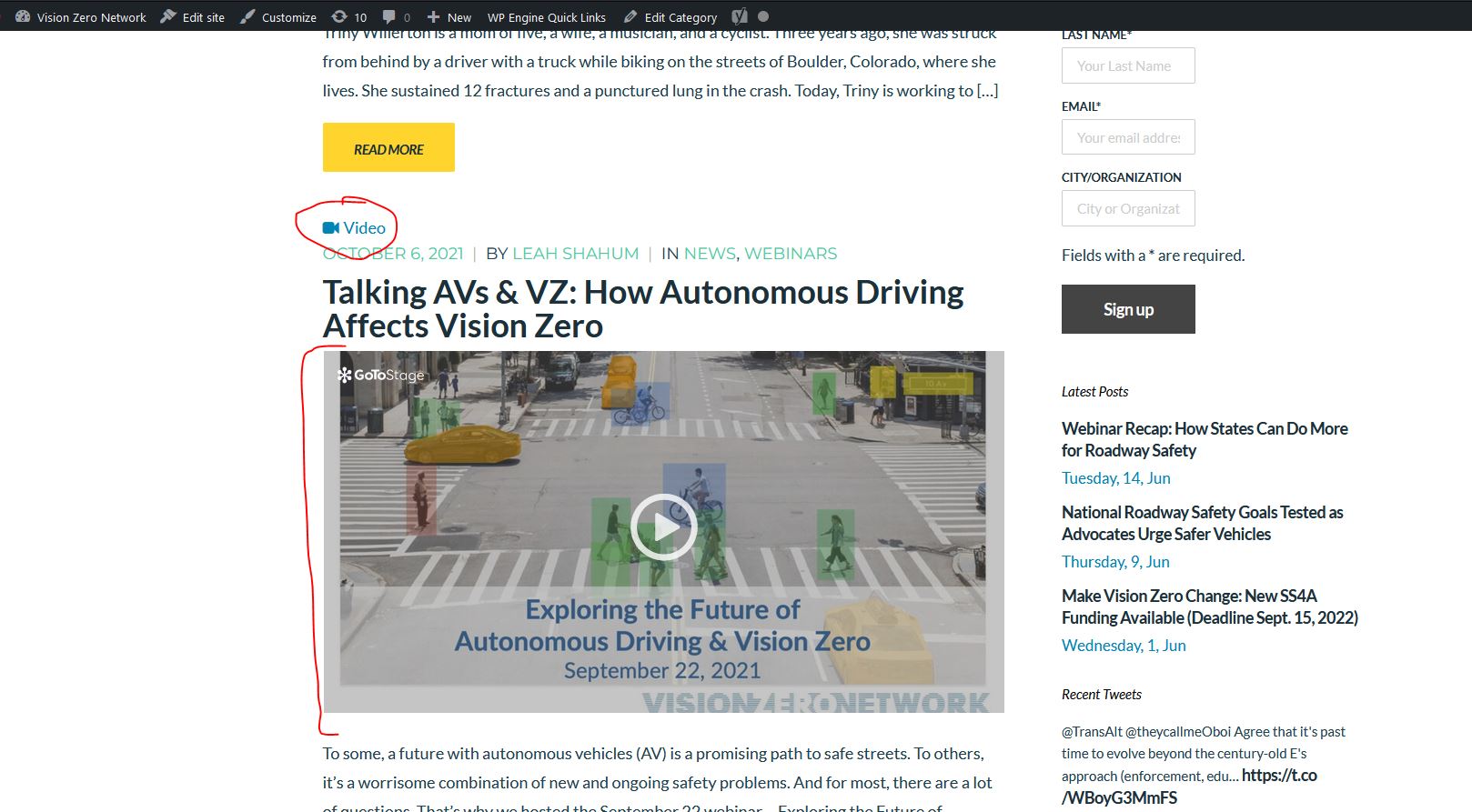
You said "if I designated a Post as a Video type, it would grab the embedded video from the Post content and display this on the Blog Feed page as the Featured image"
Do you remember how you used to designate a post as video type with WordPress?
0 -
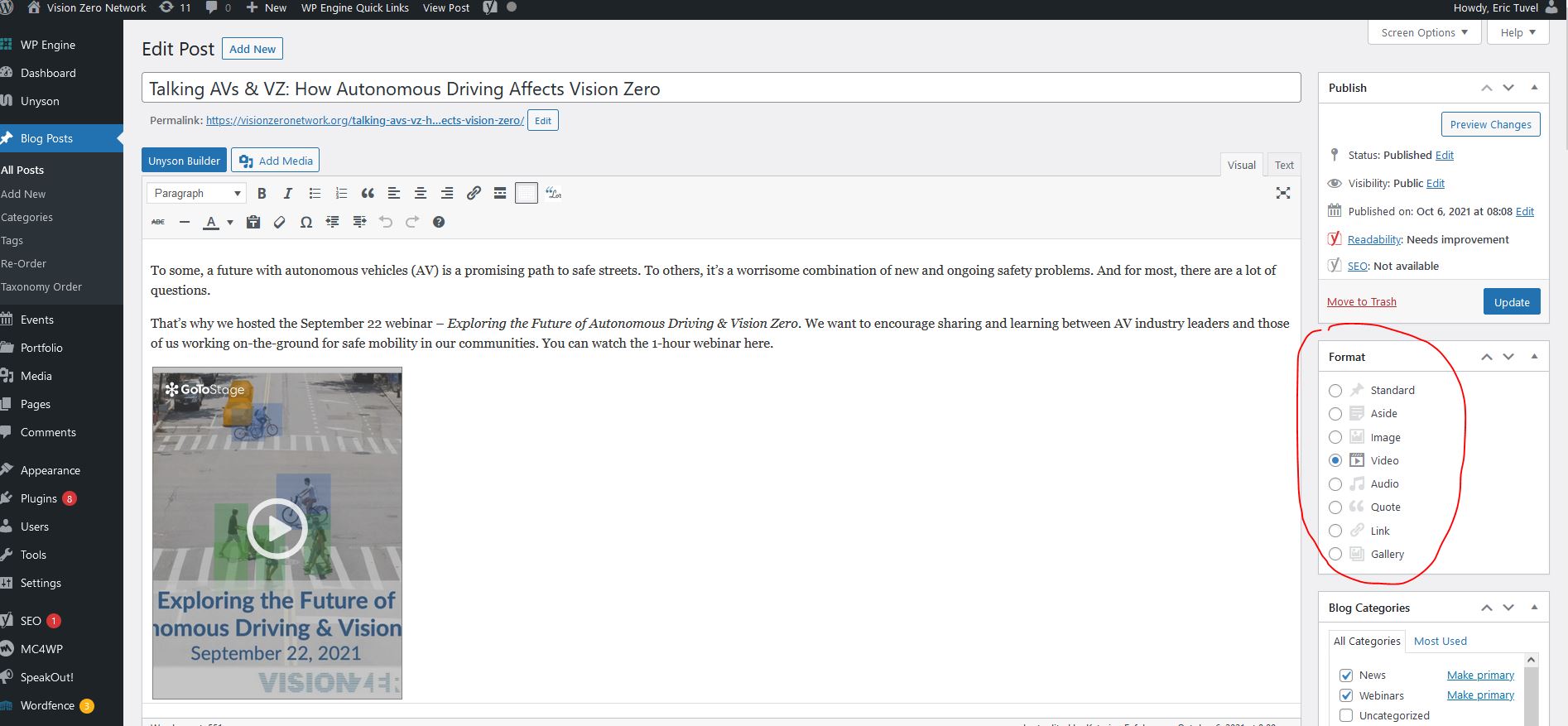
In the Blog Post editor, there is an option called Format, and you can choose Video, Image, Aside, etc.
You can see in the two images attached.
- Shows how the Video format is chosen
- Shows how the Video post is displayed in the Blog Feed using the Philanthropy theme developed by your company.
 0
0 -
Hi Eric,
I wanted to try selecting the video format and see what happens. I have not seen the Post Format in recent versions of WordPress though. What version of WordPress are you using?
0 -
You are right, I don't see the Format option on the staging site I am working on, but for some reason it still exists on the Live site which is running WordPress 5.9.3. Maybe it maintained the Format option because the site is older and this is maintained in the legacy data, but new installs of WordPress eliminated it.
That said, I am still trying to solve the issue of the Featured Image being hidden when there is none assigned. This should be a feature that exists within Brizy, since not all Posts are assigned a featured image.
0 -
Hi Eric
We do not have a solution for not showing image placeholders when featured images are missing.
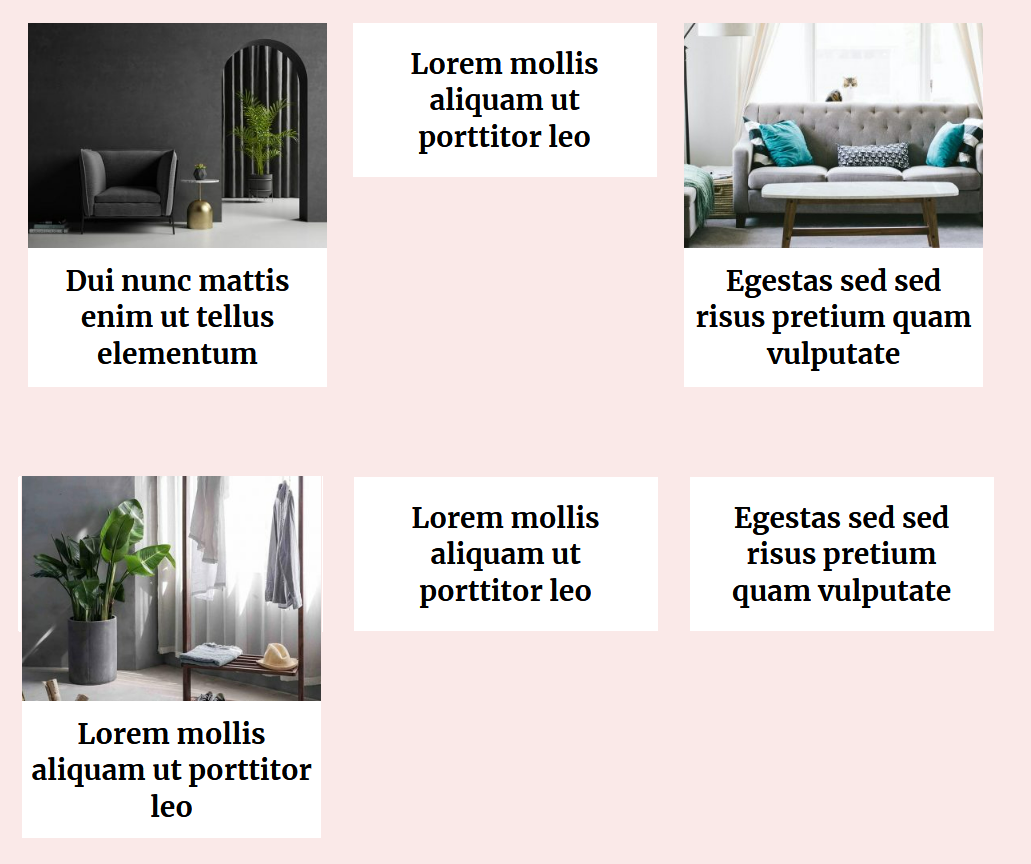
Here is something for you to think about. Mixed listing of blogposts with and without featured images may not produce a good design. You may end up with an design like this if that feature was available.
 0
0 -
I appreciate your concern but we are not using a layout like this and already have an existing website on your previous Unyson builder Philanthropy theme in which Posts with and without featured images work well together.
I appreciate if you can request this be added as a new feature in the future to hide the placeholder image when no Featured image is assigned.
0 -
Hi Eric,
I have escalated this as a Feature Request
0 -

You can add a featured image directly to the edit fill. But it limits images to less than 5 kilobytes in size. It's unbelievable how they put this limit 5 kb for image. With 5kb, you can only upload 1 icon. haha
0 -
Hi Kc George,
I had an idea for this. If I replace the no-image.png file via FTP in the Plugin with a 1 pixel empty image, then the palceholder would be blank but the ones with a featured image will display their image. However, when I tried this, there is a CSS padding of 75% on the Featured image that causes there to be a large white space. Do you have any recommendations for custom CSS I could use to make this solution work?
0 -
Hi Eric,
Do you have a page where I can see the 75% padding issue?
0 -
Here is the example where I have replaced the no-image.png with a 1 pixel height image.
https://vznstaging.wpengine.com/category/news/
but you can see the area that the Featured Images takes up is still tall and when I inspect the element with my browser, I am finding
.brz .brz-css-eacuf {
padding-top: 75%;
}which seems to be causing the issue. But the Image Height is also set to auto, so I am not sure what to do.
.brz:not(.brz-ed) .brz-image .brz-a, .brz:not(.brz-ed) .brz-image .brz-picture {
width: 100%;
height: auto;
}Appreciate your help.
0 -
Hi Eric,
Even though you have uploaded a new no-image.png file with dimensions 3840 X 1, it is being rendered within a 774 x 581 image container. All featured images are being rendered to the same size. https://jmp.sh/k1tPgvj
This could be reason why you are not able to make it work. I could not come out with a CSS solution as well.
0 -

Hi there,
Is this a feature that ever got added? That is hiding featured image on a post if there isn't one set?
Thanks,
Darren0 -

Hi Eric,
Unfortunately, there is no built-in option to hide the featured image placeholder on a post if no featured image is uploaded.
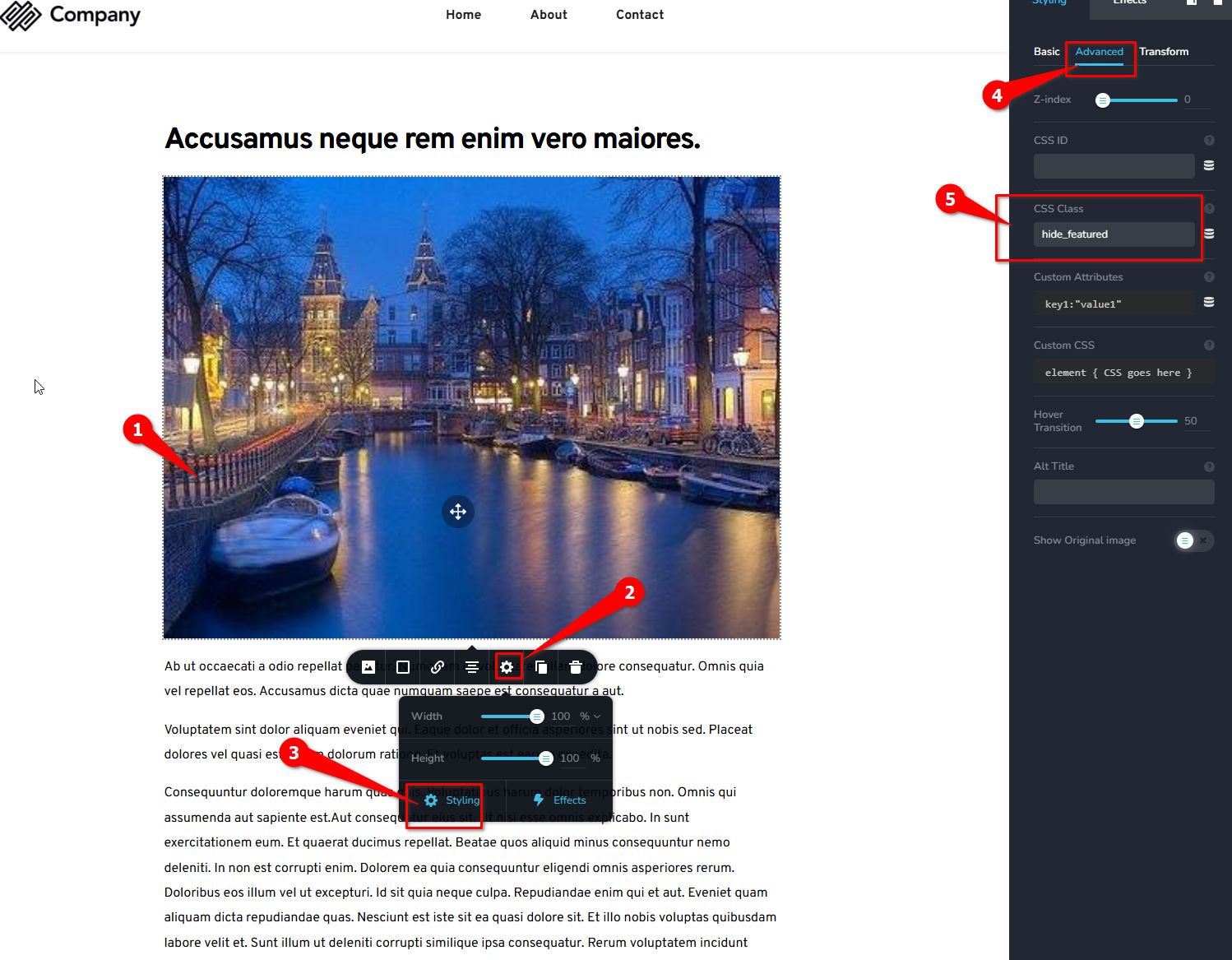
However, I’ve tested the following PHP code snippet in my environment, which should work if you already have a dynamic template for your posts and have added a CSS class for the featured image. In this case, the class .hide_featured will be targeted by the function below to hide the placeholder.
function hide_featured_if_no_thumbnail($classes) {
    if (!has_post_thumbnail()) {
        // Add a custom class to hide the .hide_featured element
        $classes[] = 'hide-featured';
    }
    return $classes;
}
add_filter('body_class', 'hide_featured_if_no_thumbnail');

function add_custom_css_to_hide_featured() {
    if (is_single() && !has_post_thumbnail()) {
        echo '<style>
            .hide_featured {
                display: none !important;
            }
        </style>';
    }
}
add_action('wp_head', 'add_custom_css_to_hide_featured');
To add this function, you'll need the WPCode plugin. Alternatively, if you're using a child theme, you can add the code to the functions.php file.1. Create a new code snippet and copy/paste the code above, selecting "PHP Snippet" since this is a PHP script.
2. Name the custom function.
3. Click "Update."
4. Set the snippet to "Active."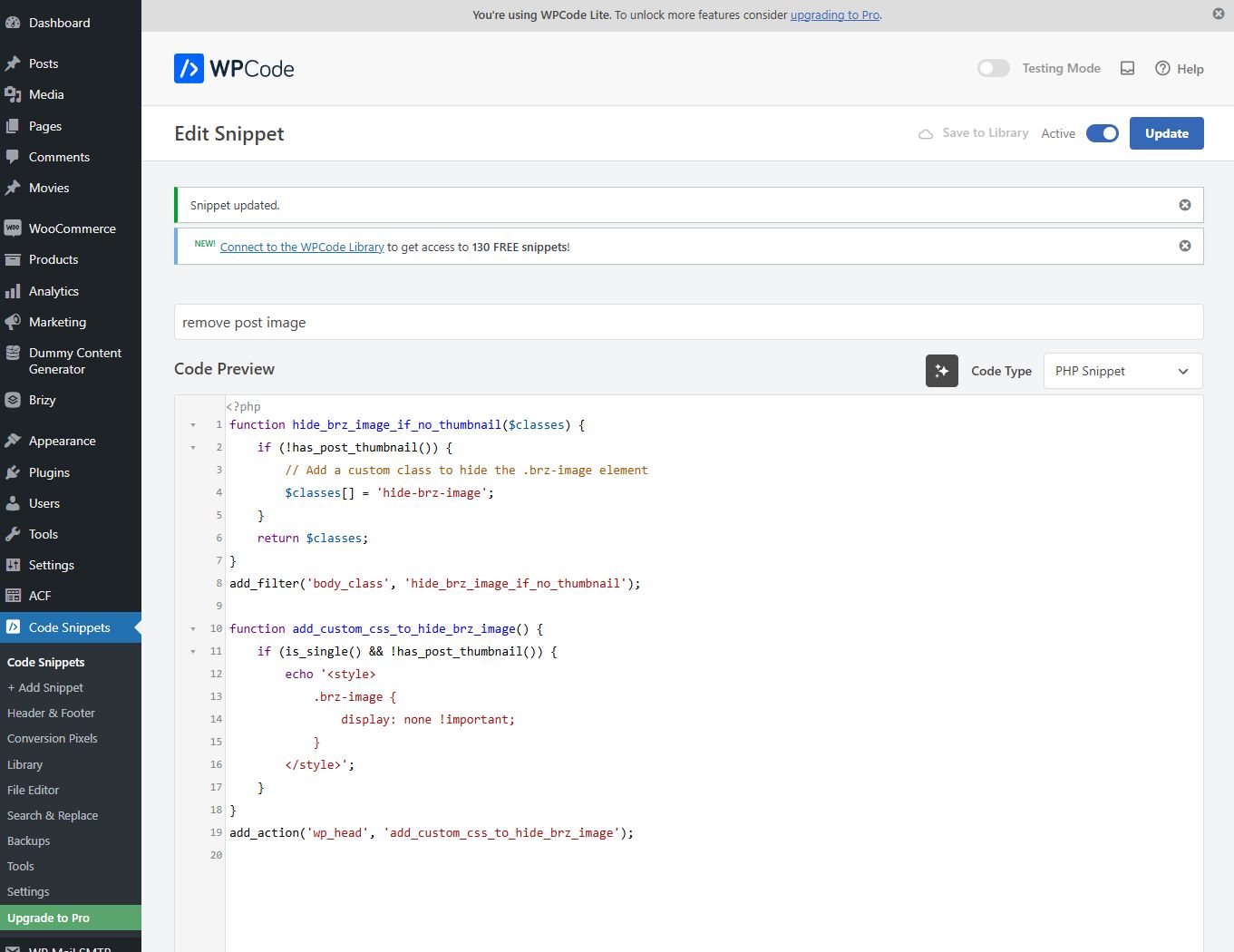
When copying and pasting the code, make sure to follow the exact format shown in the screenshot. Afterward, visit a post without a featured image and preview it in your browser.
This is demonstrated on this screencast: https://youtu.be/WpeWm-kAdYo
Please try this and let me know how it works.
Best regards,
Ariel H.0
Please sign in to leave a comment.
Comments
17 comments