Global blocks keep getting moved on my pages

I keep having to reorder a specific global block on my pages and it’s s driving me nuts! The site is https://americanphc.com and it’s the sticky navbar that keeps getting moved down the page. I’ve recorded it like 10 times but it keeps moving. Any ideas? Seems like a legit bug to me that Brizy needs to look at.
-

Hi Glen,
Thank you for contacting us.
My colleague Natalia has answered already in the private ticket. Please check your email.
Best regards, Nelea.
0 -

This is happening to me as well, would you please share the solution?
0 -
Hi Michael,
Thank you for contacting us.
Regarding the issue for the above user, it happens because the first block was a simple block and right after he had a global block. In Brizy page structure we have the top section, center and the bottom of the page.
In his case, in the top section he had a simple + global block - this will generate block movements across the page. You can start the page with a Global block - then a global /simple block; or you can start the page with a simple + one more simple block.Can you please check if you have a global block, and what is its position?
Best regards, Nelea.
0 -
For me (at https://brackenboxpro.com) I had (2) global blocks followed by the numerous simple page blocks. On one occasion when starting to build a page, I went to add the first global block and accidentally clicked on the "trash-it" icon, and it was GONE. It was still located on other pages, so I went to resave it as a global block it would not so register. It allowed me to "SAVE" it, just not GLOBAL.
0 -

Hi Michael,
The way you add a global block to a page is a bit different from the way you add a regular block in Brizy. Let me explain
Global blocks are created once and reused over and over again using 'Display Conditions'. For example, if you would like to reuse a global block in 'About' page, you add this condition.
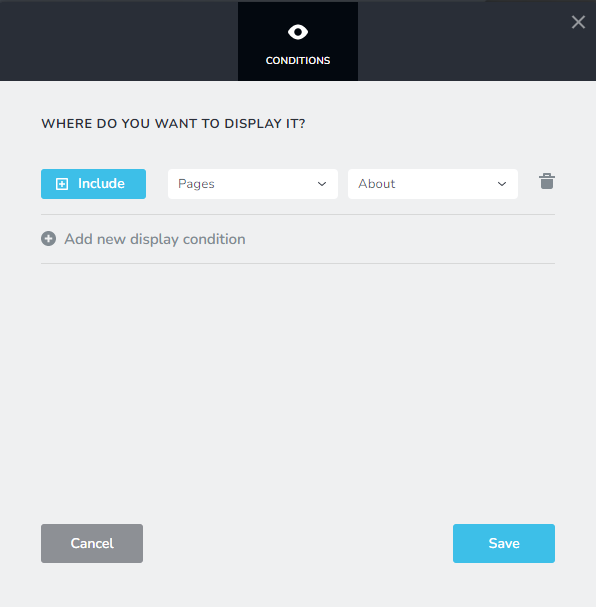
If you would like a global block to be reused on all your pages, you add this condition
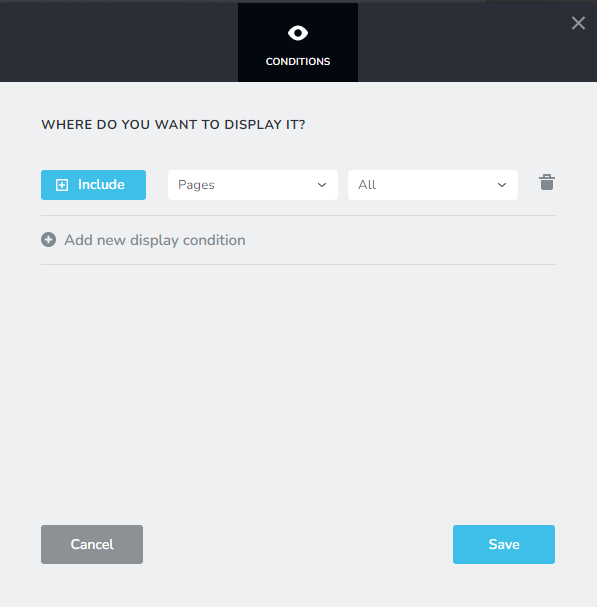
If you have too many Display Conditions associated with your global block, delete all of them and add this single Display Condition and check if the problem gets resolved.
0 -
I don't think you understand. I had a Global block and accidentally deleted it, and was not able to reassign it from "saved" to "global".
0 -
Hi Michael,
When you accidentally delete a global block from one of the pages, you normally do not lose the global bock; the specific page gets excluded from the global block's Display Conditions. Please follow this procedure to restore your global block
- Check if the deleted global block is available in another page in your website
- Go to the Display Conditions of the global block in that page and add a Display Condition to include the global block in the page you had deleted it from. Let's say you had deleted the global block from 'Home' page. Please add this Display Condition to restore the global block to the home page
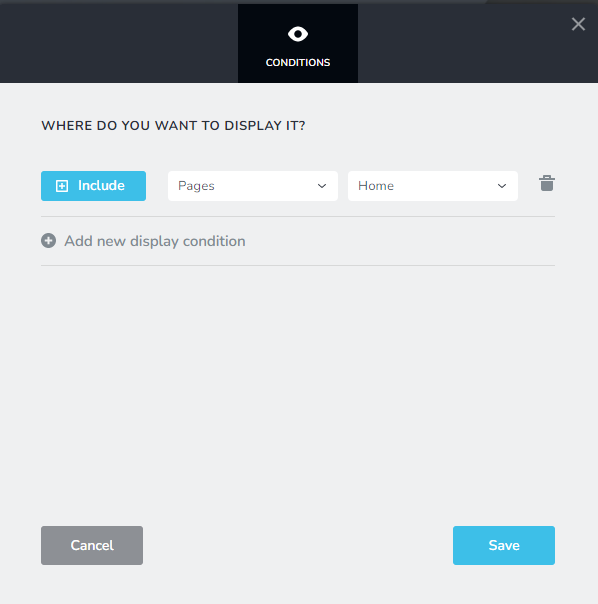
If you need help in fixing this issue, please add me as a Team Member to your project and let me know which block do you want me to make as global. My email: kc.george@brizy.io. Please assign me 'Manager' role in your project.
0 -

Hi KC, we have the same: every now and then, the header moves on 2 specific pages to the bottom, randomly. I read the instructions about global blocks and a following block, however, I need help on fixing that. As the page is multilingual, I am a bit afraid to "touch a running system" and make a small problem huge.
KC, can you help?
Regards, Leslie
In the picture:The header is above the footer.
 0
0 -
Hi Leslie,
Global blocks on your Brizy website can automatically shift positions if this scenario exists
- You have a regular block above the global header
- You have a regular block below the global footer
You can prevent global blocks from automatically altering its positions on your Brizy page by setting up your global blocks and regular blocks according to the following best practice. The top and bottom of your page must have one or a few global blocks, while the blocks in between must all be regular. For instance,
- Make both the header and footer global if the header is your first block and the footer is your last block, and the other blocks must all be regular.
- Blocks located above the global header and below the global footer must also be global.
Please get in touch with us if you are unable to resolve the issue following the above instructions. We'll help you.
0 -
Hi KC,
actually, we do have a regular block above the header on one of the pages. So I guess it is point 2 of your answer. I will switch it to global and wait an see if the problem will occur again. Thank you for your clear help!
Leslie
0
Please sign in to leave a comment.
Comments
10 comments