Best practice for blogging in Brizy Cloud

Hello. My question is about the blogging feature in Brizy Cloud. There are two ways to add text content to a blog post: (1) through a text block in the page editor, and (2) through a rich text field at the Assets > Content level. From a best practice perspective, which method is better? Does either one affect SEO?
-

Hi St. Arcadia,
We recommend adding blog post content directly in the page and adding meta data using custom fields. Let me elaborate.
Add "Meta Data" using Custom Fields
The facility to add custom fields to blogposts/custom assets is provided with the intention to add "Meta Data" to your blogposts/ custom assets. Meta data is information about your blogpost/custom asset (and not the blogpost itself). Example
- Author Name
- Author Photo
- Publishing Date
- Categories
- Author Bio
If you are adding a custom asset like Recipe, meta data may include
- Preparation Time
- Ease of Preparation
- Recipe Author
- Recipe Type
Please add these details about the blogpost/custom assets using custom fields.
Add blog post content directly in the page editor
Please add the blogpost content in the page editor directly. Using Rich Text filed for adding content is not recommended because you will be highly restricted by the minimalistic features of the Rich Text element. By adding content directly into the blogpost, you have access to all the design elements Brizy offers to design your blog post content. For example, if you would like to add images, videos, audio, timeline etc. to your blog post content, you can do it using the Brizy elements.
From an SEO perspective, both approaches could be equally good.
0 -

KC, is there a search feature based on those custom meta tags (assets) that we can use in a blog page ?
0 -
Hi JP,
Brizy Cloud does not have a search feature.
0 -

Kc George
If so, every post the writer has to change manually. It is only suitable for creating individual pages. Why not create a template and set a global condition for the blog.0 -
Hi Vantrinh,
There is a difference between creating a Brizy Blogpost template with WordPress and how you create a blog post template with Brizy Cloud. In Brizy WP, you add the blog post content in Gutenberg first and later bring it to Brizy using the content element. With Brizy Cloud, you add the content directly in Brizy editor (instead of adding it first elsewhere and then later bringing it to Brizy)
In Brizy WP and in Brizy Cloud, for every blog post the author has to add the content manually. The Dynamic elements which are part of the blog post template will get added to the blogpost automatically in both Brizy WP and Brizy Cloud.
Key points to remember while setting up blogpost template in Brizy Cloud
- Have independent blocks for dynamic and static content. If a block has dynamic content, do not add static content into it.
- Make all blocks with dynamic content Global and add the following Display Condition. For example, the Hero block may contain blog post title, categories, featured image and tags, author name etc. This block must be made global
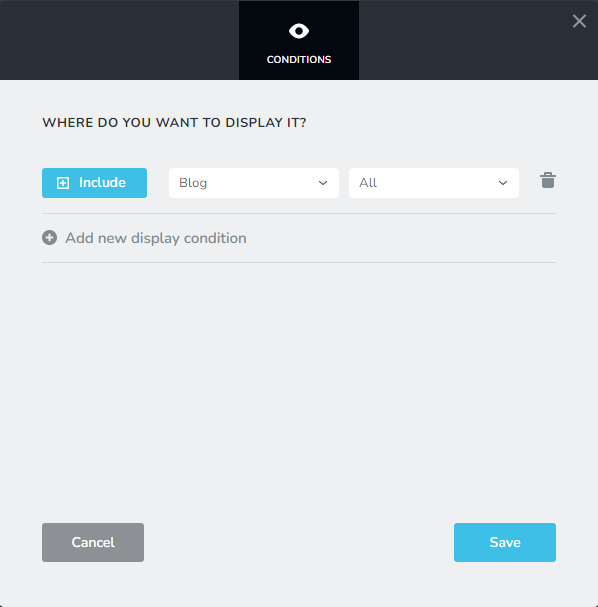
- Add all static content to a Content Block and make it a saved block. While adding a new blogpost, import the saved content block to retain the blog post content structure and replace the content.
0
Please sign in to leave a comment.
Comments
5 comments