How add my own dynamic add to cart for carousel dynamic content?

Check screenshot to understand about what do I talk
In short: I want to make dynamic links to <add to cart> for products in carusel element with brizy. And i have no clue what is dynamic content, how and where to add this dynamic content, and can't find any documentation how to make my own dynamic content with my own output (dynamic) for urls for brizy (in current case for adding direct link for adding product in carousel (woocommerce product)) directly to cart, instead of opening product page)
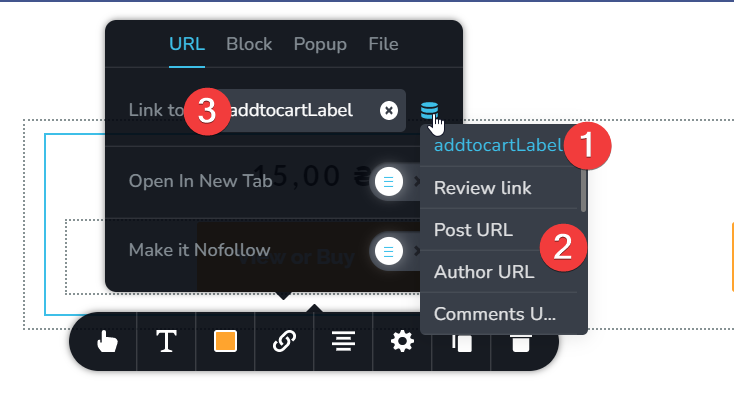
So, let's check what do we have
1 addtocartLabel = this is ACF Plugin element. Just created field nothing more.
I want to get know - how to add my own dynamic content here instead of addtocartLabel? Is it possible? I want to put there dynamically generated example.com/?add-to-cart=<product_id> url template
2. This is block of all "dynamic" things. From where these values and fields cames from? Where can I find them, and how to edit or add my own new ones here? Any guides where you can point where I can start to learn about this?
3. And this is field for link, this field i want to make dynamic. I.e. depends on the product, there will be different html output (by using template + -add-to-cart url).
In short:
How to solve my problem of creating carousel element for woocommerce category with buttons "add to cart" which will add products to cart, instead of redirecting to product page?
-

Hi Nick,
Your idea looks quite creative; however it may not be feasible. If the "Add To Card' button was linking to a specific URL, this idea could have worked. On a woocommerce website, hover your mouse over the "Add To Cart' button and you will notice that it does not link to a specific URL. Instead, it adds the product to the cart and the cart starts displaying it.
Hence redirecting the user to the Product page could be your best option. The user can click on the 'Add To Cart' button on the product page.
0
Please sign in to leave a comment.
Comments
1 comment