Where to update Brizy Pro
Completed
We purchased a license for a website we recently took over in order to update the Pro version. However, I'm not seeing where to add the license code or where to add our domain in our account.
How can we update this?
-

Hi Lance,
Thank you for contacting us.
Please watch this video, it will help you install the license in the dashboard.
Best regards, Nelea.
0 -
I'm afraid this video isn't helpful. It simply shows how to install a plugin and add a license on an older version or something. I do not have a "License" tab under Brizy > Settings in the backend like the video mentioned @2:20. However, I do have both Brizy and Brizy Pro installed and active. So, I'm guessing that tab is only on an older version or the video didn't cover my issue. How can we add a license if the license tab is missing? I've deactivated both plugins and reinstalled them, but it still doesn't have that tab.
0 -
Hi,
Please disable the White Label option from your dashboard, after this the tab for the license will appear. Please see this video: https://www.youtube.com/watch?v=cwgtzhZG6E0
Best regards, Nelea.
0 -
Hello again,
Thank you for the quick replies. However, this isn't our problem. Brizy is not white labeled. I turned this on and off again just to be sure. Again, the problem is that we simply do not have a "License" tab under Brizy > Settings in the WordPress dashboard, but all the Brizy branding is there.
The plugin simply won't let us update it due to no license, but the "License" tab under Brizy > Settings isn't there to allow us to add our license.
0 -

Hi Lance,
The license tab appears when Brizy Pro is installed. Can you confirm if Brizy Pro is installed and activated?
Can you please also confirm the Brizy and Brizy Pro version numbers?
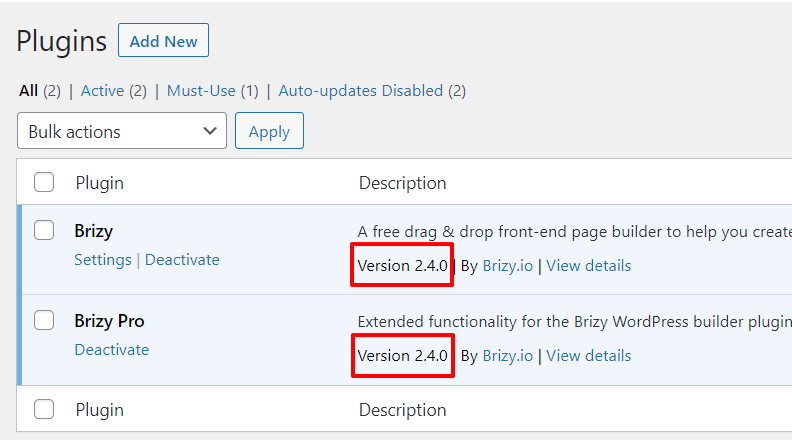 0
0 -
Yes. It's installed and active like I mentioned. We just can't update it (see below).
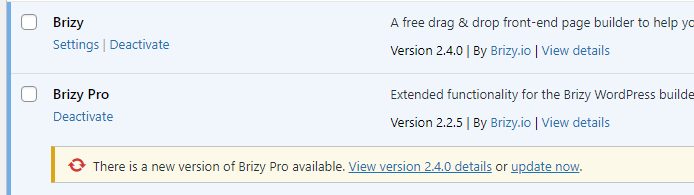 0
0 -
Hi Lance,
To update Brizy Pro, please follow these steps
- Login to your Brizy.io account and download Brizy Pro 2.4.0
- At your WordPress Dashboard under Plugins, deactivate and delete Brizy Pro
- Reinstall Brizy Pro by clicking on 'Add New' plugin and then "Upload Plugin' at the top of the page
- Under Brizy - Settings - License, please add your license key
 0
0 -
That solved it. Thanks!
0
Please sign in to leave a comment.
Comments
8 comments