Page is not mobile friendly

Dear Brizy team,
The last 21 pages I made in Brizy are assigned as "not mobile friendly" by google in the search console. You can imagine that's not good for SEO.
I have tried everything to find out what the problem is but I can't seem to correct it. The pages are made as "brizy template" and menus and footer are all brizy. So I don't use anything from the wordpress theme anymore. Strangly are the pages where I did this the ones that google finds "not mobile friendly".
The following page is one of them:
https://artiestenstal.nl/dj-boeken/
The funny thing is that the pages look great on my mobile phone.
Can you figure out what the problem is, please.
Thank you in advance!
-

Hi David,
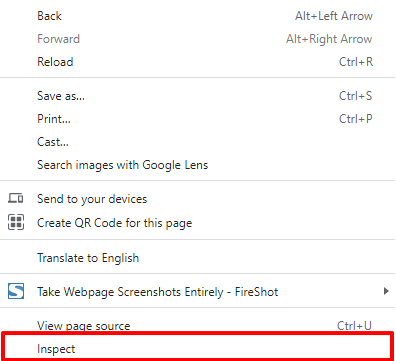
You have 172 console errors on your page https://artiestenstal.nl/dj-boeken/ Please take a look at this screenshot. https://jmp.sh/tx2eGzA These errors are to do with some Youtube videos. To reproduce these errors, in Google Chrome, right click on the page and select 'Inspect'
In this screenshot, take a look at the right hand pane for how your page appears to Googlebot smartphone. https://jmp.sh/6853p6y As you can see, Googlebot view is very different from the way it appears on a mobile phone.
Once you fix the YouTube errors, please test for mobile usability at https://search.google.com/test/mobile-friendly
0 -
Hi George,
Thank you for your comment and reply, this all came with the last update, it was not there before. It looks like the the margins are outside the viewport but I don't know how to fix it.
I also have no idea where the YouTube errors come form, can you point me in a direction?
0 -
Hi David,
I will need to look at your project to help you fix the YouTube error.
If you need help with troubleshooting, please add me as a user to your WordPress Dashboard. My email: kc.george@brizy.io. Please enable the option "Send the new user an email about their account" as in this screenshot https://jmp.sh/tSRznJX
Once you have sent me an invitation, please let me know here.
0 -
Hi KC,
Just made an account for you.
I'm using Wordfence so you might have to authenticate an email that will be send to you.
Thanks in advance!
Regards,
David0 -
Hi David,
Here is an update. I have removed the video you has embedded to the page https://artiestenstal.nl/dj-boeken/ When removing the YouTube embed, the console errors disappear from your page.
However this does not make your page mobile friendly. When doing the mobile usability test, the Googlebot smartphone still sees your page distorted. I will continue to look at this issue.
I need some help from you.
- Can you take a full backup of your website. I want to try a different theme and see if that would make a difference. (When I tried the backup, it failed two times)
- Can you please send me the YouTube link to the video in the above page so that I can add it back.
0 -
1. I tried a different theme allready and it didnt work. It looks like the margins are outside of the viewport since the last update. This problem was not there before, that is what is so strange.
2. The Youtube link is: https://youtu.be/76nZ-jbdiqI
The server makes a backup every hour at my hosting provider, so I can put a backup back when its necessary. That's only the website not the database.
Regards,
David0 -
Hi David,
I have tested few websites that are running on Brizy 2.4.0. Those websites are mobile friendly. However Googlebot is still capturing the page https://artiestenstal.nl/dj-boeken/ distorted. I will continue to look into this and see if I can get to the root cause.
0 -
Thanks you very much, maybe i have uses the margins wrong but i can't imagine that's the problem. The site looks good on my mobile phone.
0 -
Or maybe I use the paddings wrongly?
0 -
Hi David,
The problem is neither the margin not the padding. When Googebot looks at your page https://artiestenstal.nl/dj-boeken/, it sees this. In this view, surely
- The text is too small to read
- Clickable elements are too close to each other
- Content is wider than screen
Hence Googlebot says the page is not mobile friendly. At the moment, we do not know why Googlebot renders the page this way. Will keep investigating.
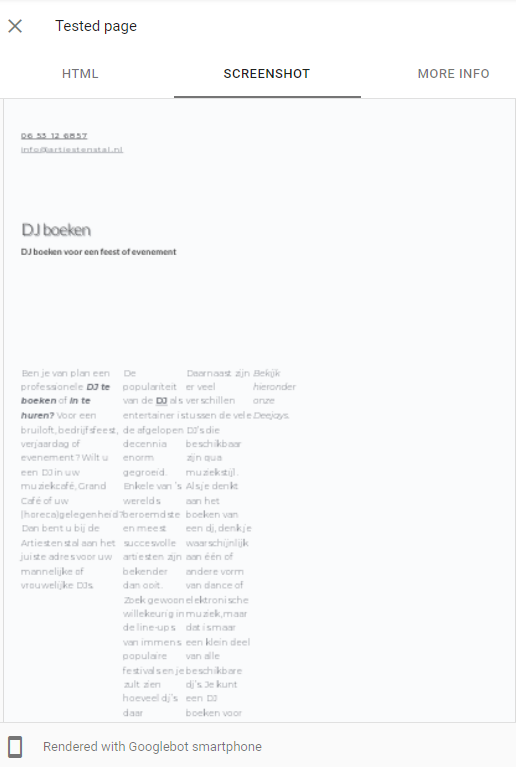
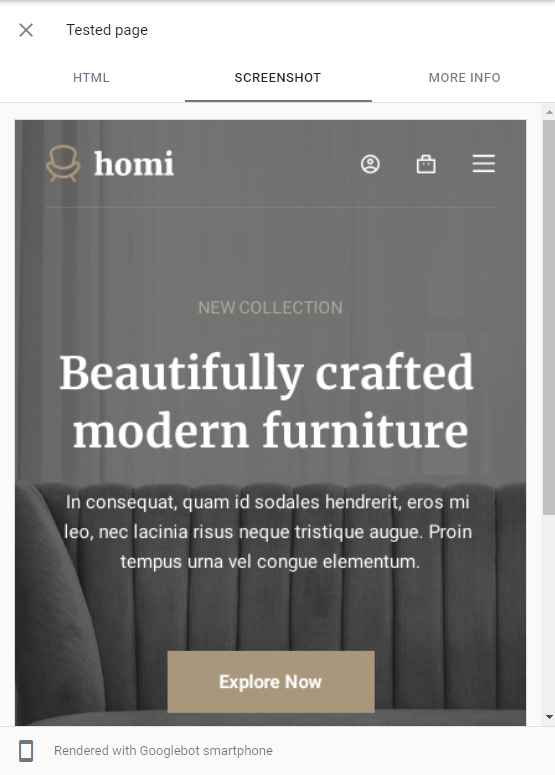
Compare it with how Googlebot sees my test website https://kctest.online/
 0
0 -
Hi KC,
I still don't understand why this is. The site looks good on my mobile phone and other devices.
Again I have to say that this problem was not there before, so there must have changed something somewhere ;-)
I also set the theme WP Ocean back because the rest of the site was looking awful with blocksy. Not all pages are Brizy templates yet. So a big part of the site is still a combination of Brizy and Wordpress.
I hope you can figure out what the problem is, maybe in the custom css in the customizer?
Regards,
David0 -
Hi David,
This is how your robots.txt file looks like. As you can see you are disallowing Search Engines to crawl wp-content and wp-includes folders except the .js, .css and .png
User-agent: *
Disallow: /wp-admin/
Disallow: /wp-content/
Disallow: /wp-includes
Allow: /wp-admin/admin-ajax.php
Allow: /wp-content/plugins/.js
Allow: /wp-content/themes/.js
Allow: /wp-content/themes/.css
Allow: /wp-content/cache/.js
Allow: /wp-content/cache/.css
Allow: /wp-includes/.js
Allow: /wp-includes/*.png
If you remove these two lines from your robots.txt file, your problem should be resolved.
- Disallow: /wp-content/
- Disallow: /wp-includes/
If you would like to read more about robots.txt, please check out this article. https://kinsta.com/blog/wordpress-robots-txt/
To edit the robots.txt file, you need access to your site root. You can use the SFTP filemanagement in your TransIP control panel to edit the file. https://www.transip.co.uk/knowledgebase/entry/567-using-sftp-filemanagement-control-panel/
0 -
Unfortunately this didnt help either :-(
0 -
As I said, this became after an update and was not like this before.
0 -
Hi David
Your robots.txt file still prohibits search engines to crawl wp-content and wp-includes folders. Please take a look at https://artiestenstal.nl/robots.txt. You will see these two entries.
Disallow: /wp-content/
Disallow: /wp-includes
If you give me access to your web space via SFTP, I can delete these two entries from your Robots.txt file. Please read the section titled "Grant access to your web space via SFTP" on this page for more info on how to give me access. https://www.transip.eu/knowledgebase/entry/389-would-create-additional-account-transip/
0 -
Hi KC, that is true, I changed it according to your advice and then run the page true search console and still it wasn't mobile friendly. So I changed it back.
I will give it another try this weekend and let you know.
Regards,
David0 -
Hi KC,
Any news on this issue?
I changed the robor.txt file.
0 -
Hi David,
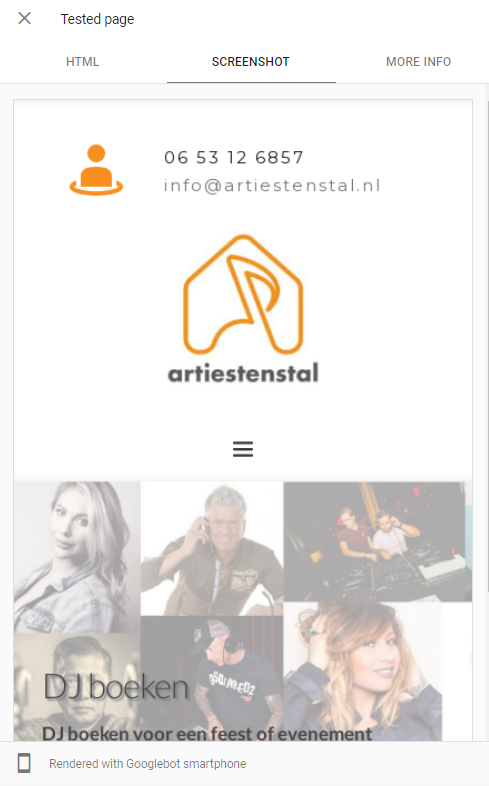
Now your page https://artiestenstal.nl/dj-boeken/ is mobile friendly. Please click on this link for the report. https://search.google.com/test/mobile-friendly/result?id=t30KBBHHokNIKWXjKotgJA Click on the "View Tested page" here and you can see how Googlebot smartphone renders your page on the right hand side. It renders correctly now.
 0
0
Please sign in to leave a comment.
Comments
18 comments