How To Create New Global Styling?

I would like to know how to create or save a global style for Brizy Cloud.
Currently, I can choose a "Current Style" and modify it. However if I choose another global style to try it and then want to go back to the previous style that I have modified, the modification are all gone and are reverted back to original default settings for that global style. How do I save a new global style so the modified settings do not get erased?
I see for some of my projects, there are additional global styles in the Current Style dropdown list. In the picture below, there are 2 new global styles (Moon & Pet Care) I think they are from Layouts templates that I have tried. So is there a way to save my own style?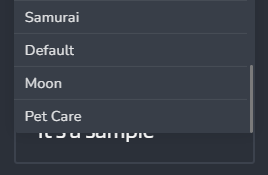
-

Hi Jason,
Thank you for contacting us.
There is no provision to add a new Global Style in Brizy Cloud. However, any modification that you make to an existing Style should not get reverted back to the original values. If this happens, we will take a look at your project. Can you please mention the brizy.site URL of your project?
Best regards, Nelea.
0 -
Hi Nelea,
I am testing in a test website.
When changing a global style's color, it will keep value when switch to another style and back.
But if you change the font of Heading 1, Heading 2, & Heading 3 of a style, then switch to another style and then switch back, the font of Heading 1-3 will revert back to the original font of that style.0 -

Hi Jason,
I just tested this feature. When I change the font of a specific style, then change the text to a different style and change it back to the original, the style seems to retain its changes. Please watch this video. https://jmp.sh/dcAWsPL
0 -
Hi,
Oh what I meant by switching the style is by selecting another style for "Current Style" dropdown field.0 -
Hi Jason,
You are right. When you change to an different style and then revert back to the original style its global typography and colors get reset to the original values.
With a good web design practice, you can overcome this issue. Check out available Styles, before finalizing your project typography and colors. Once you finalize global typography and colors for your project, apply it to one of the available Styles and stick to it. If you need to modify any typography or color, modify it in the current style.
-1 -
Hi KC,
Actually the changed colors are retained just not the typography, that's why I wonder if both changes should be retained/saved to be consistent.
What you said make sense but there are times when you thought you have finalized the style but later thought it's not quite right and want to try other styles. And once you switch you loose what you had before if you want to go back. It's not a huge deal but just thought it'd be nice to have the changed values retained. I guess if we are able to create and add new global stylings, it'd would solve this issue. Hopefully we will have it in the future.0 -

This behavior is very bad! Very sad see this happen on Brizy. 😓
Creating your own global styles could already be implemented.
1
Please sign in to leave a comment.
Comments
7 comments