Unable to filter posts on pages

-

Hi Suman,
From the video it looks like you have setup your custom assets and linked it to taxonomies well. We will need to examine your project to look into why the Posts element does not display the Posts.
I have escalated this issue to the next level. We will get back to you once we have taken a look at your project.
0 -
Sir, How much time your team will need to fix this bug?
0 -
I have updated the content for my new project, but the issue persists. Please see the video for more details and provide the resolution at the earliest.
Link to the project: https://www.brizy.cloud/projects/11182677/editor/page/1194615
0 -
This is strange, looks like Brizy Team is ignoring my requests. No resolution is provided in the last 3-days. Also, my comments which are at least a day old are also not approved.
0 -
Hi Suman,
Our support is limited on weekends.
When your Brizy Cloud page loads in the editor, if you have console errors like this, then the Posts element would not work.
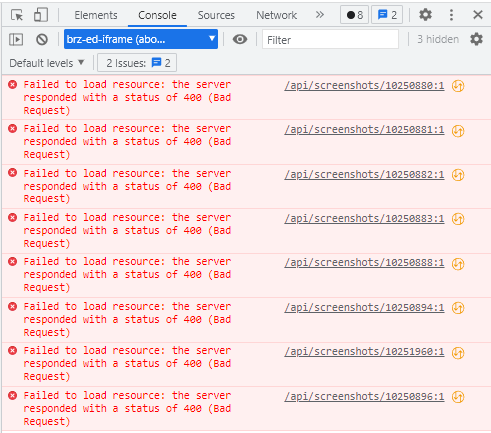
If you right click on your page while in the Brizy Cloud editor and click on "Inspect" in Google Chrome, you can check if you have this error.
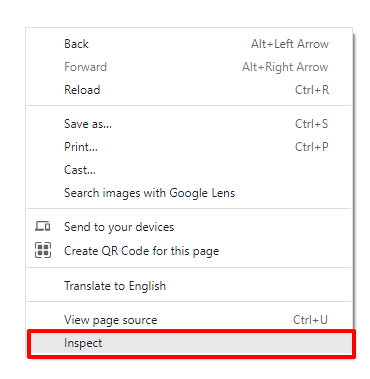
Our developers are looking into several issues at the moment and its difficult to predict a time for fixing this issue on the specific page.
If you would like to move faster, open a new page and see if the Post element works fine. If it does, delete the current page recreate it.
0 -
Hi George,
I tried filtering posts on a different page or on a single post, but the issue remains the same.
0 -
Hi Suman,
We are sorry, we still do not have a resolution for this issue. We may take few more weeks before we have a solution. Until then, the only option would be to work on a new project where you do not have the above console error.
0 -

Hi,
We would like to inform you that the issue is solved.
Have a nice day, Nelea.
0
Please sign in to leave a comment.
Comments
8 comments