Upgrade to Pro ERROR

For some unapparent reason this is what a client saw when trying to login into a WP website. I have a PRO license for life so this should not happen, but to make it worse a client login was showing Brizy Pro. When logging into admin it was requesting it be updated. I have updated and it is not functioning properly.
https://www.screencast.com/t/4o6YlpuryJY0
My question is why would this message being seen from the front end?
Why it is forcing the version update?
Thank you.
-

Hi Shane,
We are sorry for this error. It is a bug with Brizy 2.4.0. As you said the message should not be in the front end, visible to visitors. We have escalated this issue to our developers. We hope to have a fix for this soon
Even if you do not see a update notification for Brizy Pro, delete Brizy Pro, download the latest Brizy Pro from your brizy.io account and install it. This will force Brizy Pro upgrade.
0 -
The upgrade to 2.4.0 corrected the issue, just a strange experience for the end client. Bugs happen, hopefully this can be set to never effect the end client and force an update. Thank you.
0 -

Hey,
I've got the same issue.... I just update brizy + brizy pro but I've got this messages on all pro blocks... I try to desactivate + del brizo pro before downloading it from my brizy account, but bug is always there... (3w.au-roi-de-landouille-64.com). I will load backup to del the problem.
Edit :The solution is simple: you must start by updating brizy BEFORE brizy pro.0 -

Hi Brizy Support Team,
I have the same error with a Lifetime account. I have updated to Brizy 2.4.0 and Brizy Pro 2.4.0 but does not solve the problem.
Is the solution to deactivate both Birzy and Brizy Pro then to reload Brizy 2.4.0 and Brizy Pro 2.4.0 in that order? Will deactivating Brizy and Brizy Pro not ruin my webpage setup?
Thanks in advance for your help.
~Chris
0 -
Hi Christopher,
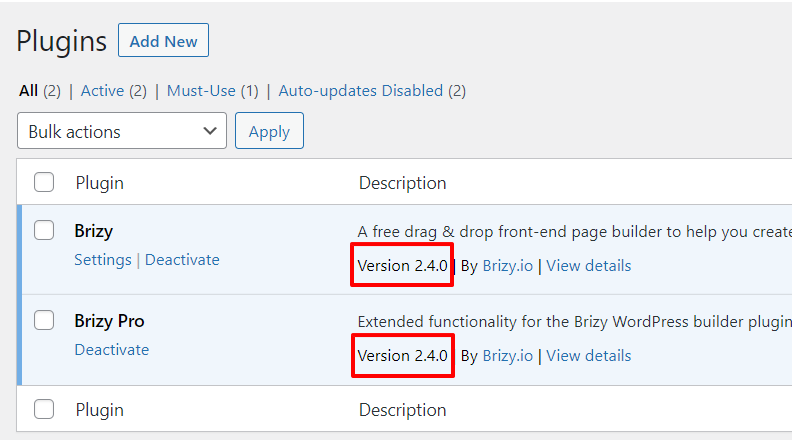
Can you please let me know your Brizy and Brizy Pro version numbers?
 0
0 -
Hi KC, I have updated both to v.2.4.0 as in your screenshot above.
Thanks,
Chris
0 -
Hi Christopher,
Do you still have the error after updating both plugins to 2.4.0?
0 -
Hi KC,
Yes I still have the error after updating both plugins to 2.4.0.
Kind regards
Chris
0 -
Hi Christopher,
Can you please share a URL where we can see the error?
0 -
Hi KC - yes it is at the top of every page: www.ginealogy.com.sg
Thanks for your help.
Chris
0 -
Hi Christopher,
Can you please check if your Brizy PRO plugin is active?
0 -
Hi KC,
I'm not sure if it is active as I get conflicting messages see sreen shot 1 and 2 below.

 0
0 -
Hi Christopher,
Can you try changing your theme from Twenty Nineteen to Blocksy and see if the issue gets resolved?
If this does not work, we would like to take a look at your WordPress Dashboard to help you further. If you need help with troubleshooting, please add me as a user to your WordPress Dashboard. My email: kc.george@brizy.io. Please enable the option "Send the new user an email about their account" as in this screenshot https://jmp.sh/tSRznJX
Once you have sent me an invitation, please let me know here.
0 -
Hi KC,
I've changed my theme to Blocksy but it did not help.
I've granted you Editor access, can you let me know if that is sufficient.
Thanks,
Chris
0 -
Hi Christopher,
With the Editor access, I won't have access to the Plugins menu in WordPress Dashboard. I won't be able to see Brizy and Brizy Pro plugins. Admin right would be useful
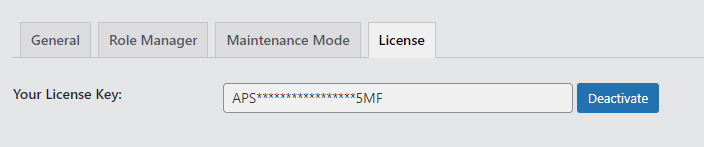
Can you also check if you have added a license under Brizy -Settings - License
0 -
Hi KC,
I have upgraded your access, you should be able to access the Plugins menu in WordPress Dashboard. Can you check and let me know.
I have added the license a few years ago and have not touched it since, so I assume it is still valid as I have a lifetime Pro membership. Here is the screenshot.
Thanks,
Chris
0 -
Hi Christopher,
I have added a new license key and the issue is resolved. Please replace my license key with a license key from your account.
0 -
Hi KC,
Thanks so much for your help! The issue now looks resolved!
How do I generate a new license key from my account? I don't see that option, only the previous static key that was not being accepted (screenshot below).
Thanks,
Chris
0 -

Hi,
You have the Appsumo plan. With this plan, you cannot generate other licenses but you should use the license that you already have.
Regards, Nelea.
0
Please sign in to leave a comment.
Comments
19 comments