help with contact form integration please?

Hi
Could I get some support tracking down an issue with a contact form please?
The contact form was originally configured with the WordPress integration. This would always create leads in the backend, but only sporadically successfully send email messages. I recently tried to switch to using the SMTP integration instead. Now it appears if both integrations are configured. Now it just throws errors.
My questions:
- how can I track down the problem?
- how can I unhook the Wordpress integration?
thanks
-

Hi Nicola,
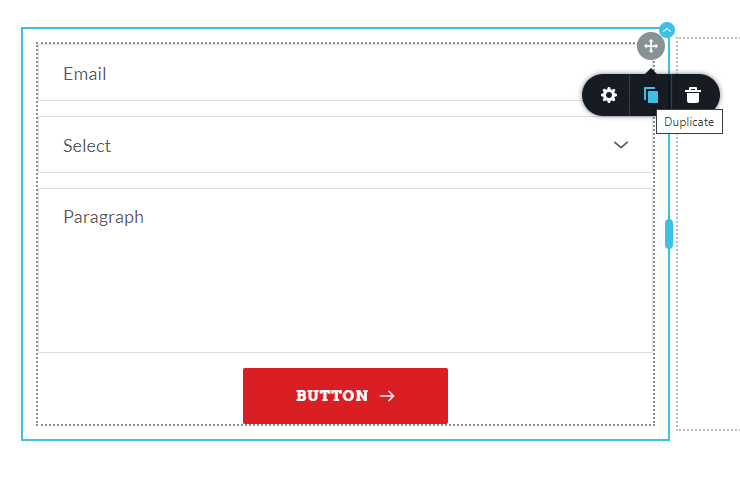
We do not have a feature to unhook the WordPress integration. However we do have a work around. Click on the right hand side top corner of the form and then select the "Duplicate" icon. Your form will be duplicated. Both the WordPress and the SMTP options will be reset in the duplicated form. Please set the SMTP option once again in the duplicated form.
If you are see the form submissions under the Leads section of Brizy, it means that the form is submitted successfully. Please try these to fix the issue.
- Specify multiple email addresses in the "Email To" filed with a comma in between. If you are using business email address, add a Gmail/ Yahoo address as well
- Ensure there are no spelling mistakes in the email address filled up here
- Check the SPAM folder of your email client. If you found the form notification in the SPAM folder then if you have an option to "Report Not Spam" please do that.
 0
0 -
Thanks for the workaround tip, that worked.
The form submission always worked, leads would always show in the backend. The problem was that the email sending via WordPress integration was poor, extremely inconsistent. Seems to be working better now with SMTP integration.
For future reference, when the contact form submission fails with a visible error message, is the reason logged anywhere? Would be useful to try and track down the problem
As a side note, the feature to 'Export to .csv' for leads would be much more useful if the date was included in the extract
0 -
Could you unmark this as answered please? Some users are still reporting problems
0 -
Repeating my previous question:
When the contact form submission fails with a visible error message, is the reason logged anywhere?
0 -
The error message just says something like "The message could not be sent". The reason is neither captured nor recorded.
If a message is sent successfully, it is recorded under Leads.
0 -
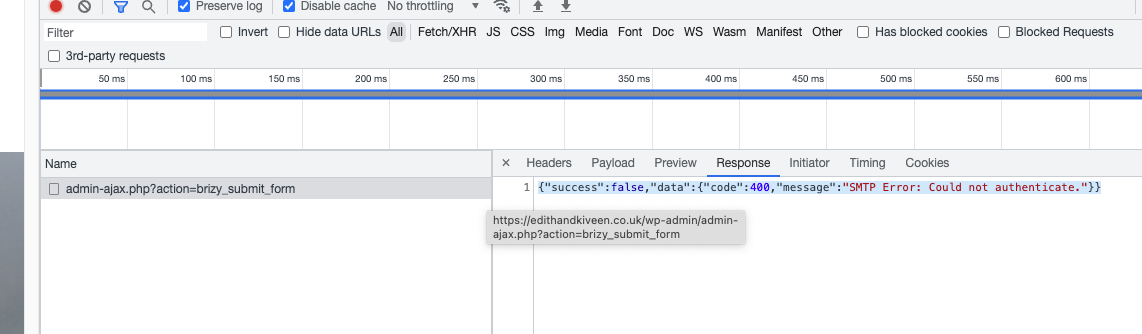
KC George you are wrong about the reason not being captured or recorded. Today I experienced myself the error reported by other users. In testing the contact form, I saw the red error box that says "Something went wrong". Checking the Network tab in developer tools, I can see that the message send is an AJAX request, and the response in this case was a JSON payload saying "SMTP Error: Could not authenticate". See attached screenshot.
How can I get help to resolve this? Could you forward this support request to someone with better knowledge of your product, or someone more technical please?
 0
0 -
Hi Nicola,
You said "How can I get help to resolve 'this'?" Can you elaborate what "this" means here? Is it about your SMTP server sometime not sending emails? If this happens sporadically, it is a bit difficult to troubleshoot. If we can reproduce the issue hopefully we can fix it.
You were looking for a more specific error message. You said you are already seeing it in the browser console. Since the error message said "Could not authenticate" you could check the SMTP authentication credentials you have entered in the form. Are you looking for something more here?
0 -
The problem is that the contact form does not work consistently. Obviously the SMTP creds are fine if it works sporadically.
If you're not going to escalate to someone else, I'm not going to pursue it - its pointless
0 -
Hi Nicola,
If we can reproduce this issue, we can definitely investigate why this is happening. Since this happens once in a while, I wonder how we can reproduce the issue at our end.
0
Please sign in to leave a comment.
Comments
9 comments