Error when embeding code into page and updating.

Hi,
I am using Brizy 2.3.37 and Brizy 2.3.30 Pro and the latest version of WordPress.
I am receiving the error "This page needs a refresh. You’ve probably updated this page (or another page) in a different tab or browser." when I attempt to update the page having added embed code for a page from Payhip.com using an embed block to display a product page from my shop.
Having done some research i found the post (https://support.brizy.io/hc/en-us/community/posts/360070978091-This-page-needs-a-refresh-You-ve-probably-updated-this-page-or-another-page-in-a-different-tab-or-browser-)
Not sure if the troubleshooting points raised are still relevent but here goes:
I am the only editor logged in with a single tab open in the browser.
The WordPresss installation is a fairly new one with minimal plugins.
The database is 47MB which is not an issue for my hosting.
PHP memory limit is set to 512M.
I have used the same embed code with other page builders like Elementor and Thrive and never experienced any issues.
I have tried the same embed code on a test page within Brizy cloud and it updates as expected without error although does seem a little slow and displays correctly on the front end.
Kind regards
Wayne
-

Hi,
Thank you for contacting us.
Could you please send us the embed code which you enter so that we can check it too?
Best regards, Nelea.
0 -
Hi,
Thanks for the reply.
The code is as follows:
<div class="payhip-embed-page" data-key="xgGrc">...</div><script type="text/javascript" src="https://payhip.com/embed-page.js?v=24u68984"></script>
Regards
Wayne
0 -

Hi Wayne,
I have embedded your code to my test page. The code seems to work fine at my end. Please take a look at my test page here: https://homi.kctest.online/test/
Can you try these and see if it makes a difference?
- Your embed code may have a conflict with one of the plugins you are using. Please try deactivating one plugin at a time and check if you stop" seeing the message "This page needs a refresh".
- It could also be because of a conflict with your theme. Try changing your theme to one of these. https://www.brizy.io/theme-partners
0 -
Hi,
Sorry for the delay I got a little side tracked with other things.
In the end I went with another route and did not use the embed code for a Payhip page, having ruled out any plugin or theme conflicts.
However the same error returned when I attempted to embed the following AWeber form code:
<div class="AW-Form-1110101032"></div>
<script type="text/javascript">(function(d, s, id) {
var js, fjs = d.getElementsByTagName(s)[0];
if (d.getElementById(id)) return;
js = d.createElement(s); js.id = id;
js.src = "//forms.aweber.com/form/32/1110101032.js";
fjs.parentNode.insertBefore(js, fjs);
}(document, "script", "aweber-wjs-n74qznsr0"));
</script>Reading another post on here I tried disabling ModSecurity on the domain and the problem dissapeared immediately. I then tried the previous embed code for Payhip and that also worked without no error.
Obviously it is not ideal to disable ModSecurity and having spoken to my hosting provider, they have asked the following:
"Can you please ask the plugin developer to get the exact rule that is getting blocked and we will add it as an exception rule on the server end to get this fixed. You will then be able to enable ModSecurity on the domain without seeing the error."
Kind regards
Wayne
0 -
Hi Wayne,
There is a possibility that ModSecurity suspected your embed code as a threat and blocked it. Since the embed code is already installed, you may not get an error. Can you enable ModSecurity without adding any exception rule and see if you get an error. If you do, please let us know.
0 -
Hi,
Thank you for the response. I can confirm that having succsefully saving an embed block with ModSecurity disabled I am then able to re-enable ModSecurity. The only problem is everytime I need to amend an existing embed code or add a new on I need to disable ModSecurity in cPanel and then re-enable after saving.
I appreciate I now have a work around and I am very grateful for this. However, would it still be possible to tell me the exception rule so it can be added on the server by my host. I know my hosting provider is very keen to make their platform as trouble free as possible.
Kind regards
Wayne
0 -
Hi Wayne,
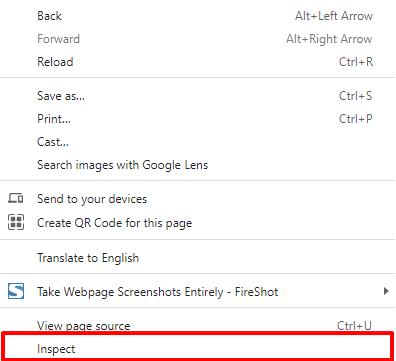
When you encounter the error, if you right click on Google Chrome and do an 'Inspect' and look at the errors you see in the browser console, you will get an idea of what was causing the conflict. Since we have not seen it, it is difficult for us comment.
 0
0
Please sign in to leave a comment.
Comments
7 comments