Linking Formating (as per Posts Element)

https://agoodread.brizy.site/quiz
I am creating a quiz and each 'question / answer' is in a block (see below). It would be REALLY helpful if I could somehow 'link' the blocks so when the formatting was changed in one - it changed for all. Like it does when you make changes in one post in POSTS ELEMENT.
If I create 100 questions and then decide I want to change the colour of the background, it will be an impossible task - even more so if I want to make lots of little adjustments!!
Or perhaps you can think of a way round this?!
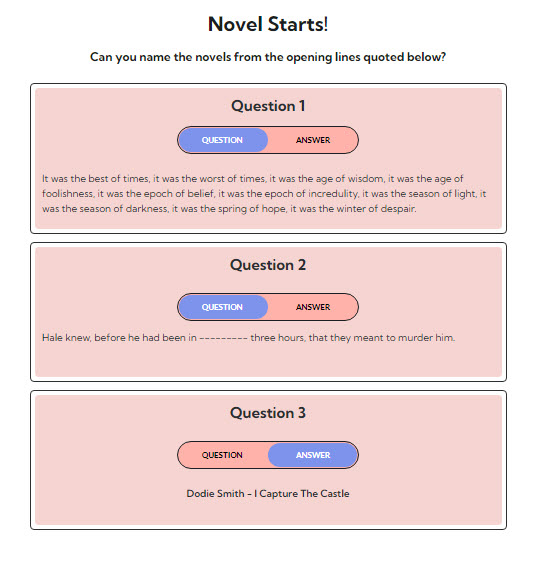
-
I would also be handy if I could make it so that BY DEFAULT the page shows the questions before the answers!!! Is that what will happen?
0 -
I know I could do this with Assets but at the moment I can't change the order in which they appear!
0 -

Hi Charles,
Thank you for contacting us.
You can add a column and then add a few rows to it, in this way when you will change the background of the column, the background color of the question from the row will be changed too, see please this video.
Best regards, Nelea.
0 -
Thank you. But... I am not just talking about the backround colours. I am talking about ALL the formatting and the elements in the column. (Like in the POSTS element - when you add a button, image, text etc it is added in ALL the posts; and when the formatting of an item is changed it is changed in ALL the posts.) I suppose I could do this via css - but I am not very sure how to do this. Could I set up a column and give all the items in the column (text, image, button etc) a separate and unique CLASS and then I could make my edits via CUSTOM CSS so that the same changes would occur in each column - I suppose I could also add and hide elements controlling their DISPLAY css. All this would be very complicated and would be much simpler if I could have control of the order in which ASSETS were displayed - i.e. changing their PUBLISHED DATE.
0 -

Hi Charles,
I don't think we have a way to modify the question box design centrally. However if you have applied global colors to your question boxes, you can change the color for any box, by changing the specific global color swatch.
0 -
I don't think you are understanding my request!!
0 -
Hi Charles,
Let me restate what you have said above so that you can check if I have understood your request.
You have 50 question boxes on your page. At the moment if you need to change the design of your question box, you need to apply the same change 50 times. You are looking for a way to design your question box in such a way that when you change it once, it applies to all 50 question boxes at once.
Your concept is similar to the global typography/colors we use in Brizy. If you change global typography /color in global styling, the changes take effect throughout the website.
0
Please sign in to leave a comment.
Comments
7 comments