Site broken after Brizy upgrade (WordPress)

When updating Brizy to the newest version the frontend breaks. First updated Brizy Free to 2.3.37, then updated Brizy Pro 2.3.30. Content and basic styling appears in frontend but does not look and work like before.
Some js and css assets can't be loaded due to paths containing redundant paths and brizy_site_url_placeholder variable: https://www.plureos.de/wp-content/plugins/brizy-pro/@brizy_SITE_URL_PLACEHOLDER@/wp-content/plugins/brizy-pro/public/editor-build/82-wp/css/preview.pro.css?ver=2.3.30
-

Hi Max,
I have looked at https://www.plureos.de/. The page looks fine and I could not find any error. Did you roll back to previous versions to fix the error? If the issue still persists, how can I see it?
0 -
Hi George,
you may find a .har Export from Chrome here: https://plureos.de/70152197d847dba281e0b469eb05e3f35fd3f983-www-plureos-de.har
It shows that some JS/CSS files can not be loaded due to wrong paths, e.g.:
There is no placeholder replacement and it shows a folder which does not exist in the current version (82-wp instead of 110-wp)
We took a look at the database and found several entries in wp_postmeta which also refer to 82-wp instead of 110-wp (brizy-free) or to 204-wp instead of 235-wp (brizy-pro). Shouldn’t they be migrated by the update?
0 -
Hi Max,
I am still not cleat what the problem you are facing is. Can you please answer these questions?
- What is a symptom that you are seeing which gives you the impression that the site is broken? (without referring to .har and paths). Example, "I am not able to see the images." "The form is not submitting". "Video is not playing"
- How do I reproduce the issue? How do I see what you see? Can you make a screen recording of the issue?
0 -
Hi George,
you are right, as now the live site is working, but we cannot update or add any content. The frontend won't show the changes made in the Brizy backend. (Preview in Brizy looks fine, though.)
It used to work but somehow stopped. On the other hand, when we update Brizy Free the frontend chrashes. It looks like there is css and styling missing. The content is there but it is messed up.
Additionally the WordPress backend does not detect that there is a new version of Brizy Pro. So, we upload it manually. But it does not help. The only way to fix it, is to roll back to 2.3.16. It repairs the site but we still cannot update content. Very weird.
Have you ever heard of an issue like this?
Max
0 -
Hi Max,
For every version of Brizy, there is a corresponding version of Brizy Pro. For example, for Brizy 2.3.16 and Brizy Pro 2.3.13 are compatible. If Brizy and Brizy Pro versions do not match, this issue can happen.
If you are unable to edit pages, we can take a look at your WordPress Dashboard and try and identify the cause. If you need help with troubleshooting, please add me as a user to your WordPress Dashboard. My email: kc.george@brizy.io. Please enable the option "Send the new user an email about their account" as in this screenshot https://jmp.sh/tSRznJX
Once you have sent me an invitation, please let me know here.
0 -
Hello George,
how about a screensharing session where I show you the issue? The site will be broken and I will have to rollback to an update.
Max
0 -
Hi Max,
Can you try the update one more time and check if it breaks the site? (I want to ensure that you are updating to compatible versions)
- Update Brizy to its latest version 2.3.37 by clicking on the "Update Now" button
- Upload Brizy Pro from this file. https://jmp.sh/9JMPxQ6
Once you complete the steps, you should have these version numbers (These versions are compatible)
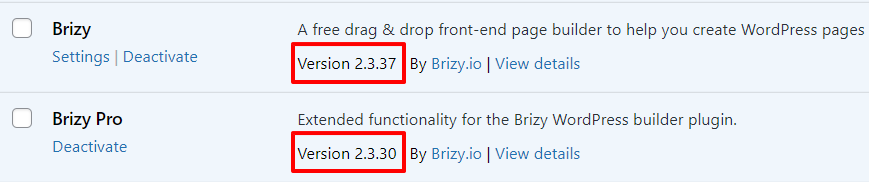 0
0 -
Hello George,
yes, we update to the versions you show in the post above. But as you see below, WordPress does not even detect the Brizy Pro update at all. When we update basic Brizy the site crashes and even manually installing Pro via zip file won't fix it.

This is extra weird because everything's fine on our testing system. The only difference is the path issue mentioned in the initial post at the start of this thread.
Max
0 -
Hi Max,
Can you please deactivate and delete Brizy PRO first and then follow the above steps? The path issue you mentioned might get resolved when you delete Brizy PRO and reinstall it.
0 -
Alright, like this?
- Deactivate and delete Brizy Pro
- Update Brizy to its latest version 2.3.37 by clicking on the "Update Now" button
- Upload Brizy Pro from this file. https://jmp.sh/9JMPxQ6 (Could I also use the latest zip you provide in my Brizy account?)
Max
0 -
Does not help; site is crashed. Have a look ;) https:///www.plureos.de
Max
0 -
Meanwhile I restored the site via backend.
0 -
Hi Max,
We are sorry for this inconvenience. We will need to take a look at your WordPress Dashboard to see why this is happening. Do you have a way to clone your website so that we can experiment with the cloned site? (so that we do not break your live site)
If you need help with troubleshooting, please add me as a user to your WordPress Dashboard. My email: kc.george@brizy.io. Please enable the option "Send the new user an email about their account" as in this screenshot https://jmp.sh/tSRznJX.
Once you have sent me an invitation, please let me know here.
0 -
Hello George,
due to security constraints I can just offer screensharing. We could go through the issue together. Cloning is technically complex in this setup. Please let me know if this approach suits you.
Thanks alot.
Max
0 -
Hi Max,
If you do not want to clone your website, the only option would be to carry out the experiment on your live site.
How do you propose to do the screen sharing? Do you want to install a remote control software like Teamviewer and give me access to your computer?
0 -
Yes, we will do it on the live site - it's the only configuration that's causing troubles. We can send you a MS Teams Invitation and could grant you access to the browser tab running WordPress. Please, let me know a time that suits you.
Max
0 -
Hi Max,
You did mention about security constraints. Hosting security systems can interfere with Brizy. Sometimes a genuine request from Brizy or Brizy Pro is mistaken as a threat by these systems. For example have you enabled these systems on your account? https://www.plusserver.com/en/products/cloud-security

Do you have an option to disable the security systems for your account? If so, please disable these security systems temporarily and check if the issue with Brizy persists.
I am based out of India. Think of a time between 9:00 AM - 7:00 PM Indian time for the appointment to take a look at your hosting account through MS Teams.
0 -
Hello George,
we don't use pluscloud so this might not be the problem. How about tomorrow at 10:30 our time (2pm your time, I guess)?
Max
0 -
Hi Max,
What hosting company do you use?
What is your time zone/city? (so that I can interpret your 10:30 AM)
0 -
Plusserver but not Cloud. Hamburg, Germany. UTC+2 at the moment.
0 -
Hi Max,
Yes; we can have our session tomorrow at 10:30 AM Hamburg, Germany. If you need my email address to send an invitation to MS Teams, please use my email: kc.george@brizy.io
0 -
Alright, I sent an invitation. See you tomorrow. Max
0 -
Hi Max,
We have just released Brizy 2.4.0 half an hour ago. If too many users have issues with their updates, we may need to postpone our session for 24 hours. Otherwise we can have our session as planned. If there is a change of plan, I will let you know through email.
0 -
No worries, just let me know ;)
0
Please sign in to leave a comment.
Comments
24 comments