Refresh Page Issue

I've seen several posts with this same issue... error dialogue box when attempting to update an edited page saying I need to refresh the page. It suggests the reason is that the page is also loaded in another window or tab (it is not).
WP, Brizy & Brizy Pro are updated and current. I've deactivated nearly all plugins and cleared cache.
It's a single page, static website. As simple as it gets.
Making revisions and updating the site worked fine as recently as two weeks ago.
Tonight, after a very frustrating two hours, I cannot seem to get past the "refresh" error to publish simple changes.
{it is currently midnight for me / 3am for the owner of the site -- if someone happens to reply right away, my apologies in advance for not responding to any questions for the next several hours; I will pick this problem back up in the morning}
-

Hi Matt,
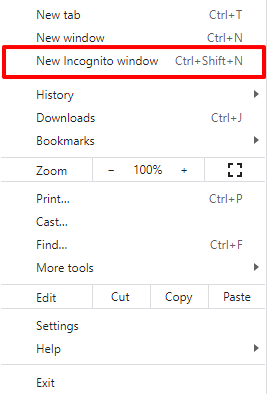
Can you try signing into your WordPress Dashboard from a browser Incognito (private) window and check if you still face this issue?
 0
0 -
Hi, KC --
Thank you for your response; unfortunately that didn't work and the same issue remains.0 -
Hi Matt
We will need to take a look at your WordPress Dashboard to assist you further.
If you need help with troubleshooting, please add me as a user to your WordPress Dashboard. My email: kc.george@brizy.io. Please enable the option "Send the new user an email about their account" as in this screenshot https://jmp.sh/tSRznJX
Once you have sent me an invitation, please let me know here.
0 -
Hi, KC --
I've created a user account for you and had the invitation sent. Thanks!
0 -
HI Matt
Your WordPress is running on PHP 7.2.34. https://jmp.sh/sECHcEU For Brizy to work well, you need PHP 7.4 or above. You can see this notification in your WordPress Dashboard home.
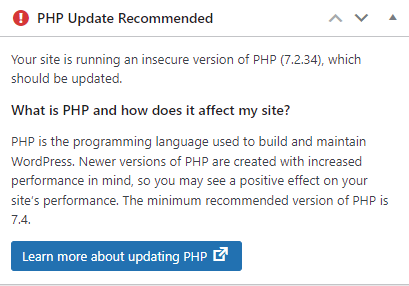
Can you ask your hosting company to upgrade PHP to 7.4 or above?
0 -
Hi, KC -- apologies for the delay over the weekend.
I just saw that, too... I've requested this to be updated and will let you know if that cleared everything up!
EDIT / UPDATE:
PHP has been upgraded; cache has been deleted.
Problem still persists.0 -
Hi Matt,
You have multiple embeds on your homepage. These embeds can sometimes conflict with Brizy.
I recreated your homepage at https://shawnandcyd.com/home1/ Instead of the YouTube embed using the Embed element, I tried the Brizy Video element. Once I made this change, the Refresh Page error disappeared on this page.
You can either set the above page as your home page here https://jmp.sh/aiyoUEp or repeat my step on your homepage and see if the error goes away on your page as well.
0 -
Hi, KC --
That did fix the issue, thank you!
However, that youtube embed script pulls in their latest video and displays it automatically; it seems the Brizy Video embed element doesn't have a way to do that so they'll have to manually change that video link each time they upload a new video, correct?0 -
Hi Matt,
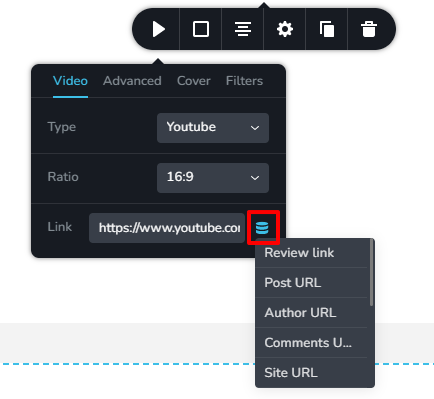
With the Video element, you cannot pull in the video link automatically. However you can add a "video link" custom field to your page and it can be pulled into the video element by selecting the "database' icon here and then selecting your "video link" custom field. You can use the Advanced Custom Fields plugin to add the "video link" custom field
 0
0 -
Hi, KC -- Thank you for all of your help in getting me back up and running.
Hopefully we can figure out a fix in the future to allow me to add that script embed back into the site and it doesn't break Brizy :)0
Please sign in to leave a comment.
Comments
10 comments