blocks never load in sidebar

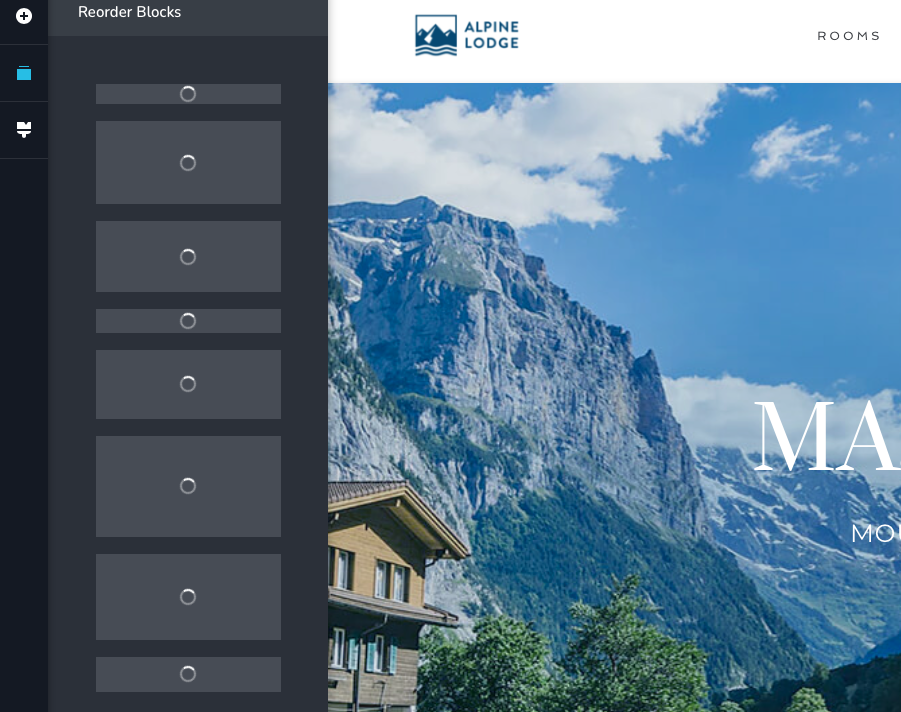
those blocks have been spinning & spinning & spinning. they are spinning as i write this. i'm on Safari on Mac, but apparently that's irrelevant. i'm using a new starter template (which doesn't show in the templates section, btw) and have NO plugins other than Brizy. this is yet another PIA that is starting to make me regret the decision to buy PRO.
-

Hi Barnhart,
Sorry for the bad experience you have with Brizy. I would like to examine your WordPress Dashboard to see why this is happening.
If you need help with troubleshooting, please add me as a user to your WordPress Dashboard. My email: kc.george@brizy.io. Please enable the option "Send the new user an email about their account" as in this screenshot https://jmp.sh/tSRznJX
Once you have sent me an invitation, please let me know here.
0 -
I deleted my WP install, clean installed with no plugins except Brizy & Pro. Took out the Twenty Twenty-two theme stuff. created 2 posts with the default template (WP/2022). Added new template / archive / blog category / publish. Editing that template with Brizy (per YT video guidance). Made simple header block: my logo image only. Made selection to "Make it global".
It has been spinning for nearly 10 minutes. First time I tried, I wondered if ExpressVPN played a role. I disconnected & shut that down; hasn't made a difference.
I am using Greengeeks hosting. Not adding anyone to my dashboard because there is nothing to troubleshoot at my end.
---
To retest the original issue after re-install:
On a new page (unpublished) I added 4 Brizy-supplied blocks & could see them all fine in the re-order blocks sidebar.However, added a layout (Carwash), the blocks spin & spin. Again, this is a WP install with virtually nothing in it other than the 2 Brizy plugins. I don't plan to use any of the supplied layouts, but I will need to be able to add Global Blocks to my templates. I can't see the problems being unrelated. And I suspect some incompatibility with WP at Brizy's end. Makes me worry for the upcoming WP6 release.
0 -
Hi Barnhart,
Please check if you have enabled ConfigServer Security and Firewall on your Greengeeks account. If you have, please disable it and check if you see any difference.
0 -
I checked with GG; that is set by default & cannot be changed.
0 -
Hi Barnhart,
Security and Firewall Systems can interfere with Brizy. If you cannot disable the software completely, try if you can lower the protection level to almost zero or to the lowest permissible level during the development. Once you move out of development, when the site goes live, you can increase it to a desired level.
0 -
Greengeeks is not going to adjust their settings for my temporary need. More importantly, if every time I want to set up a new Brizy WP site I have to monkey with the firewall, or if I want to make changes – that ain't gonna fly. Rather than playing with the webhost's security, how about Brizy identify what they are doing that is the problem? As it stands, I cannot set any global blocks, and that's a major problem. If I get too many blocks in a layout & need to move them, that's also not doable and also a major problem. This just isn't acceptable. I actually though Brizy might be a platform I could use, and so far, it's been one issue after another. Mostly because Brizy has issues with FSE themes and doesn't let users know that. It should never be on the user to fix your issues.
0 -
i updated to the 4.0 beta, and was able to add a header as a global block. it did apply to another page when saved as a Brizy edit. thanks to the coders for recognizing this problem & fixing it.
0
Please sign in to leave a comment.
Comments
7 comments